
CoCounsel Legal
CoCounsel Legal: A broad legal AI workspace for teams handling complex, high-volume matters. Ranked #2 of 35 in Legal AI Software by our editors (9.2/10); pricing: Paid; best for large teams needing high-volume research.
At a glance
- Editor score9.2 / 10
- PricingPaid
- Best forLarge teams needing high-volume research
- Free planNo
- Primary useGeneral legal
- Facts checked20 Sep 2026
Where it wins
- Deep Research provides step-by-step analysis with source citations.
- Analyzes up to 10,000 documents against up to 100 questions.
- Connects with document management and Microsoft 365 tools.
Where it doesn't
- No free plan is available.
- The product is supported on the web platform.
- The offering is focused on professional legal teams and workflows.
Our verdict on CoCounsel Legal
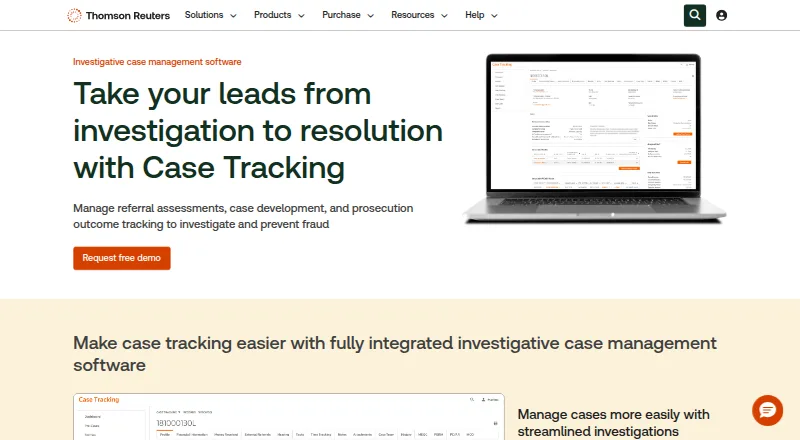
CoCounsel Legal is Thomson Reuters’ AI software for legal professionals, combining legal research, document analysis, drafting, and matter organization. It is designed for law firms, corporate legal departments, government users, and other professional legal teams. The product works from Westlaw content, Practical Law guidance, and an organization’s own documents, bringing research and internal matter materials into one experience. Its broad scope makes it a fit for teams that need more than a single-purpose document assistant.
Research and document work are the strongest parts of the offering. Deep Research provides step-by-step legal analysis with citations, while Litigation Document Analyzer handles uploaded legal documents. Tabular Analysis can evaluate up to 10,000 documents against up to 100 questions, and users can summarize, review, and compare documents with source citations. Legal drafting in Microsoft Word, Westlaw Brief Builder, and matter workspaces for documents, templates, conversations, and history extend the product from research into day-to-day legal work.
Its ecosystem fit is also significant for larger teams. CoCounsel Legal integrates with iManage, NetDocuments, SharePoint, HighQ, DeepJudge, Smokeball, Box, Litify, Microsoft Word, Microsoft Outlook, Microsoft Teams, Claude, and Supio. That range supports document management, Microsoft 365 workflows, and connected legal applications. The trade-off is a paid product with no free plan, and access is centered on professional legal use rather than lightweight individual research. Choose CoCounsel Legal for high-volume research, cited analysis, drafting, and matter organization across a larger team; choose a narrower tool if you need a simpler or lower-commitment workflow.
Your product? Our editors can test CoCounsel Legal in depth and publish a review, labelled as paid · from $149/mo →
CoCounsel Legal pricing
All 1 CoCounsel Legal plans and prices →
CoCounsel Legal fact sheet
| Free plan | No |
|---|---|
| Paid from | Not verified |
| Primary use | General legal |
| Legal source access | Yes |
| Document analysis | Yes |
| Source citations | Yes |
| Legal drafting tools | Yes |
| Matter workspace | Yes |
| Supported platforms | Web |
| Deployment | Cloud |
| Platforms | Web |
| Compliance & security | SOC 2 |
| Support | Docs |
| Built for | Mid-market, Enterprise (editorial estimate) |
| Integrations | 13 integrations: iManage, NetDocuments, SharePoint, HighQ, DeepJudge, Smokeball … |
| Pricing | Paid (source) |
| Website | legal.thomsonreuters.com |
| Facts checked | 20 Sep 2026 |
CoCounsel Legal integrations
CoCounsel Legal lists 13 integrations on its own site.
- iManage
- NetDocuments
- SharePoint
- HighQ
- DeepJudge
- Smokeball
- Box
- Litify
- Microsoft Word
- Microsoft Outlook
- Microsoft Teams
- Claude
- Supio
Alternatives to CoCounsel Legal
- HarveyA broad legal AI platform for complex enterprise workflows, with custom pricing.9.4
- Lexis+Deep U.S. legal research coverage with citation validation, dockets, guidance and alerts.9.0
- Vincent by ClioA broad legal AI workspace for firms that need cited research and matter-aware workflows.8.8


See all CoCounsel Legal alternatives →
CoCounsel Legal vs the competition
- CoCounsel Legal vs Harvey
- CoCounsel Legal vs Lexis+
- CoCounsel Legal vs Vincent by Clio
- CoCounsel Legal vs Spellbook
- CoCounsel Legal vs Luminance
- CoCounsel Legal vs Kira



Compare CoCounsel Legal with any tool side by side →
Also Ranked In
CoCounsel Legal is ranked in 5 of our directories.
Used CoCounsel Legal? Be the first to review it
The editor score above is our own research. What this page doesn't have yet is a reader's view — what you used CoCounsel Legal for, what worked and what didn't. No stars are seeded and no review is paid for; an editor reads every one before it appears.
Write a reviewTwo minutes · verified accounts only · read by an editor before it appears
Featured on iTechGuides

CoCounsel Legal is listed in our Legal AI Software directory. Add the badge to your site — it links back to this page.
<a href="https://www.itechguides.com/products/cocounsel-legal/"><img src="https://www.itechguides.com/best/badge/cocounsel-legal.svg" alt="Featured on iTechGuides" width="230" height="46"></a>
Reviewed by iTechGuides Editors · Editorial team · Updated Oct 2026
Advertiser disclosure: iTechGuides is reader-supported. Vendors can pay for top positions in our rankings and for a place on other products' pages, and we may earn a commission when you click some links. Bought places stand at the number bought; this page and our disclosure say so. Paying vendors may get a fuller, more detailed review from our editors, and that review can change their score. How we rank.
Last updated · How we research and update