cnc-ddraw
cnc-ddraw: A focused open-source fix for DirectDraw games across four host platforms. Ranked #23 of 27 in Game Compatibility Layers by our editors (6.4/10); pricing: Free plan; best for users fixing legacy DirectDraw games across platforms.
At a glance
- Editor score6.4 / 10
- PricingFree plan
- Best forUsers fixing legacy DirectDraw games across platforms
- Free planYes
- Paid fromFree
- Runtime modelTranslation + runtime
- Facts checked20 Sep 2026
Where it wins
- Supports GDI, OpenGL, and Direct3D 9 renderers
- Adds windowed, borderless, fullscreen, shader, and VSync controls
- Runs on Windows, Linux, macOS, and Android
Where it doesn't
- Only supports games using a DirectDraw software renderer
- Does not support Vulkan
- Does not include Steam integration
Our verdict on cnc-ddraw
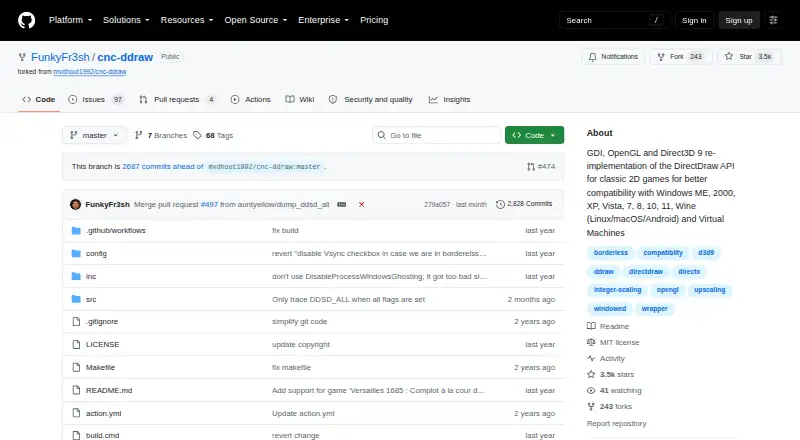
cnc-ddraw is an open-source compatibility layer for older 2D games built around the DirectDraw software renderer. It is intended for players who need to address black screens, poor performance, crashes, Alt+Tab problems, or awkward display behavior on modern systems. The project supports Windows versions from ME through 11 and can run through Wine on Linux, macOS, and Android, making it suitable for legacy-game collections spread across different host platforms.
Its strongest feature set is display control. cnc-ddraw provides GDI, OpenGL, and Direct3D 9 renderers, along with windowed, fullscreen-exclusive, and borderless modes. GLSL shader upscaling can improve the presentation of older 2D graphics, while an FPS limiter and VSync provide additional control over rendering behavior. Alt+Enter switches between fullscreen and windowed modes, and the software can automatically save and restore window position, size, and state. Optional mouse-sensitivity scaling, preliminary libretro shader support, and a configuration utility extend the practical tuning options.
The setup model is lightweight: files are extracted into a game folder, with documentation and a configuration utility available for problematic games. cnc-ddraw is open source and includes a free plan, with no paid tiers described. Its focus is deliberately narrow, however. Games must use a DirectDraw software renderer, and the project explicitly excludes Direct3D games. Vulkan support and Steam integration are not included. Choose cnc-ddraw when the target game fits that DirectDraw profile and display compatibility is the main concern; choose another compatibility layer when the game depends on Direct3D, Vulkan, or Steam-specific integration.
Your product? Our editors can test cnc-ddraw in depth and publish a review, labelled as paid · from $149/mo →
cnc-ddraw pricing
cnc-ddraw fact sheet
| Free plan | Yes |
|---|---|
| Paid from | Free |
| Host platforms | Windows, Linux, macOS, Android |
| Runtime model | Translation + runtime |
| DirectX support | Not stated |
| Vulkan support | No |
| Steam integration | No |
| Anti-cheat status | Not stated |
| Deployment | Desktop |
| Platforms | Windows, Linux, macOS, Android |
| Support | Community, Docs |
| Built for | Solo, Small business (editorial estimate) |
| Pricing | Free plan |
| Website | github.com |
| Facts checked | 20 Sep 2026 |
Alternatives to cnc-ddraw
- CrossOverA mature paid compatibility layer with broad Windows app support for Mac and Linux.9.3
- WineA mature, free compatibility layer for running many Windows apps across Linux and macOS.9.0
- OpenNativeA flexible Android game container with broad runtime controls and unsupported anti-cheat.8.8


See all cnc-ddraw alternatives →
Used cnc-ddraw? Be the first to review it
The editor score above is our own research. What this page doesn't have yet is a reader's view — what you used cnc-ddraw for, what worked and what didn't. No stars are seeded and no review is paid for; an editor reads every one before it appears.
Write a reviewTwo minutes · verified accounts only · read by an editor before it appears
Featured on iTechGuides

cnc-ddraw is listed in our Game Compatibility Layers directory. Add the badge to your site — it links back to this page.
<a href="https://www.itechguides.com/products/cnc-ddraw/"><img src="https://www.itechguides.com/best/badge/cnc-ddraw.svg" alt="Featured on iTechGuides" width="230" height="46"></a>
Reviewed by iTechGuides Editors · Editorial team · Updated Oct 2026
Advertiser disclosure: iTechGuides is reader-supported. Vendors can pay for top positions in our rankings and for a place on other products' pages, and we may earn a commission when you click some links. Bought places stand at the number bought; this page and our disclosure say so. Paying vendors may get a fuller, more detailed review from our editors, and that review can change their score. How we rank.
Last updated · How we research and update