
ClickClickBlock
ClickClickBlock: A focused web tool for monitoring suspicious clicks and syncing Google Ads exclusions. Ranked #14 of 30 in Click Fraud Software by our editors (7.0/10); pricing: 14-day trial; best for small teams wanting straightforward click-velocity controls.
At a glance
- Editor score7.0 / 10
- Pricing14-day trial
- Best forSmall teams wanting straightforward click-velocity controls
- Free planNo
- Paid from$29/mo
- Automatic click blockingYes
- Facts checked23 Sep 2026
Where it wins
- Seven detection rules cover bots, datacenter IPs, velocity and mouse behavior
- Monitor-first review, ad hiding and configurable session or daily limits
- Automatic Google Ads IP exclusion syncing with a 500-IP campaign capacity
Where it doesn't
- Automatic exclusion syncing is explicitly documented only for Google Ads
- Cloud deployment and web access may not suit teams needing other environments
- No free plan; monthly pricing starts at $29
Our verdict on ClickClickBlock
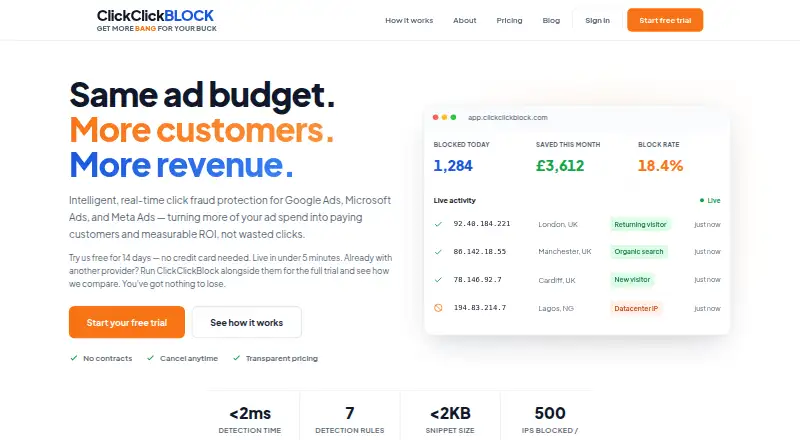
ClickClickBlock is a cloud-based click-fraud monitoring and blocking tool for advertisers running paid traffic. It watches website visits in real time and records suspicious activity in a dashboard event log and block audit trail. Detection covers bot signatures, datacenter IP ranges, rapid-fire or repeated clicks, zero mouse movement, clicks within two seconds of landing, and configurable per-session or daily limits. Small and mid-market teams can review flagged visits in monitor-first mode before enabling blocking, while on-site ad hiding provides protection across supported ad platforms.
Pricing is month to month, with a 14-day trial and no free plan. Starter costs $29 per month and includes all seven detection rules, Google Ads auto-sync and email support. Pro is $79 per month with the same detection and syncing features plus priority support. Agency costs $199 per month and adds dedicated support while retaining the same seven rules and Google Ads auto-sync. The shared feature set keeps plan selection mainly about support level and operating scale rather than unlocking different detection capabilities.
For platform fit, ClickClickBlock provides a website snippet for on-site controls, a web dashboard for review, and cloud deployment. Google Ads exclusion lists can be updated automatically, with up to 500 IPs per Google Ads campaign. Microsoft Ads is listed as an integration, but the Microsoft Ads API sync is described as coming soon; other ad platforms can receive on-site protection without documented automatic exclusion syncing. Choose it if you want focused click-velocity controls and a review-before-block workflow. Teams requiring automatic Microsoft Ads syncing today or a non-web deployment should consider alternatives.
Your product? Our editors can test ClickClickBlock in depth and publish a review, labelled as paid · from $149/mo →
ClickClickBlock pricing
All 3 ClickClickBlock plans and prices →
ClickClickBlock fact sheet
| Free plan | No |
|---|---|
| Paid from | $29/mo |
| Ad platforms supported | Google Ads; Microsoft Ads; Meta Ads; LinkedIn Ads; other PPC platforms (on-site protection) |
| Automatic click blocking | Yes |
| Detection methods | Bot signatures; datacenter IP ranges; rapid click velocity; zero mouse movement; session and daily click limits; clicks within 2 seconds of landing |
| Ad account limit | Not verified |
| Traffic reporting | Not verified |
| IP exclusion capacity | 500 |
| Free trial | 14 days · no card needed |
| Deployment | Cloud |
| Platforms | Web |
| Support | |
| Built for | Small business, Mid-market (editorial estimate) |
| Integrations | 2 integrations: Google Ads, Microsoft Ads |
| Pricing | 14-day trial (source) |
| Website | clickclickblock.com |
| Facts checked | 23 Sep 2026 |
ClickClickBlock integrations
ClickClickBlock lists 2 integrations on its own site.
- Google Ads
- Microsoft Ads
Alternatives to ClickClickBlock
- ClickCeaseBroad, real-time ad-fraud protection for teams running campaigns across major ad platforms.9.2
- LunioMachine-learning click scoring and nine ad-platform integrations for paid-media protection.8.8
- Fraud BlockerDetailed fraud scoring and API access for teams managing multiple ad channels.8.6



See all ClickClickBlock alternatives →
Used ClickClickBlock? Be the first to review it
The editor score above is our own research. What this page doesn't have yet is a reader's view — what you used ClickClickBlock for, what worked and what didn't. No stars are seeded and no review is paid for; an editor reads every one before it appears.
Write a reviewTwo minutes · verified accounts only · read by an editor before it appears
Featured on iTechGuides

ClickClickBlock is listed in our Click Fraud Software directory. Add the badge to your site — it links back to this page.
<a href="https://www.itechguides.com/products/clickclickblock/"><img src="https://www.itechguides.com/best/badge/clickclickblock.svg" alt="Featured on iTechGuides" width="230" height="46"></a>
Reviewed by iTechGuides Editors · Editorial team · Updated Oct 2026
Advertiser disclosure: iTechGuides is reader-supported. Vendors can pay for top positions in our rankings and for a place on other products' pages, and we may earn a commission when you click some links. Bought places stand at the number bought; this page and our disclosure say so. Paying vendors may get a fuller, more detailed review from our editors, and that review can change their score. How we rank.
Last updated · How we research and update