
CleanShot X
CleanShot X: A capable Mac capture suite, with cloud collaboration on Pro and no free plan. Ranked #11 of 61 in Screen Capture Software by our editors (7.8/10); pricing: Paid; best for mac users needing polished recording and sharing.
At a glance
- Editor score7.8 / 10
- PricingPaid
- Best forMac users needing polished recording and sharing
- Free planNo
- Paid from$10/user/mo
- Annotation toolsYes
- Facts checked19 Sep 2026
Where it wins
- Captures scrolling pages, timed shots and full-screen or window views
- Combines annotations, on-device OCR and MP4 or GIF recording
- Cloud sharing adds comments, transcripts and protected links
Where it doesn't
- Runs on macOS only
- No free plan; Basic starts at $35 one-time
- SSO and SCIM are limited to the Pro plan
Our verdict on CleanShot X
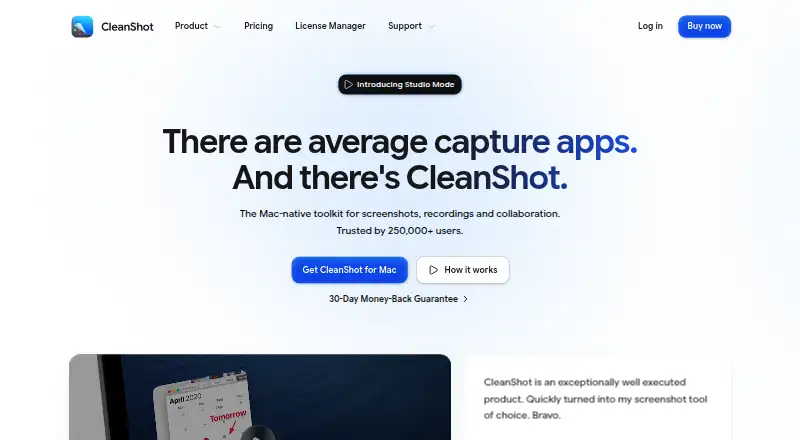
CleanShot X brings screenshots, screen recording, annotation, editing and sharing together in a macOS app. It suits Mac users who need to explain visual material, capture scrolling content or distribute recordings and screenshots through shareable links. Capture options include area, window, fullscreen, timed and scrolling screenshots; recordings export as MP4 or GIF. On-device OCR and QR-code reading extend its capture workflow beyond simply saving an image.
Its editing tools cover arrows, text, shapes, blur, pixelation and spotlight, with video controls for smart zooms, cursor adjustments, backgrounds and motion blur. That makes it a broader capture and polish toolkit than a basic screenshot utility. CleanShot Cloud adds uploads and sharing, with comments, transcripts, access controls and password-protected links. Buyers focused on local captures and editing may find this breadth useful, while those seeking a non-Mac option should look elsewhere.
According to the vendor's pricing page, CleanShot Basic costs $35 one-time and includes the Mac app, one year of updates and 1 GB of cloud storage. CleanShot Pro is $10 per user per month, billed annually; it adds ongoing updates, unlimited cloud storage, custom domain and branding, advanced sharing and security, SSO and SCIM. There is no free plan. Basic fits someone who wants a one-time license and modest cloud storage; Pro is the relevant tier for teams needing its sharing and access features. The recurring, annually billed Pro price and Mac-only platform make it a poor fit for users seeking free software or cross-platform coverage.
Your product? Our editors can test CleanShot X in depth and publish a review, labelled as paid · from $149/mo →
CleanShot X pricing
All 2 CleanShot X plans and prices →
CleanShot X fact sheet
| Free plan | No |
|---|---|
| Paid from | $10/user/mo |
| Scrolling capture | Yes |
| Annotation tools | Yes |
| OCR | Yes |
| Browser extension | Not verified |
| Desktop platforms | Macos |
| Cloud sharing | Yes |
| Export formats | MP4, GIF |
| Deployment | Desktop |
| Platforms | macOS |
| Pricing | Paid (source) |
| Website | cleanshot.com |
| Facts checked | 19 Sep 2026 |
Alternatives to CleanShot X
- SnagitA polished capture and editing toolkit for teams that can budget for an annual subscription.9.3
- ShareXA flexible Windows capture toolkit with scrolling screenshots, OCR, recording and upload workflows.9.1
- ZightA cross-platform capture tool with team workflows, integrations, and a free plan.9.0



See all CleanShot X alternatives →
Also Ranked In
CleanShot X is ranked in 3 of our directories.
Used CleanShot X? Be the first to review it
The editor score above is our own research. What this page doesn't have yet is a reader's view — what you used CleanShot X for, what worked and what didn't. No stars are seeded and no review is paid for; an editor reads every one before it appears.
Write a reviewTwo minutes · verified accounts only · read by an editor before it appears
Featured on iTechGuides

CleanShot X is listed in our Screen Capture Software directory. Add the badge to your site — it links back to this page.
<a href="https://www.itechguides.com/products/cleanshot-x/"><img src="https://www.itechguides.com/best/badge/cleanshot-x.svg" alt="Featured on iTechGuides" width="230" height="46"></a>
Reviewed by iTechGuides Editors · Editorial team · Updated Oct 2026
Advertiser disclosure: iTechGuides is reader-supported. Vendors can pay for top positions in our rankings and for a place on other products' pages, and we may earn a commission when you click some links. Bought places stand at the number bought; this page and our disclosure say so. Paying vendors may get a fuller, more detailed review from our editors, and that review can change their score. How we rank.
Last updated · How we research and update