Classkick
Classkick: Classkick gives teachers live visibility, multimodal responses and feedback in web and iOS assignments. Ranked #43 of 57 in Whiteboarding Software by our editors (5.0/10); pricing: Free plan; best for teachers assigning interactive digital workspaces.
At a glance
- Editor score5.0 / 10
- PricingFree plan
- Best forTeachers assigning interactive digital workspaces
- Free planYes
- Facts checked17 Nov 2026
Where it wins
- Live whole-class view of student work
- Supports writing, drawing, text, audio and other responses
- AI helpers plus Google Classroom and Clever integrations
Where it doesn't
- Access is limited to web and iOS platforms
- CSV exports and Classroom/Clever integrations require a Pro plan
- Focuses on classroom assignments rather than broad whiteboarding
Our verdict on Classkick
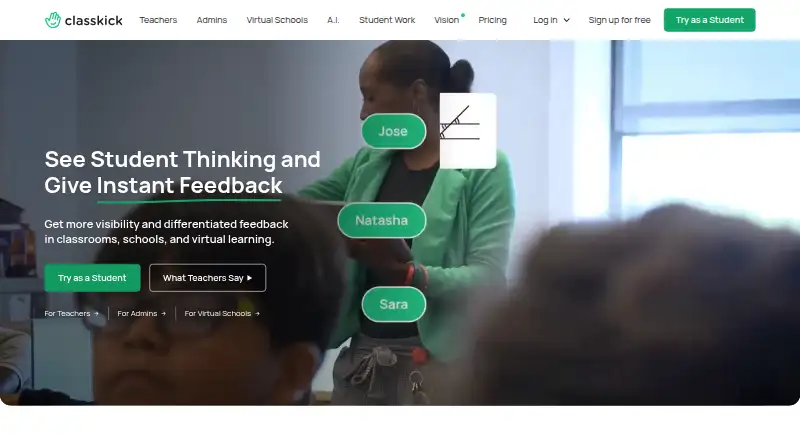
Classkick is a web and iPad instructional platform for teachers and students. Teachers can upload PDFs, slides, images and Google Docs, or create assignments directly. Students respond with writing, drawing, text, audio and other tools. The classroom view shows student work in real time, helping teachers identify who needs assistance and provide feedback during synchronous or asynchronous learning. Its audience includes individual teachers, schools, districts and virtual schools that need interactive digital workspaces.
The freemium structure starts with the Basic plan, which includes up to 500 student work pages per month and up to 20 assignment slots. Starter is an individual teacher plan with no yearly commitment and cancellation at any time. Expert and Champion are Pro teacher plans. Pro features include CSV grade and student-work exports, Google Classroom and Clever integrations, progress tracking and shared assignment libraries. These tiers make the product suitable for a solo teacher while also offering functions for school or district workflows that need exports and classroom-system connections.
Classkick’s distinctive value is the combination of live visibility, immediate feedback and varied student input methods in one assignment flow. AI Student Helper can provide in-assignment guidance, while AI Assignment Create can produce curriculum-aligned drafts. Teachers can monitor participation without waiting for submissions, and assignments can run in synchronous or asynchronous settings. The trade-off is scope: Classkick is adjacent to whiteboarding, with its center of gravity in classroom assignments, responses and feedback rather than broad collaborative canvases. Teachers seeking an education-focused workspace should consider it; teams needing a general-purpose whiteboard or platforms beyond web and iOS should look elsewhere.
Your product? Our editors can test Classkick in depth and publish a review, labelled as paid · from $149/mo →
Classkick pricing
All 4 Classkick plans and prices →
Classkick fact sheet
| Free plan | Yes |
|---|---|
| Paid from | Not verified |
| Guest access | Not verified |
| Voting tools | Not verified |
| Timer tools | Not verified |
| Presentation mode | Not verified |
| Export formats | Not verified |
| Participant limit | Not verified |
| Access channels | Not verified |
| Money-back guarantee | 30 days |
| Deployment | Cloud, Mobile |
| Platforms | Web, iOS |
| Compliance & security | 2FA |
| Support | Email, Docs |
| Built for | Solo, Small business, Mid-market, Enterprise (editorial estimate) |
| Integrations | 2 integrations: Google Classroom, Clever |
| Pricing | Free plan (source) |
| Website | classkick.com |
| Facts checked | 17 Nov 2026 |
Classkick integrations
Classkick lists 2 integrations on its own site.
- Google Classroom
- Clever
Alternatives to Classkick
- MiroBroad whiteboarding workspace with diagrams, workshops, presentations, and AI.9.4
- FigJamAffordable whiteboarding with strong workshop tools and Figma ecosystem fit.9.2
- Zoom WhiteboardAn inexpensive, Zoom-connected canvas for workshops, diagrams, and collaborative planning.9.0



See all Classkick alternatives →
Used Classkick? Be the first to review it
The editor score above is our own research. What this page doesn't have yet is a reader's view — what you used Classkick for, what worked and what didn't. No stars are seeded and no review is paid for; an editor reads every one before it appears.
Write a reviewTwo minutes · verified accounts only · read by an editor before it appears
Featured on iTechGuides

Classkick is listed in our Whiteboarding Software directory. Add the badge to your site — it links back to this page.
<a href="https://www.itechguides.com/products/classkick/"><img src="https://www.itechguides.com/best/badge/classkick.svg" alt="Featured on iTechGuides" width="230" height="46"></a>
Reviewed by iTechGuides Editors · Editorial team · Updated Nov 2026
Advertiser disclosure: iTechGuides is reader-supported. Vendors can pay for top positions in our rankings and for a place on other products' pages, and we may earn a commission when you click some links. Bought places stand at the number bought; this page and our disclosure say so. Paying vendors may get a fuller, more detailed review from our editors, and that review can change their score. How we rank.
Last updated · How we research and update