Classical Text Editor
Classical Text Editor: A specialist Windows editor for scholars working with textual witnesses and scholarly editions. Ranked #35 of 45 in Word Processing Software by our editors (5.8/10); pricing: 30-day trial; best for scholars editing critical editions and manuscripts.
At a glance
- Editor score5.8 / 10
- Pricing30-day trial
- Best forScholars editing critical editions and manuscripts
- Free planNo
- Desktop appsYes
- Founded1997
- Facts checked23 Sep 2026
Where it wins
- Collates textual witnesses automatically or manually, with definable sigla and groups
- Supports critical apparatus, footnotes, notes and parallel-text layouts
- Imports common text formats and exports TEI XML, HTML and PDF
Where it doesn't
- Focused on scholarly editions rather than general-purpose word processing
- Windows application; macOS and Linux require emulation or Wine
- No real-time collaboration or AI features
Our verdict on Classical Text Editor
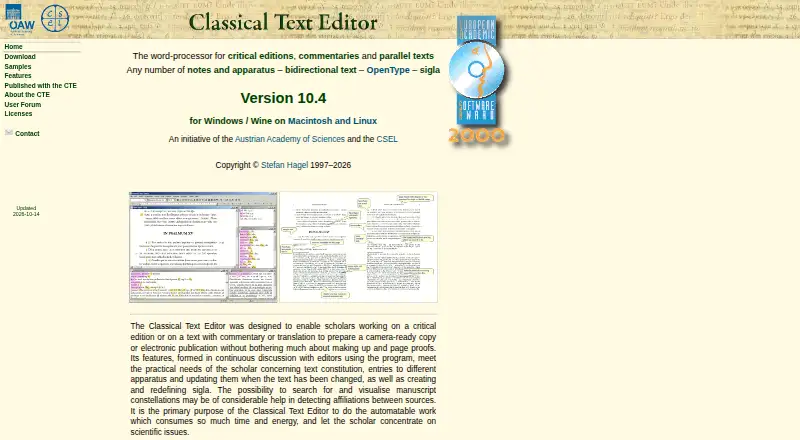
Classical Text Editor is a desktop word processor for scholars preparing critical editions, commentaries, translations and parallel texts for print or digital publication. Its core audience is researchers handling manuscript witnesses and complex scholarly apparatus, rather than people looking for a general-purpose document editor. Features include footnotes and notes in multiple formats, cross-references, indexes, search and replacement, and support for bidirectional and complex-script text.
Its strongest distinction is the way it handles textual evidence and scholarly page structure. Users can collate witnesses automatically or manually, define sigla and witness groups, and arrange parallel texts as facing pages, columns or blocks. The editor can import XML/TEI, Microsoft Word, RTF and plain text, then produce TEI XML, HTML and PDF output. Zotero, Mendeley and EndNote are listed as integrations. That combination makes it a focused fit for editing and publishing scholarly texts across print and digital formats, not a substitute for a broad collaborative writing suite.
Classical Text Editor is distributed as a Windows application. The vendor describes running it on macOS or Linux through Windows emulation or Wine, so those platforms involve an extra compatibility step rather than native desktop support. The paid offering includes permanent licenses, including individual, student, premium and institutional options, as well as yearly subscriptions; upgrade coverage varies by plan. A 30-day free trial is available. Email and documentation are the listed support channels. Choose it when witness collation, apparatus and parallel-text layout are central to the work; choose a general editor if collaboration or native support across desktop platforms matters more.
Your product? Our editors can test Classical Text Editor in depth and publish a review, labelled as paid · from $149/mo →
Classical Text Editor pricing
All 7 Classical Text Editor plans and prices →
Classical Text Editor fact sheet
| Free plan | No |
|---|---|
| Paid from | Not verified |
| Desktop apps | Yes |
| Offline editing | Yes |
| Real-time collaboration | No |
| Track changes | Not verified |
| Desktop platforms | Windows; macOS and Linux via Windows emulation or Wine |
| Maximum document size | Not verified |
| Free trial | 30 days |
| Deployment | Desktop |
| Platforms | Windows |
| Support | Email, Docs |
| Built for | Solo, Small business (editorial estimate) |
| Integrations | 3 integrations: Zotero, Mendeley, EndNote |
| Pricing | 30-day trial (source) |
| Website | cte.oeaw.ac.at |
| Facts checked | 23 Sep 2026 |
Classical Text Editor integrations
Classical Text Editor lists 3 integrations on its own site.
- Zotero
- Mendeley
- EndNote
Alternatives to Classical Text Editor
- Microsoft WordA complete word processor with strong collaboration, review, accessibility, and Microsoft ecosystem support.9.4
- Google DocsA strong browser-first word processor for teams that edit documents together.9.2
- Zoho WriterA broad free word processor for teams needing cross-platform editing and workflow features.9.0


See all Classical Text Editor alternatives →
Used Classical Text Editor? Be the first to review it
The editor score above is our own research. What this page doesn't have yet is a reader's view — what you used Classical Text Editor for, what worked and what didn't. No stars are seeded and no review is paid for; an editor reads every one before it appears.
Write a reviewTwo minutes · verified accounts only · read by an editor before it appears
Featured on iTechGuides

Classical Text Editor is listed in our Word Processing Software directory. Add the badge to your site — it links back to this page.
<a href="https://www.itechguides.com/products/classical-text-editor/"><img src="https://www.itechguides.com/best/badge/classical-text-editor.svg" alt="Featured on iTechGuides" width="230" height="46"></a>
Reviewed by iTechGuides Editors · Editorial team · Updated Oct 2026
Advertiser disclosure: iTechGuides is reader-supported. Vendors can pay for top positions in our rankings and for a place on other products' pages, and we may earn a commission when you click some links. Bought places stand at the number bought; this page and our disclosure say so. Paying vendors may get a fuller, more detailed review from our editors, and that review can change their score. How we rank.
Last updated · How we research and update