Chopify
Chopify: Free local clip automation with strong repurposing features, limited to Windows and self-hosting. Ranked #29 of 50 in AI Video Repurposing Tools by our editors (5.6/10); pricing: Free plan; best for self-hosted users wanting free clip automation.
At a glance
- Editor score5.6 / 10
- PricingFree plan
- Best forSelf-hosted users wanting free clip automation
- Free planYes
- Paid fromFree
- AI highlight detectionYes
- Facts checked19 Sep 2026
Where it wins
- AI virality scoring and complete-thought clip detection
- Speaker tracking, vertical reframing, and word-by-word captions
- Metadata generation, silence removal, and loudness normalization
Where it doesn't
- Windows is the only listed operating-system requirement
- Self-hosting and command-line workflows require local setup
- Platform coverage is limited compared with hosted, multi-OS tools
Our verdict on Chopify
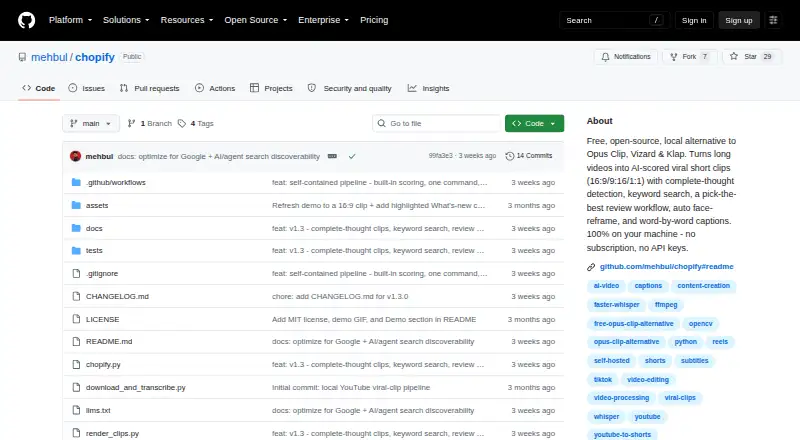
Chopify is a free, open-source command-line tool for turning long videos into short-form clips locally. It is intended for creators repurposing podcasts, interviews, webinars, lectures, and other long videos for TikTok, Instagram Reels, and YouTube Shorts. The tool accepts YouTube or other video URLs, transcribes content, identifies segments, and renders landscape, vertical, or square clips. It suits users who want local processing and are comfortable managing a self-hosted workflow on Windows.
Its standout strength is the breadth of automated clip preparation in one workflow. Chopify combines AI virality scoring with complete-thought detection and keyword search over transcripts, helping users identify candidate segments by both predicted appeal and specific content. Automatic speaker-tracking reframing adapts footage for vertical video, while filler-word and silence removal can tighten the result. Word-by-word burned-in captions, caption style presets, and preview draft rendering support review before export. Ready-to-post titles, descriptions, and hashtags extend the workflow beyond editing, and loudness normalization handles a final audio preparation step.
The main trade-off is control over the operating environment. Chopify is local, command-line based, and self-hosted, with Windows explicitly required; that makes it a focused option for users who prefer open-source tooling but narrows platform coverage. Its listed ecosystem connections are YouTube and Ollama. Choose Chopify when free local automation, transcript-driven selection, reframing, captions, and metadata matter more than a hosted interface or broader platform reach. Users seeking a browser-based workflow or wider operating-system coverage should consider an alternative built around those requirements.
Your product? Our editors can test Chopify in depth and publish a review, labelled as paid · from $149/mo →
Chopify pricing
Chopify fact sheet
| Free plan | Yes |
|---|---|
| Paid from | Free |
| Max source length | Not verified |
| AI highlight detection | Yes |
| Automatic reframing | Yes |
| Social platform presets | Yes |
| Transcript-to-post output | Yes |
| Brand templates | Not verified |
| Monthly clip limit | Not verified |
| Deployment | Desktop, Self-hosted |
| Platforms | Windows |
| Integrations | 2 integrations: YouTube, Ollama |
| Pricing | Free plan |
| Website | github.com |
| Facts checked | 19 Sep 2026 |
Chopify integrations
Chopify lists 2 integrations on its own site.
- YouTube
- Ollama
Alternatives to Chopify
- OpusClipA broad AI workflow for turning long videos into branded, social-ready clips.9.9
- HeadlinerA broad, affordable toolkit for turning long-form media into social-ready clips.8.9
- quso.aiA broad AI repurposing suite with scheduling and analytics, though paid access starts at $29 monthly.8.7



See all Chopify alternatives →
Used Chopify? Be the first to review it
The editor score above is our own research. What this page doesn't have yet is a reader's view — what you used Chopify for, what worked and what didn't. No stars are seeded and no review is paid for; an editor reads every one before it appears.
Write a reviewTwo minutes · verified accounts only · read by an editor before it appears
Featured on iTechGuides

Chopify is listed in our AI Video Repurposing Tools directory. Add the badge to your site — it links back to this page.
<a href="https://www.itechguides.com/products/chopify/"><img src="https://www.itechguides.com/best/badge/chopify.svg" alt="Featured on iTechGuides" width="230" height="46"></a>
Reviewed by iTechGuides Editors · Editorial team · Updated Sep 2026
Advertiser disclosure: iTechGuides is reader-supported. Vendors can pay for top positions in our rankings and for a place on other products' pages, and we may earn a commission when you click some links. Bought places stand at the number bought; this page and our disclosure say so. Paying vendors may get a fuller, more detailed review from our editors, and that review can change their score. How we rank.
Last updated · How we research and update