CheatDeck
CheatDeck: A focused Linux launcher for running Windows sidecars beside Steam Deck games. Ranked #23 of 30 in Game Trainers by our editors (6.4/10); pricing: Open source; best for steam Deck sidecar program launching.
At a glance
- Editor score6.4 / 10
- PricingOpen source
- Best forSteam Deck sidecar program launching
- Paid fromFree
- Platform supportLinux
- Facts checked20 Sep 2026
Where it wins
- Runs Windows .exe and .bat sidecars in the game's Proton/Wine environment
- Stops the sidecar automatically when the primary game exits
- Offers presets plus custom variables, commands, arguments, and locale settings
Where it doesn't
- Linux and Steam Deck focused rather than cross-platform
- Trainer compatibility can depend on Proton/Wine and runtime dependencies
- Does not provide a verified trainer catalog or update system
Our verdict on CheatDeck
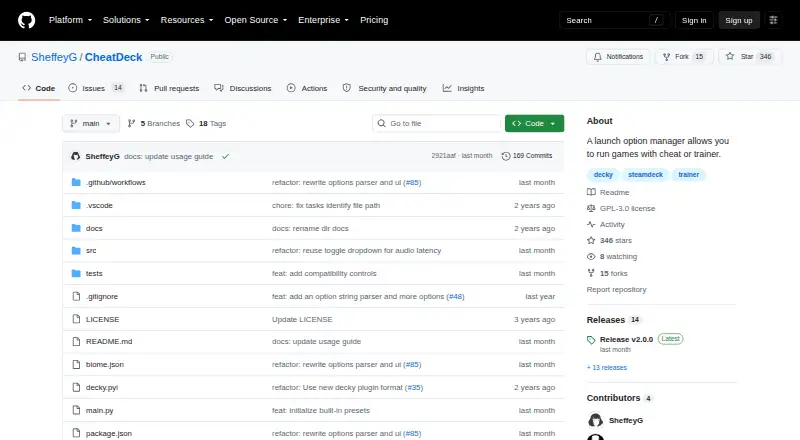
CheatDeck is an open-source Decky Loader plugin for Steam Deck users who want to launch Windows sidecar programs alongside games. That includes game trainers and utilities, with the selected program running through the same Proton or Wine environment as the primary game. Its scope is focused: it is a Linux launcher for managing companion executables and game launch behavior, rather than a trainer library or a broad game-management platform.
Installation uses Decky Loader and a release ZIP, making the product fit users already working within the Steam Deck plugin ecosystem. CheatDeck can stop the sidecar when the primary game exits, while its launch controls cover Steam Deck behavior, FSYNC, WineD3D, compatibility data paths, audio latency, custom environment variables, prefix commands, launch arguments, and selectable locale settings. The source-preserving launch-options parser also supports users who need to retain existing launch configuration while adding sidecar behavior.
The main strength is control over the execution environment. Running the sidecar in the game's Proton or Wine environment can align the companion program with the game, while presets reduce the need to enter every setting manually. The tradeoff is a narrow focus and runtime dependence: compatibility may vary with Proton/Wine and additional dependencies, and the product does not supply a verified trainer catalog or update system. Choose CheatDeck if you want a configurable Steam Deck sidecar launcher; choose an alternative if you need built-in trainer discovery, catalog coverage, or a broader platform range.
Your product? Our editors can test CheatDeck in depth and publish a review, labelled as paid · from $149/mo →
CheatDeck pricing
CheatDeck fact sheet
| Free plan | Not verified |
|---|---|
| Paid from | Free |
| Platform support | Linux |
| Delivery model | Launcher |
| In-game overlay | Not verified |
| Automatic updates | Not verified |
| Offline mode | Not verified |
| Simultaneous devices | Not verified |
| Refund window | Not verified |
| Deployment | Desktop |
| Platforms | Linux |
| Support | Community, Docs |
| Built for | Solo, Small business (editorial estimate) |
| Pricing | Open source |
| Website | github.com |
| Facts checked | 20 Sep 2026 |
Alternatives to CheatDeck
- Cheat HappensA mature trainer platform with Aurora, offline access, overlays, AI tools, and mobile control.9.4
- PLITCHA polished multi-device trainer with a useful free tier and paid companion features.9.1
- WeModA free Windows trainer with maps, overlays, automatic detection, and AI assistance.8.8



See all CheatDeck alternatives →
Used CheatDeck? Be the first to review it
The editor score above is our own research. What this page doesn't have yet is a reader's view — what you used CheatDeck for, what worked and what didn't. No stars are seeded and no review is paid for; an editor reads every one before it appears.
Write a reviewTwo minutes · verified accounts only · read by an editor before it appears
Featured on iTechGuides

CheatDeck is listed in our Game Trainers directory. Add the badge to your site — it links back to this page.
<a href="https://www.itechguides.com/products/cheatdeck/"><img src="https://www.itechguides.com/best/badge/cheatdeck.svg" alt="Featured on iTechGuides" width="230" height="46"></a>
Reviewed by iTechGuides Editors · Editorial team · Updated Oct 2026
Advertiser disclosure: iTechGuides is reader-supported. Vendors can pay for top positions in our rankings and for a place on other products' pages, and we may earn a commission when you click some links. Bought places stand at the number bought; this page and our disclosure say so. Paying vendors may get a fuller, more detailed review from our editors, and that review can change their score. How we rank.
Last updated · How we research and update