Casual Slides
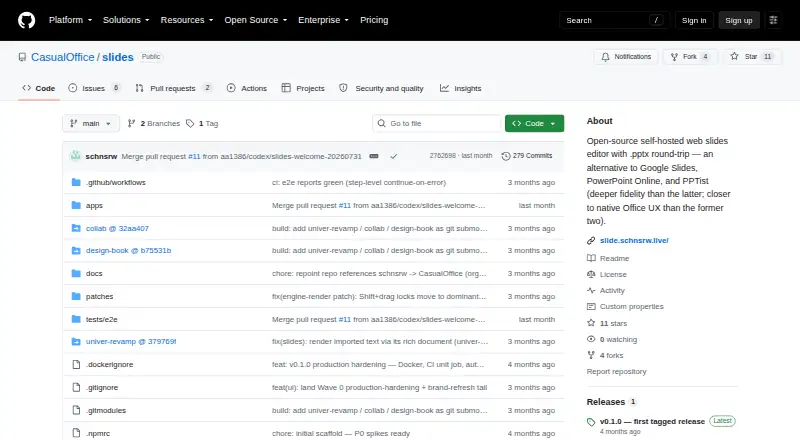
Casual Slides: A focused browser editor for PPTX workflows, with self-hosting and limited collaboration. Ranked #67 of 93 in Presentation Software by our editors (3.0/10); pricing: Open source; best for self-hosted PowerPoint-compatible users.
At a glance
- Editor score3.0 / 10
- PricingOpen source
- Best forSelf-hosted PowerPoint-compatible users
- Paid fromFree
- AI assistanceNo
- Facts checked20 Sep 2026
Where it wins
- Imports and exports PowerPoint PPTX files
- Familiar ribbon, layouts, themes, notes, and presenter view
- Docker deployment with browser-based access
Where it doesn't
- Collaboration is experimental and supports one active editor session
- AI features are not included
- Mobile support is outside the current scope
Our verdict on Casual Slides
Casual Slides is an open-source, browser-based presentation editor for people who want a PowerPoint-style workflow without giving up self-hosting. It runs in desktop browsers and can be deployed with Docker. The editor includes an Office-style ribbon, slide thumbnails, layouts, themes, background controls, slideshow mode, presenter view, speaker notes, and recent files backed by IndexedDB. Its clearest fit is for individuals and teams that work with PPTX files and prefer a self-hosted web application.
PPTX compatibility is the product’s defining strength. Casual Slides can open and save PowerPoint files through an OOXML-based import and export pipeline, while familiar editing controls reduce the change from a conventional desktop presentation workflow. Slide thumbnails support reorder, duplicate, hide, and delete actions, and presentation delivery is covered by keyboard navigation, slideshow mode, presenter view, and speaker notes. This makes the product more suitable for creating and presenting standard slide decks than for users seeking a broad connected ecosystem or AI-assisted authoring.
The collaboration feature should be treated as an early, limited capability rather than a real-time team workspace. It is an experimental, gated phase-two feature and currently supports only a single active editor session. AI is also outside the current release scope, as is mobile support. Choose Casual Slides for PPTX round-tripping, browser access, Docker-based self-hosting, and a focused presentation tool. Choose an alternative if simultaneous editing, mobile workflows, or AI assistance are central requirements.
Your product? Our editors can test Casual Slides in depth and publish a review, labelled as paid · from $149/mo →
Casual Slides pricing
Casual Slides fact sheet
| Free plan | Not verified |
|---|---|
| Paid from | Free |
| AI assistance | No |
| Real-time collaboration | No |
| PowerPoint import | Yes |
| PowerPoint export | Yes |
| Offline access | Not verified |
| Presenter mode | Yes |
| Supported platforms | web; desktop browsers; self-hosted |
| Deployment | Cloud, Self-hosted, Browser extension |
| Platforms | Web |
| Support | Docs, Community |
| Built for | Solo, Small business (editorial estimate) |
| Pricing | Open source |
| Website | github.com |
| Facts checked | 20 Sep 2026 |
Alternatives to Casual Slides
- Microsoft PowerPointA broad presentation workspace spanning web, desktop, mobile, collaboration, AI, and rehearsal tools.9.4
- Apple KeynoteA polished free presentation tool for Apple ecosystem users, with optional AI features.9.1
- Zoho ShowA capable free option for teams that need collaboration, offline work, and PPTX support.9.0



See all Casual Slides alternatives →
Used Casual Slides? Be the first to review it
The editor score above is our own research. What this page doesn't have yet is a reader's view — what you used Casual Slides for, what worked and what didn't. No stars are seeded and no review is paid for; an editor reads every one before it appears.
Write a reviewTwo minutes · verified accounts only · read by an editor before it appears
Featured on iTechGuides

Casual Slides is listed in our Presentation Software directory. Add the badge to your site — it links back to this page.
<a href="https://www.itechguides.com/products/casual-slides/"><img src="https://www.itechguides.com/best/badge/casual-slides.svg" alt="Featured on iTechGuides" width="230" height="46"></a>
Guides on presentation software
- 5 Best AI Presentation and PowerPoint Design Tools in 2026Aug 2026
- Best AI Tools for Effortless Presentation Design Compared 2025: 2026 Buyer’s UpdateAug 2026
- Best Presentation Apps for iPad and iPhone: Keynote, PowerPoint, Google Slides, Canva, and PreziAug 2026
Reviewed by iTechGuides Editors · Editorial team · Updated Oct 2026
Advertiser disclosure: iTechGuides is reader-supported. Vendors can pay for top positions in our rankings and for a place on other products' pages, and we may earn a commission when you click some links. Bought places stand at the number bought; this page and our disclosure say so. Paying vendors may get a fuller, more detailed review from our editors, and that review can change their score. How we rank.
Last updated · How we research and update