Cartographer
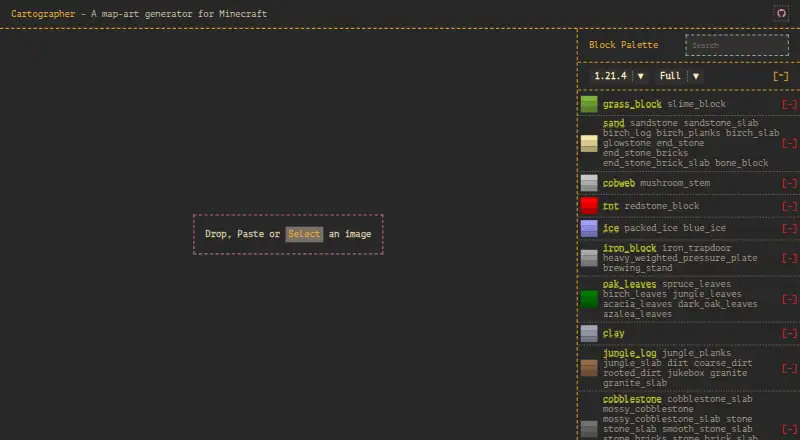
Cartographer: A focused open-source tool for previewing, shaping, and exporting Minecraft map art. Ranked #11 of 20 in Minecraft Map Art Generators by our editors (8.0/10); pricing: Open source; best for open-source browser-based schematic exports.
At a glance
- Editor score8.0 / 10
- PricingOpen source
- Best forOpen-source browser-based schematic exports
- Paid fromFree
- Facts checked20 Sep 2026
Where it wins
- Live preview with cropping, saturation, and brightness controls
- Exports Schematic, Litematica, JSON, and NBT formats
- Provides staircasing algorithms and a material list view
Where it doesn't
- Block-palette control is fixed
- Generation is limited to the web browser
- Does not include AI features
Our verdict on Cartographer
Cartographer converts images into Minecraft map art in a browser, with tools for selecting, cropping, and adjusting an image before export. It is aimed at Minecraft builders who want a visual workflow for preparing map-art blueprints, rather than a general-purpose image editor or an AI image-generation tool. The project is open source under the GPL-3.0 license, and generation takes place in the browser.
Its strongest area is the path from source image to build-ready output. A live preview helps connect image adjustments with the expected Minecraft result, while saturation and brightness controls provide basic visual tuning. Users can choose from multiple staircasing algorithms, inspect a material list, and export in Schematic, Litematica, JSON, or NBT formats. That combination gives builders several ways to move generated designs into their preferred workflow, with schematic exports serving as blueprints for construction.
The main constraint is palette flexibility: block-palette control is fixed, while custom block-palette uploads are a roadmap item. The browser-only format may also be a poor fit for users who need a native desktop workflow or a tool centered on other Minecraft platform requirements. Choose Cartographer if open-source delivery, live image preparation, material planning, and broad schematic-format exports matter most. Look elsewhere if custom palette creation, AI-assisted generation, or a non-browser application is central to the project.
Your product? Our editors can test Cartographer in depth and publish a review, labelled as paid · from $149/mo →
Cartographer pricing
Cartographer fact sheet
| Free plan | Not verified |
|---|---|
| Paid from | Free |
| Java support | Not verified |
| Bedrock support | Not verified |
| Schematic export | Yes |
| Materials list | Yes |
| Placement guidance | Not verified |
| Palette control | Fixed |
| Maps per image | Not verified |
| Deployment | Browser extension |
| Platforms | Web |
| Built for | Solo, Small business (editorial estimate) |
| Pricing | Open source |
| Website | cartographer-mc.com |
| Facts checked | 20 Sep 2026 |
Alternatives to Cartographer
- MapartCraftA free, complete workflow for converting images into buildable Minecraft map art.9.4
- ImageToMapMCA capable open-source desktop editor for detailed Minecraft map-art workflows.9.1
- MapArtisanA flexible open-source tool for palette-controlled multi-map Minecraft designs.8.9

See all Cartographer alternatives →
Used Cartographer? Be the first to review it
The editor score above is our own research. What this page doesn't have yet is a reader's view — what you used Cartographer for, what worked and what didn't. No stars are seeded and no review is paid for; an editor reads every one before it appears.
Write a reviewTwo minutes · verified accounts only · read by an editor before it appears
Featured on iTechGuides

Cartographer is listed in our Minecraft Map Art Generators directory. Add the badge to your site — it links back to this page.
<a href="https://www.itechguides.com/products/cartographer/"><img src="https://www.itechguides.com/best/badge/cartographer.svg" alt="Featured on iTechGuides" width="230" height="46"></a>
Reviewed by iTechGuides Editors · Editorial team · Updated Oct 2026
Advertiser disclosure: iTechGuides is reader-supported. Vendors can pay for top positions in our rankings and for a place on other products' pages, and we may earn a commission when you click some links. Bought places stand at the number bought; this page and our disclosure say so. Paying vendors may get a fuller, more detailed review from our editors, and that review can change their score. How we rank.
Last updated · How we research and update