Capto
Capto: A broad desktop capture toolkit with OCR, recording, editing, and sharing. Ranked #13 of 39 in Screenshot Software by our editors (8.0/10); pricing: Paid; best for users wanting capture, OCR, and video editing.
At a glance
- Editor score8.0 / 10
- PricingPaid
- Best forUsers wanting capture, OCR, and video editing
- Free planNo
- Paid from$29.99 one-time
- Scrolling captureYes
- Founded2007 · Udupi, India
- Facts checked20 Sep 2026
Where it wins
- Scrolling webpage capture plus full-screen, window, and area modes
- OCR, annotations, and video editing in one desktop application
- Cloud, FTP/SFTP, and social sharing integrations
Where it doesn't
- No free plan
- Paid license terms are listed for Macs
- Desktop coverage is limited to macOS and Windows
Our verdict on Capto
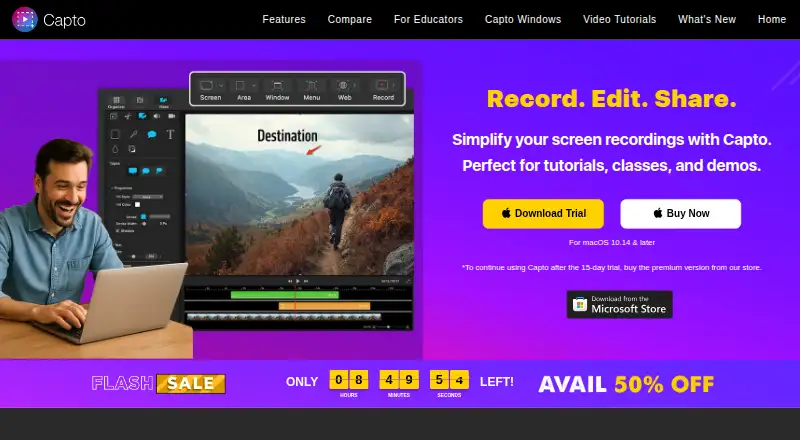
Capto is desktop software for capturing screenshots, recording screens, editing images and videos, organizing captures, extracting text, and sharing content. It supports full-screen, window, area, webpage, webcam, iOS-device, and audio capture. Educators, students, content creators, businesses, and other users making tutorials, presentations, demonstrations, and instructional content are the clearest fit. Its feature set covers both quick image capture and more involved instructional media workflows.
According to the vendor's pricing page, the Single License costs $29.99 as a one-time purchase and is valid for use on 2 Macs per user or account. The Family Pack costs $74.99 one time and covers 5 Macs per user or account. There is no free plan. Capto supports macOS and Windows, while the published paid license terms are for Macs. The macOS listing documents a 15-day trial without card details, and the vendor's Windows article states a 7-day trial. Integrations include Dropbox, Evernote, Google Drive, YouTube, Facebook, Tumblr, FTP, and SFTP, giving the product several routes for storing or distributing captures.
Capto's main distinction is the breadth of its capture-to-output workflow. Scrolling webpage capture handles content beyond a single screen, OCR extracts text from captured material, and the editor supports image annotations plus video trimming, joining, cropping, and annotation. Folder-based organization and tagging help manage captures, while supported formats include PNG, JPEG, TIFF, PDF, GIF, and BMP. This range suits users who want one application for screenshots, recordings, basic video work, and sharing. Users seeking only quick screenshots may find the wider toolset unnecessary, while teams needing broader platform coverage or license terms beyond the listed Mac plans should consider another option.
Your product? Our editors can test Capto in depth and publish a review, labelled as paid · from $149/mo →
Capto pricing
All 2 Capto plans and prices →
Capto fact sheet
| Free plan | No |
|---|---|
| Paid from | $29.99 one-time |
| Scrolling capture | Yes |
| OCR text extraction | Yes |
| Supported platforms | macOS, Windows |
| Export formats | PNG, JPEG, TIFF, PDF, GIF, BMP |
| Cloud storage | Not verified |
| Shareable links | Yes |
| Deployment | Desktop |
| Platforms | macOS, Windows |
| Support | Email, Docs |
| Built for | Solo, Small business, Mid-market (editorial estimate) |
| Integrations | 8 integrations: Dropbox, Evernote, Google Drive, YouTube, Facebook, Tumblr … |
| Pricing | Paid (source) |
| Website | globaldelight.com |
| Facts checked | 20 Sep 2026 |
Capto integrations
Capto lists 8 integrations on its own site.
- Dropbox
- Evernote
- Google Drive
- YouTube
- Tumblr
- FTP
- SFTP
Alternatives to Capto
- SnagitA mature screenshot and recording suite for teams that need more than basic captures.9.3
- ShareXA powerful free Windows capture tool with automation, editing, OCR, recording and uploads.9.2
- GyazoA versatile capture tool with broad platform support and useful Pro upgrades.9.1



Also Ranked In
Capto is ranked in 3 of our directories.
Used Capto? Be the first to review it
The editor score above is our own research. What this page doesn't have yet is a reader's view — what you used Capto for, what worked and what didn't. No stars are seeded and no review is paid for; an editor reads every one before it appears.
Write a reviewTwo minutes · verified accounts only · read by an editor before it appears
Featured on iTechGuides

Capto is listed in our Screenshot Software directory. Add the badge to your site — it links back to this page.
<a href="https://www.itechguides.com/products/capto-screenshot-software/"><img src="https://www.itechguides.com/best/badge/capto-screenshot-software.svg" alt="Featured on iTechGuides" width="230" height="46"></a>
Reviewed by iTechGuides Editors · Editorial team · Updated Oct 2026
Advertiser disclosure: iTechGuides is reader-supported. Vendors can pay for top positions in our rankings and for a place on other products' pages, and we may earn a commission when you click some links. Bought places stand at the number bought; this page and our disclosure say so. Paying vendors may get a fuller, more detailed review from our editors, and that review can change their score. How we rank.
Last updated · How we research and update