Camera Plus
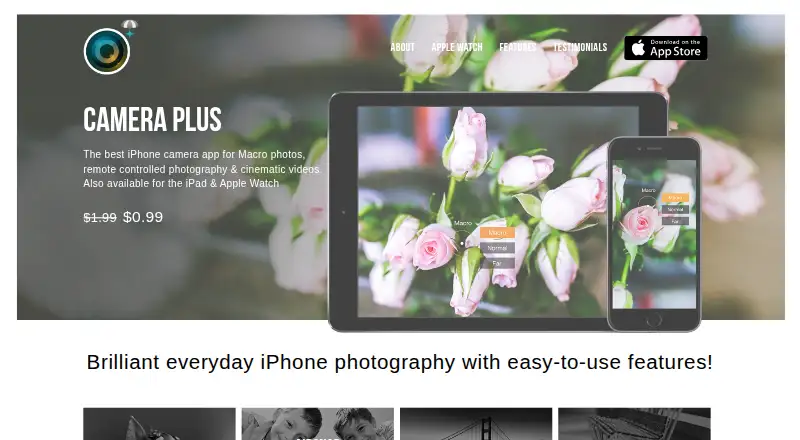
Camera Plus: A focused mobile camera app for straightforward capture, enhancement, and Apple-device control. Ranked #126 of 158 in Photo Editing Software by our editors (3.0/10); pricing: Paid; best for simple mobile capture and enhancement.
At a glance
- Editor score3.0 / 10
- PricingPaid
- Best forSimple mobile capture and enhancement
- Free planNo
- PlatformMobile
- Founded2007 · Udupi, India
- Facts checked20 Sep 2026
Where it wins
- Macro focus, exposure controls, HDR effects, and one-touch enhancement
- AirSnap enables remote photography between compatible Apple devices
- Private folder plus Apple Watch capture and preview features
Where it doesn't
- No verified RAW workflow, layers, masking, or batch editing
- No AI retouching tools are listed
- Its strongest remote features depend on compatible Apple devices
Our verdict on Camera Plus
Camera Plus combines mobile photo and video capture with straightforward editing tools for consumers who want more control than a standard camera app without a broad desktop-style workflow. Its feature set covers macro photography, exposure adjustment with Lumy, filters, HDR effects, captions, cropping, rotation, and controls for brightness, contrast, sharpness, color, and temperature. One-touch Pix’d enhancement adds a quicker option for improving photos, while the private folder is designed for locking photos and videos. The app is listed for iOS and Android, with Apple-focused features available across compatible devices.
The standout area is remote photography. AirSnap supports remote capture between compatible Apple devices, and Apple Watch integration adds remote capture and preview. Apple Photos and iCloud are also listed integrations, giving the product a clear fit within an Apple-centered photo workflow. Macro focus is another defined strength for close-up subjects, while captions include font and color controls for users who want to add text directly to images. Buyers choosing Camera Plus should prioritize mobile capture, selective adjustments, and device-to-device control over a larger editing environment.
Camera Plus keeps its scope focused rather than offering a full professional editing stack. The published feature set does not include a verified RAW workflow, layers, masking, batch editing, or AI retouching, and desktop coverage is not broad. That makes it less suitable for photographers who need complex compositing, high-volume processing, or advanced retouching. It is a better choice for consumers seeking macro capture, quick enhancement, private media storage, and Apple-device integration in a compact mobile tool.
Questions about Camera Plus
What does Camera Plus run on? iOS and Android. It runs as a mobile app.
What does Camera Plus integrate with? 3 integrations: Apple Watch, Apple Photos and iCloud.
Who is Camera Plus built for? Solo users and small businesses (our editorial estimate).
Your product? Our editors can test Camera Plus in depth and publish a review, labelled as paid · from $149/mo →
Camera Plus pricing
All 1 Camera Plus plans and prices →
Camera Plus fact sheet
| Free plan | No |
|---|---|
| Paid from | Not verified |
| Platform | Mobile |
| RAW photo support | Not verified |
| Layer editing | Not verified |
| Masking tools | Not verified |
| Batch editing | Not verified |
| Cloud sync | Not verified |
| AI retouching | Not verified |
| Deployment | Mobile |
| Platforms | iOS, Android |
| Built for | Solo, Small business (editorial estimate) |
| Integrations | 3 integrations: Apple Watch, Apple Photos, iCloud |
| Pricing | Paid (source) |
| Website | globaldelight.com |
| Facts checked | 20 Sep 2026 |
Camera Plus integrations
Camera Plus lists 3 integrations on its own site.
- Apple Watch
- Apple Photos
- iCloud
Alternatives to Camera Plus
- Adobe PhotoshopA deep, multi-platform editor for compositing, retouching, RAW work, and AI-assisted edits.9.4
- Adobe LightroomA broad Lightroom workflow for RAW editing, masking, organization, and synchronized access.9.2
- Capture OneA deep choice for professional RAW and tethered workflows, without a free plan.9.0



See all Camera Plus alternatives →
Used Camera Plus? Be the first to review it
The editor score above is our own research. What this page doesn't have yet is a reader's view — what you used Camera Plus for, what worked and what didn't. No stars are seeded and no review is paid for; an editor reads every one before it appears.
Write a reviewTwo minutes · verified accounts only · read by an editor before it appears
Featured on iTechGuides

Camera Plus is listed in our Photo Editing Software directory. Add the badge to your site — it links back to this page.
<a href="https://www.itechguides.com/products/camera-plus/"><img src="https://www.itechguides.com/best/badge/camera-plus.svg" alt="Featured on iTechGuides" width="230" height="46"></a>
Reviewed by iTechGuides Editors · Editorial team · Updated Nov 2026
Advertiser disclosure: iTechGuides is reader-supported. Vendors can pay for top positions in our rankings and for a place on other products' pages, and we may earn a commission when you click some links. Bought places stand at the number bought; this page and our disclosure say so. Paying vendors may get a fuller, more detailed review from our editors, and that review can change their score. How we rank.
Last updated · How we research and update