
Calibration Control
Calibration Control: A Windows-focused calibration system with strong records, traceability, and one-time licensing. Ranked #16 of 23 in Calibration Management Software by our editors (7.7/10); pricing: 30-day trial; best for windows teams wanting one-time licensing.
At a glance
- Editor score7.7 / 10
- Pricing30-day trial
- Best forWindows teams wanting one-time licensing
- Free planNo
- Paid from$50/seat one-time
- Calibration schedulingYes
- Facts checked22 Sep 2026
Where it wins
- Recurring schedules and due-date tracking for calibration and maintenance
- Certificates, audit trails, standards traceability, and historical records
- Barcode workflows, asset transfers, check-in/check-out, and reporting
Where it doesn't
- Windows-only deployment limits platform flexibility
- No mobile support is available
- The 30-day trial is not a perpetual free plan
Our verdict on Calibration Control
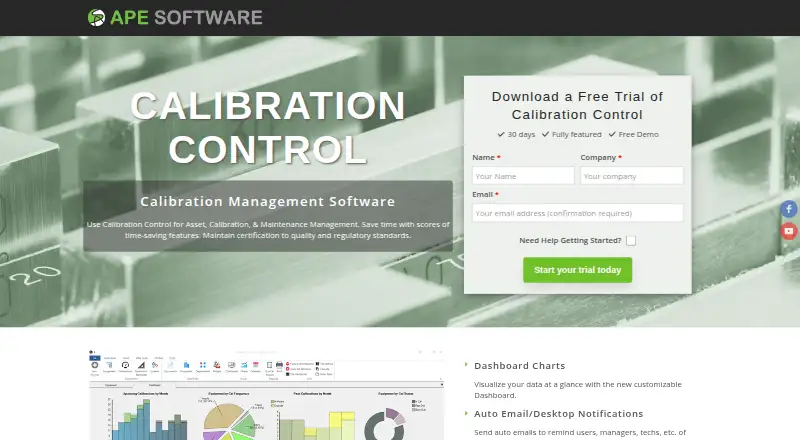
Calibration Control is desktop software for organizations managing gauges, test equipment, tools, and related maintenance activities. It combines recurring calibration frequencies and due-date tracking with event history, measurement records, certificates, attachments, standards traceability, notifications, barcode workflows, reporting, and asset movement controls. Its audience is Windows-based teams that need a structured record of calibration work and prefer a one-time license over a recurring SaaS subscription.
Pricing is organized around deployment and access needs. The Free Trial is fully functional for 30 days, supports unlimited seats, and installs on Windows. The Per Seat plan costs $768 USD one time for a single-user base license and includes 12 months of SMA. The Concurrent plan costs $1,037 USD one time for a concurrent-user base license and also includes 12 months of SMA. Terminal seats cost $50 USD one time, support barcode scanning use cases, and install with the full version. Read Only users are listed at $0 USD one time. This structure gives teams several ways to match licensing to how staff access the system.
The strongest fit is a Windows environment that values detailed calibration history, certificate control, audit-related records, and operational workflows such as barcode searches, transfers, status changes, and check-out. Microsoft Access and Microsoft SQL Server support, along with documented multi-user network and hosted SQL deployment options, provide database choices within that desktop model. The trade-off is platform scope: the software runs on Windows and has no mobile support. Teams requiring mobile calibration work or broader device coverage should consider an alternative; Windows teams seeking one-time licensing and a focused calibration record system are the clearer match.
Your product? Our editors can test Calibration Control in depth and publish a review, labelled as paid · from $149/mo →
Calibration Control pricing
All 5 Calibration Control plans and prices →
Calibration Control fact sheet
| Free plan | No |
|---|---|
| Paid from | $50/seat one-time |
| Calibration scheduling | Yes |
| Certificate management | Yes |
| Audit trail | Yes |
| Standards traceability | Yes |
| Asset limit | Not verified |
| Mobile support | None |
| Barcode or QR scanning | Yes |
| Free trial | 30 days |
| Deployment | Desktop, Cloud |
| Platforms | Windows |
| Support | Email, Phone, Docs |
| Built for | Small business, Mid-market (editorial estimate) |
| Integrations | 2 integrations: Microsoft Access, Microsoft SQL Server |
| Pricing | 30-day trial (source) |
| Website | apesoftware.com |
| Facts checked | 22 Sep 2026 |
Calibration Control integrations
Calibration Control lists 2 integrations on its own site.
- Microsoft Access
- Microsoft SQL Server
Alternatives to Calibration Control
- CaliBroad compliance and calibration controls with transparent annual licensing.9.4
- Fluke CalStudioA configurable cloud platform for labs managing calibration workflows, records, and certificates.9.2
- Beamex CMXA mature CMMS-integrated system for complex, compliance-focused calibration programs.9.1


See all Calibration Control alternatives →
Used Calibration Control? Be the first to review it
The editor score above is our own research. What this page doesn't have yet is a reader's view — what you used Calibration Control for, what worked and what didn't. No stars are seeded and no review is paid for; an editor reads every one before it appears.
Write a reviewTwo minutes · verified accounts only · read by an editor before it appears
Featured on iTechGuides

Calibration Control is listed in our Calibration Management Software directory. Add the badge to your site — it links back to this page.
<a href="https://www.itechguides.com/products/calibration-control/"><img src="https://www.itechguides.com/best/badge/calibration-control.svg" alt="Featured on iTechGuides" width="230" height="46"></a>
Reviewed by iTechGuides Editors · Editorial team · Updated Oct 2026
Advertiser disclosure: iTechGuides is reader-supported. Vendors can pay for top positions in our rankings and for a place on other products' pages, and we may earn a commission when you click some links. Bought places stand at the number bought; this page and our disclosure say so. Paying vendors may get a fuller, more detailed review from our editors, and that review can change their score. How we rank.
Last updated · How we research and update