CalendarPad
CalendarPad: A focused Apple planner for handwritten scheduling, notes, and printable calendar pages. Ranked #150 of 193 in Calendar Apps by our editors (3.0/10); pricing: Free plan; best for iPad and Mac users who handwrite planners.
At a glance
- Editor score3.0 / 10
- PricingFree plan
- Best foriPad and Mac users who handwrite planners
- Free planYes
- Facts checked22 Sep 2026
Where it wins
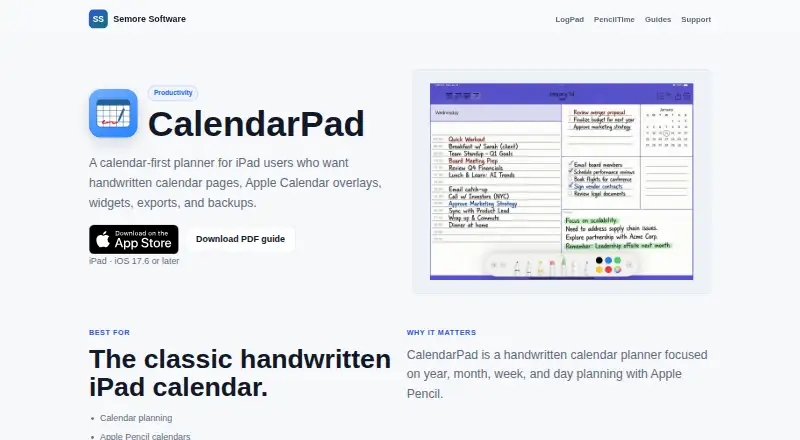
- Apple Pencil handwriting and drawing directly on calendar pages
- Year, month, week, and day views with printable exports
- Widgets, backups, and Apple Calendar event overlays
Where it doesn't
- Apple Calendar synchronization is one-way
- No shared-calendar or scheduling features
- Advanced views and features require the Pro upgrade
Our verdict on CalendarPad
CalendarPad is a handwritten calendar planner for iPad users who prefer writing, sketching, and organizing plans on digital pages. It supports year, month, week, and day views, allowing users to add priorities, to-dos, goals, reminders, and drawings with Apple Pencil. The app also runs on macOS, includes Home Screen widgets, and supports printing, sharing, and exporting pages as PDF or PNG. Its free plan provides the current and previous months in the Month Calendar, while Pro adds broader planning views and additional capabilities.
The app fits well within an Apple-focused workflow. Apple Calendar events can appear in the Day planner, and iCloud Drive can be used for backup restoration. The integration is intentionally limited: CalendarPad provides one-way synchronization rather than a two-way scheduling system. That makes it more suitable for viewing existing events alongside handwritten plans than for managing a shared calendar or coordinating appointments with others. Users who rely on collaborative scheduling, shared calendars, or bidirectional calendar updates should look for a more scheduling-oriented alternative.
CalendarPad’s strongest distinction is the combination of Apple Pencil input, multiple calendar layouts, and page-based output. Manual and automatic backups, local or iCloud Drive restoration, and PDF or PNG export support a planner workflow that may extend to printed pages or shared documents. The free tier offers a useful entry point for month-based planning, while Pro unlocks Year, Week, and Day planners, future months, Apple Calendar events in the Day planner, and advanced backup and restore. Choose CalendarPad for personal, handwritten planning on Apple devices; avoid it if collaboration and full calendar synchronization are central requirements.
Questions about CalendarPad
Does CalendarPad have a free plan? Yes, there is a free plan.
What does CalendarPad run on? macOS and iOS. It runs as a desktop app and as a mobile app.
What does CalendarPad integrate with? 2 integrations: Apple Calendar and iCloud Drive.
Who is CalendarPad built for? Solo users and small businesses (our editorial estimate).
Your product? Our editors can test CalendarPad in depth and publish a review, labelled as paid · from $149/mo →
CalendarPad pricing
All 2 CalendarPad plans and prices →
CalendarPad fact sheet
| Free plan | Yes |
|---|---|
| Paid from | Not verified |
| Shared calendars | Not verified |
| Time blocking | Not verified |
| Scheduling links | Not verified |
| Calendar sync | One_way |
| Mobile apps | Ios |
| Video meeting support | Not verified |
| Deployment | Desktop, Mobile |
| Platforms | macOS, iOS |
| Support | |
| Built for | Solo, Small business (editorial estimate) |
| Integrations | 2 integrations: Apple Calendar, iCloud Drive |
| Pricing | Free plan (source) |
| Website | semore-software.com |
| Facts checked | 22 Sep 2026 |
CalendarPad integrations
CalendarPad lists 2 integrations on its own site.
- Apple Calendar
- iCloud Drive
Alternatives to CalendarPad
- Google CalendarA versatile calendar for personal schedules and Google Workspace collaboration.9.4
- Microsoft OutlookA flexible calendar choice for people and teams already working in Microsoft’s ecosystem.9.2
- Zoho CalendarA low-cost calendar with booking, sync, room reservations, and broad integrations.9.1


See all CalendarPad alternatives →
Used CalendarPad? Be the first to review it
The editor score above is our own research. What this page doesn't have yet is a reader's view — what you used CalendarPad for, what worked and what didn't. No stars are seeded and no review is paid for; an editor reads every one before it appears.
Write a reviewTwo minutes · verified accounts only · read by an editor before it appears
Featured on iTechGuides

CalendarPad is listed in our Calendar Apps directory. Add the badge to your site — it links back to this page.
<a href="https://www.itechguides.com/products/calendarpad/"><img src="https://www.itechguides.com/best/badge/calendarpad.svg" alt="Featured on iTechGuides" width="230" height="46"></a>
Reviewed by iTechGuides Editors · Editorial team · Updated Nov 2026
Advertiser disclosure: iTechGuides is reader-supported. Vendors can pay for top positions in our rankings and for a place on other products' pages, and we may earn a commission when you click some links. Bought places stand at the number bought; this page and our disclosure say so. Paying vendors may get a fuller, more detailed review from our editors, and that review can change their score. How we rank.
Last updated · How we research and update