
Bricks
Bricks: A deep WordPress builder for full-site editing, dynamic content, and WooCommerce. Ranked #3 of 31 in WordPress Page Builders by our editors (8.8/10); pricing: Paid; best for advanced full-site WordPress projects.
At a glance
- Editor score8.8 / 10
- PricingPaid
- Best forAdvanced full-site WordPress projects
- Free planNo
- Paid from$79/yr
- Theme builderYes
- Facts checked22 Sep 2026
Where it wins
- Full-site editing covers templates, archives, headers, footers, and menus
- Dynamic data, query loops, and custom-field integrations support complex sites
- WooCommerce, popups, responsive controls, and reusable systems are included
Where it doesn't
- No time-unlimited free product plan is offered
- Paid plans are priced per website per year except Ultimate Lifetime
- The breadth of controls may exceed the needs of simple page-building projects
Our verdict on Bricks
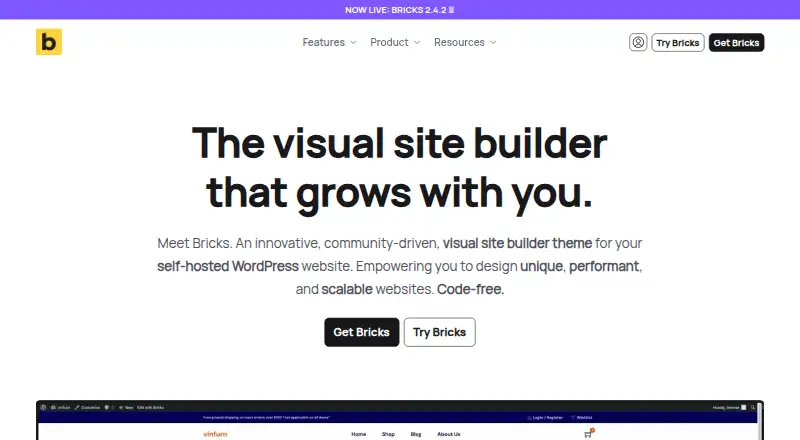
Bricks is a visual site builder theme for self-hosted WordPress websites. It is aimed at individuals, professionals, and agencies creating full-site experiences, including client websites. The builder covers pages, headers, footers, archives, menus, WooCommerce layouts, and popups through a visual interface. Its focus extends beyond page layouts into reusable systems, dynamic data, query loops, conditions, interactions, and template management.
Pricing is structured around annual subscriptions or a lifetime purchase. Starter costs $79 per year per website and includes updates, all features, and support during the subscription term. Business costs $149 per year, with the same included access. Agency costs $249 per year and also includes eligibility for the Bricks Expert Listing. Ultimate Lifetime costs $599 as a one-time payment and includes all future updates, features, and technical support, along with Bricks Expert Listing eligibility. The published plans show a paid product rather than a time-unlimited $0 plan, although the official pricing page offers a free online playground.
Bricks suits projects that need control across the WordPress site rather than a narrow page-building workflow. Responsive editing supports customizable breakpoints, while dynamic data connects with Advanced Custom Fields, Meta Box, JetEngine, Pods, and Toolset. WooCommerce tools cover shop, product, cart, checkout, and account layouts. Integrations also include Gutenberg, WPML, Polylang, Google Maps, and Unsplash. Reusable components, CSS classes, variables, global styles, template import and export, remote template sources, and front-end interactions add depth for structured builds. Choose Bricks for advanced self-hosted WordPress projects that benefit from full-site control and dynamic content. A simpler page-focused tool may be a better fit when those capabilities are unnecessary.
Your product? Our editors can test Bricks in depth and publish a review, labelled as paid · from $149/mo →
Bricks pricing
All 4 Bricks plans and prices →
Bricks fact sheet
| Free plan | No |
|---|---|
| Paid from | $79/yr |
| Theme builder | Yes |
| Responsive controls | Yes |
| Dynamic content | Yes |
| WooCommerce tools | Yes |
| Popup builder | Yes |
| Template count | Not verified |
| Money-back guarantee | 60 days |
| Deployment | Self-hosted |
| Platforms | Web |
| Support | Email, Community, Docs |
| Built for | Solo, Small business, Mid-market (editorial estimate) |
| Integrations | 11 integrations: WooCommerce, Gutenberg, WPML, Polylang, Google Maps, Unsplash … See all → |
| Pricing | Paid (source) |
| Website | bricksbuilder.io |
| Facts checked | 22 Sep 2026 |
Bricks integrations
Bricks lists 11 integrations on its own site.
- WooCommerce
- Gutenberg
- WPML
- Polylang
- Google Maps
- Unsplash
- Advanced Custom Fields
- Meta Box
- JetEngine
- Pods
- Toolset
Alternatives to Bricks
- ElementorA broad WordPress builder combining visual editing, marketing tools, and optional AI.9.3
- DiviA broad WordPress builder for visual site creation, with strong value in its lifetime plan.9.1
- BreakdanceA broad WordPress builder for dynamic sites, stores, popups, forms, and custom layouts.8.6



Bricks vs the competition
- Bricks vs Elementor
- Bricks vs Divi
- Bricks vs Breakdance
- Bricks vs Visual Composer
- Bricks vs SeedProd
- Bricks vs WPBakery Page Builder



Compare Bricks with any tool side by side →
Used Bricks? Be the first to review it
The editor score above is our own research. What this page doesn't have yet is a reader's view — what you used Bricks for, what worked and what didn't. No stars are seeded and no review is paid for; an editor reads every one before it appears.
Write a reviewTwo minutes · verified accounts only · read by an editor before it appears
Featured on iTechGuides

Bricks is listed in our WordPress Page Builders directory. Add the badge to your site — it links back to this page.
<a href="https://www.itechguides.com/products/bricks-wordpress-page-builder/"><img src="https://www.itechguides.com/best/badge/bricks-wordpress-page-builder.svg" alt="Featured on iTechGuides" width="230" height="46"></a>
Reviewed by iTechGuides Editors · Editorial team · Updated Oct 2026
Advertiser disclosure: iTechGuides is reader-supported. Vendors can pay for top positions in our rankings and for a place on other products' pages, and we may earn a commission when you click some links. Bought places stand at the number bought; this page and our disclosure say so. Paying vendors may get a fuller, more detailed review from our editors, and that review can change their score. How we rank.
Last updated · How we research and update