
Braiv
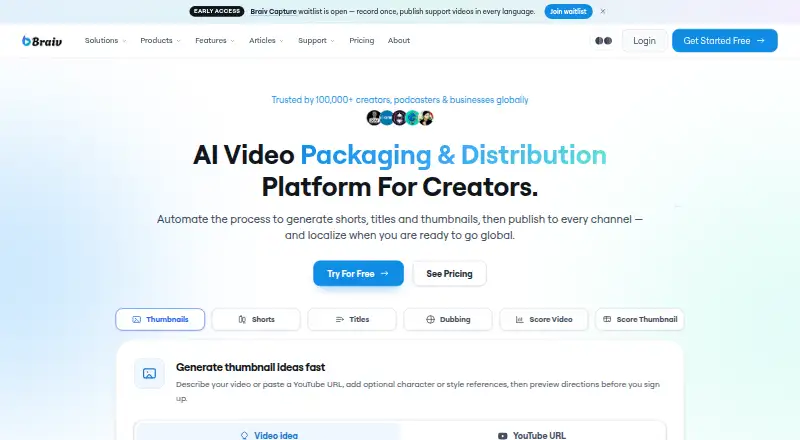
Braiv: A broad video repurposing suite with especially strong dubbing and voice features. Ranked #22 of 50 in AI Video Repurposing Tools by our editors (6.3/10); pricing: Paid; best for creators needing dubbing and voice features.
At a glance
- Editor score6.3 / 10
- PricingPaid
- Best forCreators needing dubbing and voice features
- Free planNo
- AI highlight detectionYes
- Facts checked19 Sep 2026
Where it wins
- Combines clipping, hooks, captions, thumbnails, metadata, and analytics
- Supports dubbing, voice cloning, and lip synchronization
- Publishes across YouTube, Instagram, and TikTok
Where it doesn't
- No free plan is available
- Starter videos are limited to 30 minutes
- Platform integrations are limited to three listed channels
Our verdict on Braiv
Braiv is a web-based AI video packaging and distribution platform for creators, podcasters, studios, and teams. It turns long-form video into short clips, detects highlights and hooks, automatically reframes content to 9:16, and adds animated or translated captions. It also creates thumbnails, titles, descriptions, tags, and chapters. Creators focused on multilingual publishing can use dubbing, translation, voice cloning, lip synchronization, and multilingual video playback features in the same product.
Pricing is structured around AI Credits and video-length limits. The On Demand plan includes 150 starter AI Credits one-off, supports videos up to 15 minutes, and provides one language track. Starter costs $12 per month with 600 AI Credits, a 30-minute maximum video length, three language tracks, and up to 1,800 credit rollover. Pro costs $35 per month with 2,700 credits, 60-minute videos, five language tracks, and up to 8,100 credit rollover. Business costs $70 per month with 5,400 credits, 120-minute videos, ten language tracks, and up to 16,200 credit rollover. Enterprise adds custom limits, videos up to four hours, unlimited social integrations, and dedicated support.
The strongest case for Braiv is a workflow that spans editing, packaging, localization, publishing, and analytics rather than clipping alone. AI thumbnails with style and brand templates, generated metadata, transcript-to-post capabilities, and social presets extend the repurposing process beyond creating short videos. YouTube, Instagram, and TikTok are the listed integrations, so teams needing a wider platform ecosystem may find the fit narrower. Choose Braiv when dubbing, voice features, language tracks, and a broad content workflow matter; consider an alternative if you need a free plan, broader integrations, or a longer Starter source limit.
Questions about Braiv
Does Braiv have a free plan? No free plan is listed; paid plans start at $12/mo (Starter).
How much does Braiv cost? Braiv lists 3 paid plans; the lowest is Starter at $12/mo.
What does Braiv run on? Web. It runs in the cloud.
What does Braiv integrate with? 3 integrations: YouTube, Instagram and TikTok.
Your product? Our editors can test Braiv in depth and publish a review, labelled as paid · from $149/mo →
Braiv pricing
All 5 Braiv plans and prices →
Braiv fact sheet
| Free plan | No |
|---|---|
| Paid from | Not verified |
| Max source length | 30 min |
| AI highlight detection | Yes |
| Automatic reframing | Yes |
| Social platform presets | Yes |
| Transcript-to-post output | Yes |
| Brand templates | Yes |
| Monthly clip limit | Not verified |
| Deployment | Cloud |
| Platforms | Web |
| Integrations | 3 integrations: YouTube, Instagram, TikTok |
| Pricing | Paid (source) |
| Website | braiv.co |
| Facts checked | 19 Sep 2026 |
Braiv integrations
Braiv lists 3 integrations on its own site.
- YouTube
- TikTok
Alternatives to Braiv
- OpusClipA broad AI workflow for turning long videos into branded, social-ready clips.9.9
- HeadlinerA broad, affordable toolkit for turning long-form media into social-ready clips.8.9
- quso.aiA broad AI repurposing suite with scheduling and analytics, though paid access starts at $29 monthly.8.7



Used Braiv? Be the first to review it
The editor score above is our own research. What this page doesn't have yet is a reader's view — what you used Braiv for, what worked and what didn't. No stars are seeded and no review is paid for; an editor reads every one before it appears.
Write a reviewTwo minutes · verified accounts only · read by an editor before it appears
Featured on iTechGuides

Braiv is listed in our AI Video Repurposing Tools directory. Add the badge to your site — it links back to this page.
<a href="https://www.itechguides.com/products/braiv/"><img src="https://www.itechguides.com/best/badge/braiv.svg" alt="Featured on iTechGuides" width="230" height="46"></a>
Reviewed by iTechGuides Editors · Editorial team · Updated Nov 2026
Advertiser disclosure: iTechGuides is reader-supported. Vendors can pay for top positions in our rankings and for a place on other products' pages, and we may earn a commission when you click some links. Bought places stand at the number bought; this page and our disclosure say so. Paying vendors may get a fuller, more detailed review from our editors, and that review can change their score. How we rank.
Last updated · How we research and update