
Bowdler
Bowdler: A focused Mac editor for transcript cleanup, censorship, captions, and multicam work. Ranked #67 of 78 in AI Video Editors by our editors (3.2/10); pricing: Paid; best for mac users cleaning and censoring spoken video.
At a glance
- Editor score3.2 / 10
- PricingPaid
- Best forMac users cleaning and censoring spoken video
- Free planNo
- Paid from$59 one-time
- Text-based editingYes
- Facts checked22 Sep 2026
Where it wins
- Transcript editing, silence removal, subtitles, and profanity censorship
- Local Whisper and Parakeet models run on Apple Silicon Macs
- Exports include SRT, VTT, FCPXML, XMEML, and DaVinci Resolve timelines
Where it doesn't
- Requires an Apple Silicon Mac running macOS 14 or later
- The $59 license allows one active Mac per license key
- No integrations or audio cleanup features are listed
Our verdict on Bowdler
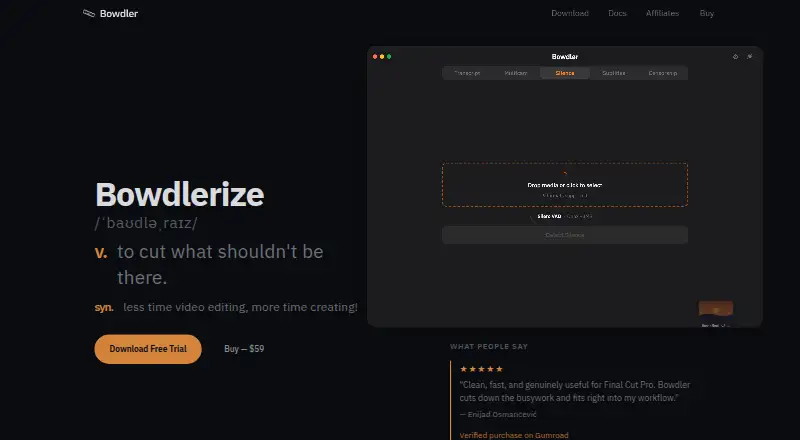
Bowdler is a macOS video-editing application for video editors, videographers, and creators who want to reduce repetitive work on spoken-video projects. Its workflow centers on transcript-based editing, with tools for removing silence, generating subtitles, detecting and censoring profanity, identifying speakers, and synchronizing multicam footage. AI models run locally on Apple Silicon Macs, which suits creators who want to process media without uploading it to a cloud service.
The pricing is straightforward: the License costs $59 USD as a one-time payment. It includes unlimited exports, all AI models and features, all future updates, and one active Mac per license key. A free trial provides 8 real exports without requiring a credit card, although it is limited to basic Whisper models. For creators who expect to keep using the application, the one-time structure is easier to understand than a recurring plan, while the single-Mac restriction matters to teams or editors who move between computers.
Bowdler’s strongest fit is repetitive spoken-video cleanup rather than broad production management. Local Whisper and Parakeet transcription models support the transcript workflow, while speaker detection and labels add structure to multi-person recordings. Export options cover SRT and VTT subtitles, FCPXML, XMEML, DaVinci Resolve timelines, and flattened media files, giving editors several ways to continue work in other tools. Multicam synchronization extends the focus beyond simple captioning. However, the application is limited to macOS and Apple Silicon, and audio cleanup is not listed among its features. Choose Bowdler for local, transcript-led editing on a compatible Mac; choose another editor if you need broader platform support, integrations, or audio-focused processing.
Your product? Our editors can test Bowdler in depth and publish a review, labelled as paid · from $149/mo →
Bowdler pricing
All 1 Bowdler plans and prices →
Bowdler fact sheet
| Free plan | No |
|---|---|
| Paid from | $59 one-time |
| Text-based editing | Yes |
| Automatic captions | Yes |
| Silence removal | Yes |
| AI audio cleanup | No |
| Maximum export resolution | Not verified |
| Supported platforms | macOS |
| Money-back guarantee | 14 days |
| Deployment | Desktop |
| Platforms | macOS |
| Compliance & security | GDPR |
| Support | Email, Docs |
| Built for | Solo, Small business (editorial estimate) |
| Pricing | Paid (source) |
| Website | bowdler.app |
| Facts checked | 22 Sep 2026 |
Alternatives to Bowdler
- DaVinci ResolveA full post-production suite with an unusually capable free version.9.4
- Adobe PremiereA deep Adobe-centered editor for professional video work and collaborative production.9.3
- Avid Media ComposerA deep editor for teams needing transcript tools, high-resolution media, and shared projects.9.1


See all Bowdler alternatives →
Used Bowdler? Be the first to review it
The editor score above is our own research. What this page doesn't have yet is a reader's view — what you used Bowdler for, what worked and what didn't. No stars are seeded and no review is paid for; an editor reads every one before it appears.
Write a reviewTwo minutes · verified accounts only · read by an editor before it appears
Featured on iTechGuides

Bowdler is listed in our AI Video Editors directory. Add the badge to your site — it links back to this page.
<a href="https://www.itechguides.com/products/bowdler/"><img src="https://www.itechguides.com/best/badge/bowdler.svg" alt="Featured on iTechGuides" width="230" height="46"></a>
Reviewed by iTechGuides Editors · Editorial team · Updated Oct 2026
Advertiser disclosure: iTechGuides is reader-supported. Vendors can pay for top positions in our rankings and for a place on other products' pages, and we may earn a commission when you click some links. Bought places stand at the number bought; this page and our disclosure say so. Paying vendors may get a fuller, more detailed review from our editors, and that review can change their score. How we rank.
Last updated · How we research and update