
Boats Animator
Boats Animator: A simple free webcam capture tool with onion skinning and high-resolution export. Ranked #18 of 29 in Stop Motion Software by our editors (7.2/10); pricing: Free plan; best for free, simple desktop webcam capture.
At a glance
- Editor score7.2 / 10
- PricingFree plan
- Best forFree, simple desktop webcam capture
- Free planYes
- Paid fromFree
- Onion skinningYes
- Facts checked20 Sep 2026
Where it wins
- Free and open source across Windows, macOS and Linux
- High-resolution webcam capture, including 1080p and beyond
- Onion skinning, frame review, playback and export tools
Where it doesn't
- No verified exposure control
- No audio support
- Focused on webcam capture rather than full timeline editing
Our verdict on Boats Animator
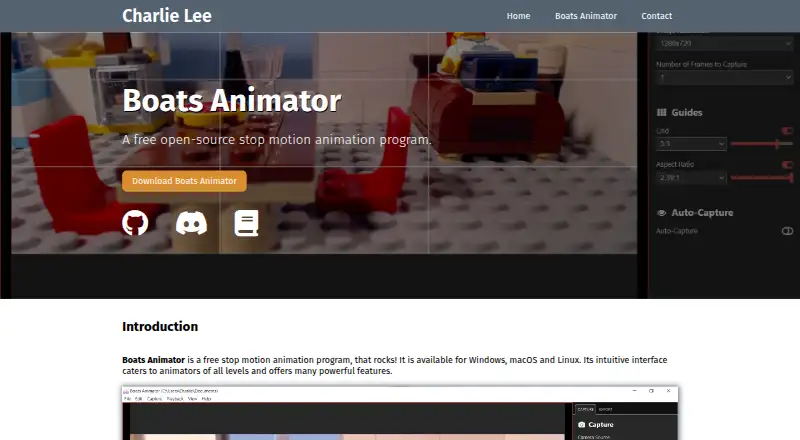
Boats Animator is free, open-source stop-motion software for desktop computers. It captures still images from webcams and similar USB camera devices, with a live camera preview and tools for reviewing and playing back captured frames. Beginners, experienced animators, and brickfilm creators can use it for webcam-based stop-motion workflows on Windows, macOS, or Linux.
Its strongest area is capture clarity and frame-by-frame guidance. The software supports high-resolution webcam capture, including 1080p and beyond, while onion skinning with adjustable opacity helps align successive frames. A frame reel supports review, and playback includes adjustable frame rates and looping. Grid overlays and aspect-ratio masks add composition aids without changing the software's focused capture workflow. Captured material can be exported as video or sequential image files for use in video-editing software.
Boats Animator is a good fit when the priority is straightforward, cost-free desktop capture with core stop-motion aids. Deletion and undo controls provide basic correction during capture, and the open-source model makes the software accessible across three desktop platforms. Its scope is narrower than a full production environment: verified exposure control, audio support, and timeline editing are not part of the stated feature set. Users who need camera exposure management, sound handling, or deeper timeline work should choose a tool built around those functions instead. The published release information lists version 0.13.0 downloads, while the main repository branch is undergoing a rewrite and may differ from the last released version.
Your product? Our editors can test Boats Animator in depth and publish a review, labelled as paid · from $149/mo →
Boats Animator pricing
Boats Animator fact sheet
| Free plan | Yes |
|---|---|
| Paid from | Free |
| Onion skinning | Yes |
| Live frame capture | Yes |
| Exposure controls | No |
| Timeline editing | Not verified |
| Audio support | No |
| Supported platforms | windows, macos, linux |
| Deployment | Desktop |
| Platforms | Windows, macOS, Linux |
| Support | Community, Docs |
| Built for | Solo, Small business (editorial estimate) |
| Pricing | Free plan |
| Website | charlielee.uk |
| Facts checked | 20 Sep 2026 |
Alternatives to Boats Animator
- DragonframeA deep professional toolkit with broad hardware support and a high one-time price.9.4
- MOTK ShootA capable open-source capture studio with camera control, editing, audio, and recovery tools.9.2
- Stop Motion StudioA broad stop-motion toolkit with capture, editing, camera controls, audio, and compositing.8.9


See all Boats Animator alternatives →
Used Boats Animator? Be the first to review it
The editor score above is our own research. What this page doesn't have yet is a reader's view — what you used Boats Animator for, what worked and what didn't. No stars are seeded and no review is paid for; an editor reads every one before it appears.
Write a reviewTwo minutes · verified accounts only · read by an editor before it appears
Featured on iTechGuides

Boats Animator is listed in our Stop Motion Software directory. Add the badge to your site — it links back to this page.
<a href="https://www.itechguides.com/products/boats-animator/"><img src="https://www.itechguides.com/best/badge/boats-animator.svg" alt="Featured on iTechGuides" width="230" height="46"></a>
Reviewed by iTechGuides Editors · Editorial team · Updated Oct 2026
Advertiser disclosure: iTechGuides is reader-supported. Vendors can pay for top positions in our rankings and for a place on other products' pages, and we may earn a commission when you click some links. Bought places stand at the number bought; this page and our disclosure say so. Paying vendors may get a fuller, more detailed review from our editors, and that review can change their score. How we rank.
Last updated · How we research and update