
Bloom
Bloom: A focused DAW plug-in for dynamic tonal balance and frequency-dependent compression. Ranked #29 of 41 in AI Audio Mixing Software by our editors (5.0/10); pricing: 20-day trial; best for mixers seeking dynamic tonal-balance enhancement.
At a glance
- Editor score5.0 / 10
- Pricing20-day trial
- Best forMixers seeking dynamic tonal-balance enhancement
- Free planNo
- Stem separationNo
- Facts checked24 Sep 2026
Where it wins
- Dynamically adjusts perceived tonal balance and mitigates frequency build-ups
- Squash mode adds frequency-dependent upward and downward compression
- Works on tracks, buses, and masters with low-latency tracking mode
Where it doesn't
- Focused on tonal shaping rather than a broad mixing workflow
- No free plan; the trial lasts 20 days
- Purchases are final, according to the product page
Our verdict on Bloom
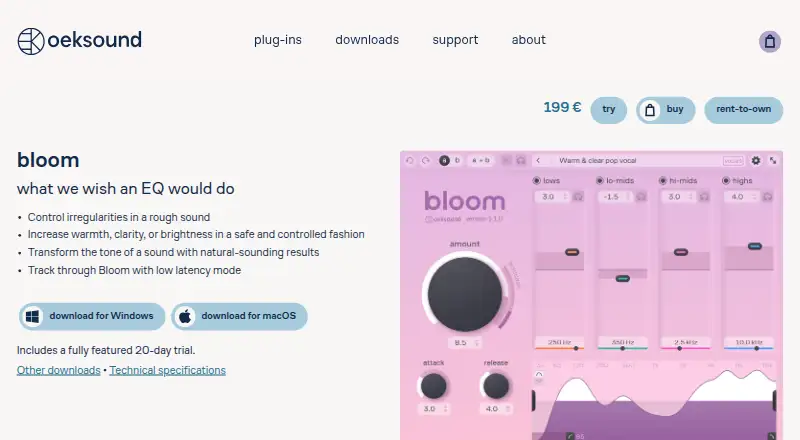
Bloom is a DAW plug-in for shaping the tonal balance and character of audio, aimed at mixers who want dynamic adjustment rather than only static tone changes. It analyzes a signal and responds to its character, using frequency boosts and cuts to address energy build-ups or add warmth, brightness, or clarity. It can be placed on an individual track, bus, or master, making it relevant to solo mixers and smaller or mid-market teams working in a desktop DAW.
Its core appeal is the combination of adaptive tone shaping and dynamics. Four tone controls adjust overall tonal balance, while Squash mode applies frequency-dependent upward and downward compression. This gives Bloom a more specific role than an all-purpose mixing suite: it is suited to targeted tonal and dynamic processing across different mix stages. Low-latency mode also supports tracking use, and preset browsing and management provide a way to navigate and organize settings. Bloom is stereo and is available for macOS and Windows in VST, AU, and AAX formats.
Bloom is paid software with a fully featured 20-day trial; the vendor's product page also offers buy and rent-to-own options. The product page says all purchases are final, so the trial is the opportunity to evaluate fit before buying. Support channels include email and documentation. Choose Bloom if dynamic tonal balance and frequency-dependent compression are central to your workflow. If you need a broader audio production tool or processing beyond stereo tonal shaping, a more general mixing product may be a better fit.
Your product? Our editors can test Bloom in depth and publish a review, labelled as paid · from $149/mo →
Bloom pricing
Bloom fact sheet
| Free plan | No |
|---|---|
| Paid from | Not verified |
| DAW plugin | Yes |
| Stem separation | No |
| Automatic EQ | Yes |
| Automatic dynamics | Yes |
| Spatial processing | Stereo |
| Maximum track count | Not verified |
| Plugin formats | Not verified |
| Free trial | 20 days |
| Deployment | Desktop |
| Platforms | macOS, Windows |
| Support | Email, Docs |
| Built for | Solo, Small business, Mid-market (editorial estimate) |
| Pricing | 20-day trial |
| Website | oeksound.com |
| Facts checked | 24 Sep 2026 |
Alternatives to Bloom
- iZotope Neutron 5A deep AI-assisted mixing suite for producers who want detailed control inside a DAW.9.2
- iZotope Nectar 4A focused vocal suite with AI assistance, harmonies, effects, and unmasking.7.9
- EZmix 3A flexible preset-led mixing tool, but not a complete automatic full-mix solution.7.9



Used Bloom? Be the first to review it
The editor score above is our own research. What this page doesn't have yet is a reader's view — what you used Bloom for, what worked and what didn't. No stars are seeded and no review is paid for; an editor reads every one before it appears.
Write a reviewTwo minutes · verified accounts only · read by an editor before it appears
Featured on iTechGuides

Bloom is listed in our AI Audio Mixing Software directory. Add the badge to your site — it links back to this page.
<a href="https://www.itechguides.com/products/bloom-ai-audio-mixing-software/"><img src="https://www.itechguides.com/best/badge/bloom-ai-audio-mixing-software.svg" alt="Featured on iTechGuides" width="230" height="46"></a>
Reviewed by iTechGuides Editors · Editorial team · Updated Oct 2026
Advertiser disclosure: iTechGuides is reader-supported. Vendors can pay for top positions in our rankings and for a place on other products' pages, and we may earn a commission when you click some links. Bought places stand at the number bought; this page and our disclosure say so. Paying vendors may get a fuller, more detailed review from our editors, and that review can change their score. How we rank.
Last updated · How we research and update