
Blink Captions
Blink Captions: Polished captions and editing tools across mobile and web, with Creator starting at $29/month. Ranked #30 of 99 in AI Video Caption Generators by our editors (4.7/10); pricing: Free plan; best for mobile-first creators who want polished captions.
At a glance
- Editor score4.7 / 10
- PricingFree plan
- Best forMobile-first creators who want polished captions
- Free planYes
- Paid from$29/mo
- Caption stylingYes
- Facts checked22 Sep 2026
Where it wins
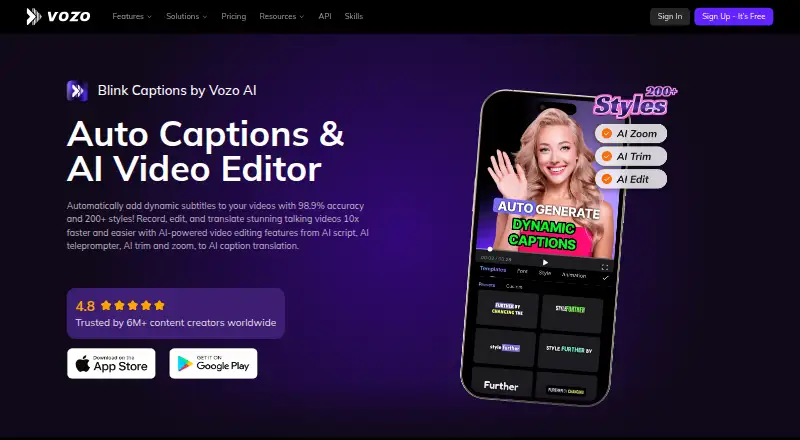
- 200+ caption styles, presets, translation, and caption highlighting
- AI trimming, zoom, teleprompter, script writing, and audio cleanup
- Available on web, iOS, and Android, with TikTok, Instagram, and YouTube integrations
Where it doesn't
- Creator starts at $29/month after the limited Free plan
- Free limits videos to 20 minutes and AI translation
- Studio-only bulk upload, glossary, brand governance, and faster processing
Our verdict on Blink Captions
Blink Captions is an AI captioning and video-editing app for creators making talking videos, short-form content, music videos, and social posts. It transcribes speech, applies customizable caption styles, translates subtitles, and includes editing tools such as filler-word and silence trimming, automatic zooms, highlighting, a teleprompter, script writing, voice isolation, and denoising. With web, iOS, and Android apps, it suits creators who want caption styling and supporting edits in a mobile-friendly workflow. The product is now presented as Vozo AI Video Creator or Vozo AI Video Translator & Dub; official app listings identify it as formerly Blink Captions.
The Free plan costs $0 per month and includes limited AI translation, 20 AI points for trial use, and videos up to 20 minutes. Creator costs $29 per month and adds unlimited AI translation, 150 AI points monthly, all AI tools, and watermark removal. Studio costs $99 per month, with 600 monthly AI points, bulk upload, glossary and brand governance, and faster processing, alongside unlimited translation. Studio XL and Studio XXL list 1,500 and 4,000 monthly AI points and include Studio features; their displayed $0 placeholders do not provide a usable paid price. Enterprise lists large-volume discounts, API access, an enterprise-grade SLA, a dedicated account manager, and priority support. Choose a paid tier based on the AI points and workflow features needed.
Captioning is the center of the product, but the feature set extends beyond subtitles: styles, translation, trimming, zooms, and audio cleanup can support short-form production, while Lyrics mode addresses music videos. Integrations include TikTok, Instagram, and YouTube. The breadth may appeal to solo creators and small teams that want several edits alongside captions; those seeking only basic captions may find the $29 monthly Creator entry point harder to justify after trying Free. Bulk workflows and brand governance are specifically part of Studio, while Enterprise adds API access and service commitments for larger-volume needs.
Your product? Our editors can test Blink Captions in depth and publish a review, labelled as paid · from $149/mo →
Blink Captions pricing
All 6 Blink Captions plans and prices →
Blink Captions fact sheet
| Free plan | Yes |
|---|---|
| Paid from | $29/mo |
| Max video length | 60 minutes |
| Caption languages | 118 languages |
| Caption styling | Yes |
| Subtitle export | Other formats |
| Burn-in captions | Yes |
| Speaker identification | Not verified |
| Brand caption presets | Yes |
| Deployment | Cloud, Mobile |
| Platforms | Web, iOS, Android |
| Compliance & security | SOC 2, GDPR |
| Support | Email, Live chat, Docs |
| Built for | Solo, Small business, Mid-market (editorial estimate) |
| Integrations | 3 integrations: TikTok, Instagram, YouTube |
| Pricing | Free plan (source) |
| Website | vozo.ai |
| Facts checked | 22 Sep 2026 |
Blink Captions integrations
Blink Captions lists 3 integrations on its own site.
- TikTok
- YouTube
Alternatives to Blink Captions
- WhisperA flexible local transcription engine, but not a complete caption-editing product.9.2
- CaptionHubA workflow-rich caption and localization platform for enterprise video teams.8.8
- SubmagicAn all-in-one caption editor with styling, text editing, B-roll, and publishing tools.8.7


See all Blink Captions alternatives →
Used Blink Captions? Be the first to review it
The editor score above is our own research. What this page doesn't have yet is a reader's view — what you used Blink Captions for, what worked and what didn't. No stars are seeded and no review is paid for; an editor reads every one before it appears.
Write a reviewTwo minutes · verified accounts only · read by an editor before it appears
Featured on iTechGuides

Blink Captions is listed in our AI Video Caption Generators directory. Add the badge to your site — it links back to this page.
<a href="https://www.itechguides.com/products/blink-captions/"><img src="https://www.itechguides.com/best/badge/blink-captions.svg" alt="Featured on iTechGuides" width="230" height="46"></a>
Reviewed by iTechGuides Editors · Editorial team · Updated Oct 2026
Advertiser disclosure: iTechGuides is reader-supported. Vendors can pay for top positions in our rankings and for a place on other products' pages, and we may earn a commission when you click some links. Bought places stand at the number bought; this page and our disclosure say so. Paying vendors may get a fuller, more detailed review from our editors, and that review can change their score. How we rank.
Last updated · How we research and update