
BitRecover PDF Converter Wizard
BitRecover PDF Converter Wizard: A low-cost Windows converter for batch PDF exports without recurring billing. Ranked #42 of 46 in PDF Converter Software by our editors (4.8/10); pricing: Paid; best for low-cost offline Windows PDF export.
At a glance
- Editor score4.8 / 10
- PricingPaid
- Best forLow-cost offline Windows PDF export
- Free planNo
- Paid from$29 one-time
- Founded2011 · 2885 Sanford Ave SW #35065, Grandville, MI 49418, USA
- Facts checked19 Sep 2026
Where it wins
- Converts PDFs to 19 document, image, email, and publication formats
- Supports unlimited batch conversion with file or folder selection
- Preserves text, images, fonts, hyperlinks, forms, and bookmarks
Where it doesn't
- Runs on Windows only
- The full version has a $29 one-time cost
- The five-file trial adds a company watermark
Our verdict on BitRecover PDF Converter Wizard
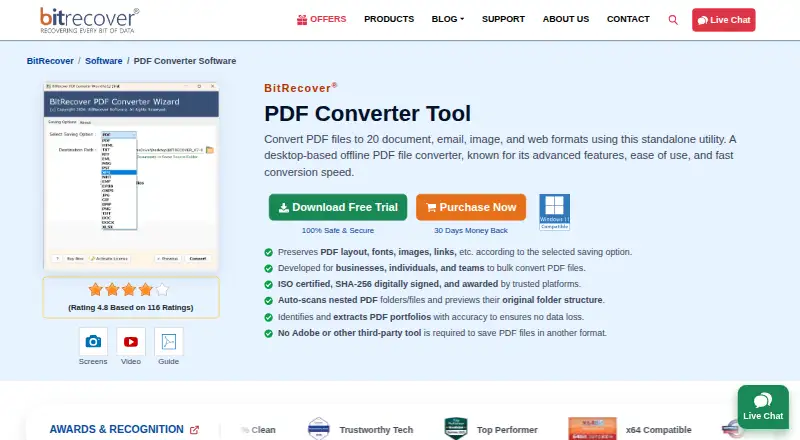
BitRecover PDF Converter Wizard is an offline Windows application for converting PDF files into 19 output formats. It is designed for people and organizations that need local PDF exports without Adobe Acrobat or other third-party applications. Supported targets include HTML, TXT, RTF, PDF, email formats, XPS, MHT, EPUB, OXPS, image formats, DOC, and DOCX. File or folder selection and batch processing make it suited to repeated document conversion.
The published plan structure is straightforward: the Full version costs $29 as a one-time license. It includes unlimited batch conversion, 19 output formats, and no watermark. A limited trial converts five PDF files and adds a company watermark, so it works as an evaluation option rather than a free plan. For buyers who prefer a single desktop purchase over recurring billing, the pricing is easy to understand. Those needing a permanently free converter should look elsewhere.
Its main strength is focused offline conversion with preservation of text, images, fonts, hyperlinks, forms, and bookmarks. The output range also covers document, image, email, and publication formats, including DOC, DOCX, JPG, PNG, TIFF, EML, MSG, PST, and EPUB. The trade-off is platform scope: it is a Windows application rather than a cross-platform or browser-based service. Buyers seeking local batch exports across a defined set of formats should consider it; teams needing broader platform coverage, integrations, or OCR-focused workflows should choose a different type of PDF converter.
Your product? Our editors can test BitRecover PDF Converter Wizard in depth and publish a review, labelled as paid · from $149/mo →
BitRecover PDF Converter Wizard pricing
All 1 BitRecover PDF Converter Wizard plans and prices →
BitRecover PDF Converter Wizard fact sheet
| Free plan | No |
|---|---|
| Paid from | $29 one-time |
| Conversion targets | PDF to HTML, TXT, RTF, PDF, EML, MSG, PST, XPS, MHT, EMF, EPUB, OXPS, JPG, GIF, BMP, PNG, TIFF, DOC, DOCX |
| OCR conversion | Not verified |
| Batch conversion | Yes |
| Maximum file size | Not verified |
| Supported platforms | windows |
| API access | Not verified |
| Deployment | Desktop |
| Platforms | Windows |
| Pricing | Paid (source) |
| Website | bitrecover.com |
| Facts checked | 19 Sep 2026 |
Alternatives to BitRecover PDF Converter Wizard
- Wondershare PDFelementA full PDF workbench with conversion, OCR, forms, security, signatures, and AI tools.9.3
- Adobe PDF Services APIA broad PDF automation API with a useful free tier and quote-based paid scaling.9.1
- ConvertioA broad cloud converter for documents, media, images, and automated workflows.9.0



See all BitRecover PDF Converter Wizard alternatives →
Used BitRecover PDF Converter Wizard? Be the first to review it
The editor score above is our own research. What this page doesn't have yet is a reader's view — what you used BitRecover PDF Converter Wizard for, what worked and what didn't. No stars are seeded and no review is paid for; an editor reads every one before it appears.
Write a reviewTwo minutes · verified accounts only · read by an editor before it appears
Featured on iTechGuides

BitRecover PDF Converter Wizard is listed in our PDF Converter Software directory. Add the badge to your site — it links back to this page.
<a href="https://www.itechguides.com/products/bitrecover-pdf-converter-wizard/"><img src="https://www.itechguides.com/best/badge/bitrecover-pdf-converter-wizard.svg" alt="Featured on iTechGuides" width="230" height="46"></a>
Reviewed by iTechGuides Editors · Editorial team · Updated Oct 2026
Advertiser disclosure: iTechGuides is reader-supported. Vendors can pay for top positions in our rankings and for a place on other products' pages, and we may earn a commission when you click some links. Bought places stand at the number bought; this page and our disclosure say so. Paying vendors may get a fuller, more detailed review from our editors, and that review can change their score. How we rank.
Last updated · How we research and update