BitCam
BitCam: A focused Apple app for turning photos into one-bit and eight-color pixelated images. Ranked #142 of 158 in Photo Editing Software by our editors (3.0/10); pricing: Free plan · 3-day trial; best for users creating retro one-bit and pixelated photos.
At a glance
- Editor score3.0 / 10
- PricingFree plan · 3-day trial
- Best forUsers creating retro one-bit and pixelated photos
- Free planYes
- PlatformMulti-platform
- Facts checked23 Sep 2026
Where it wins
- Captures in black-and-white or eight-color mode
- Offers three pixel resolutions and dithering colors and gradients
- Exports high-resolution PNGs; Mac adds a camera extension
Where it doesn't
- Its workflow centers on pixelated, dithered images
- Full editor access requires a purchase after a three-day trial
- Available only on iOS and macOS
Our verdict on BitCam
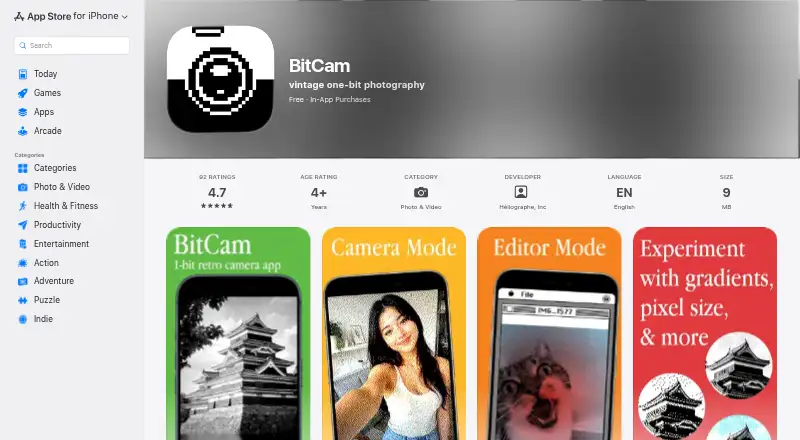
BitCam is a camera and photo editor for making one-bit black-and-white images and eight-color variations with an Atkinson-style dithering effect. It suits people who want a deliberately pixelated, retro look rather than broad-purpose photo adjustments. The app is available for iPhone, iPad and Mac, and its free camera mode captures images without requiring the Editor trial. In the editor, users can process photos from their library and export high-resolution PNG files.
The strongest fit is its focused image-making workflow. Camera capture includes black-and-white and eight-color modes, while the editor offers three pixel resolutions and dithering options with colors and gradients. That gives users ways to shape the look without turning the app into a general retouching suite. On Mac, BitCam can also work as a system camera extension in compatible video-call and camera apps, extending the visual style beyond still photos.
BitCam is freemium: the camera mode is always free, and Editor mode has a three-day trial; the Full BitCam plan unlocks full editor access. The US App Store listing shows a one-time purchase price, which can vary by region. Choose it if one-bit or eight-color output, dithering controls and PNG export are the goal. Choose a broader photo editor instead if you need conventional correction, retouching or a wider range of editing tools; BitCam's appeal is its narrow, stylized approach.
Questions about BitCam
Is there a free trial of BitCam? Yes: a 3-day free trial.
What does BitCam run on? iOS and macOS. It runs as a mobile app and as a desktop app.
Who is BitCam built for? Solo users (our editorial estimate).
Your product? Our editors can test BitCam in depth and publish a review, labelled as paid · from $149/mo →
BitCam pricing
All 1 BitCam plans and prices →
BitCam fact sheet
| Free plan | Yes |
|---|---|
| Paid from | Not verified |
| Platform | Multi-platform |
| RAW photo support | Not verified |
| Layer editing | Not verified |
| Masking tools | Not verified |
| Batch editing | Not verified |
| Cloud sync | Not verified |
| AI retouching | No |
| Free trial | 3 days |
| Deployment | Mobile, Desktop |
| Platforms | iOS, macOS |
| Built for | Solo (editorial estimate) |
| Pricing | Free plan · 3-day trial (source) |
| Website | bitcam.app |
| Facts checked | 23 Sep 2026 |
Alternatives to BitCam
- Adobe PhotoshopA deep, multi-platform editor for compositing, retouching, RAW work, and AI-assisted edits.9.4
- Adobe LightroomA broad Lightroom workflow for RAW editing, masking, organization, and synchronized access.9.2
- Capture OneA deep choice for professional RAW and tethered workflows, without a free plan.9.0



Used BitCam? Be the first to review it
The editor score above is our own research. What this page doesn't have yet is a reader's view — what you used BitCam for, what worked and what didn't. No stars are seeded and no review is paid for; an editor reads every one before it appears.
Write a reviewTwo minutes · verified accounts only · read by an editor before it appears
Featured on iTechGuides

BitCam is listed in our Photo Editing Software directory. Add the badge to your site — it links back to this page.
<a href="https://www.itechguides.com/products/bitcam/"><img src="https://www.itechguides.com/best/badge/bitcam.svg" alt="Featured on iTechGuides" width="230" height="46"></a>
Reviewed by iTechGuides Editors · Editorial team · Updated Nov 2026
Advertiser disclosure: iTechGuides is reader-supported. Vendors can pay for top positions in our rankings and for a place on other products' pages, and we may earn a commission when you click some links. Bought places stand at the number bought; this page and our disclosure say so. Paying vendors may get a fuller, more detailed review from our editors, and that review can change their score. How we rank.
Last updated · How we research and update