
Biosphere3D
Biosphere3D: A Windows desktop tool for rendering terrain, vegetation and buildings on a virtual globe. Ranked #47 of 52 in 3D Visualization Software by our editors (4.5/10); pricing: Free plan; best for landscape planners visualizing terrain and vegetation.
At a glance
- Editor score4.5 / 10
- PricingFree plan
- Best forLandscape planners visualizing terrain and vegetation
- Free planYes
- Paid fromFree
- Primary platformDesktop
- Facts checked24 Sep 2026
Where it wins
- Imports elevation, raster imagery, shapefiles, Collada, KML and KMZ data
- Combines plant models, distribution maps and editable building layers
- Exports still images and animations with atmospheric and shading effects
Where it doesn't
- Runs on Windows only
- Its focus is landscape scenes rather than general-purpose 3D visualization
- Paid support services are separate from the open-source software
Our verdict on Biosphere3D
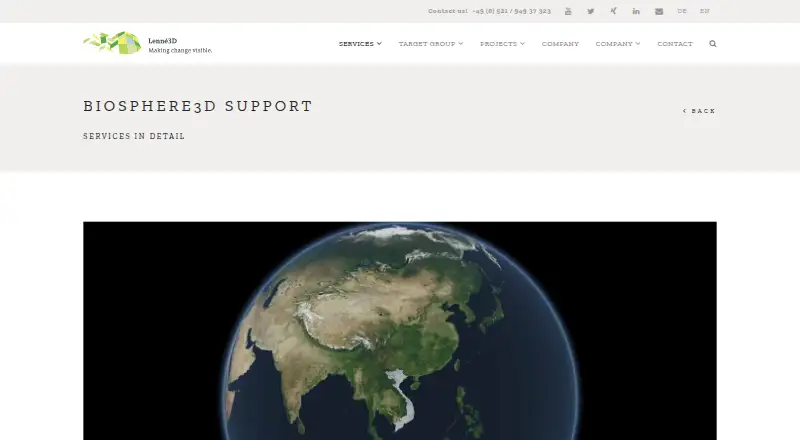
Biosphere3D is an open-source desktop application for interactive landscape visualization, built around a virtual globe. It is aimed at landscape planners and also supports work in architecture, visual impact assessment, archaeology, urban planning and forestry. Users can rotate, tilt and zoom around scenes assembled from terrain, imagery, vegetation and buildings. The software is a fit for teams that need landscape-focused visual context; it is less suited to buyers seeking a broad, platform-neutral 3D visualization tool.
The scene workflow brings together several kinds of geographic and model data. Biosphere3D can import digital elevation models and raster imagery, along with ESRI shapefiles, Collada, KML and KMZ data. Plant models can be loaded with distribution maps, while polygon footprints can generate building blocks and building heights can be edited by layer. Atmospheric scattering, ambient occlusion, sun shading and water shading provide visual treatments. This combination is particularly relevant when a planning review depends on how proposed structures and vegetation sit within terrain, rather than on detailed object modeling alone.
The software exports still images and animations as PNG or OpenEXR, which supports both static presentation and moving scene views. Biosphere3D is described as open source and includes a free plan; Lenné3D also provides related training, support, model libraries and custom software development. The referenced documentation describes 64-bit Windows releases, and the product is presented for interactive presentations. That makes it worth considering for teams working in a Windows desktop environment that need landscape-specific scene building. Teams that require other operating systems or a wider 3D production workflow should look elsewhere.
Your product? Our editors can test Biosphere3D in depth and publish a review, labelled as paid · from $149/mo →
Biosphere3D pricing
Biosphere3D fact sheet
| Free plan | Yes |
|---|---|
| Paid from | Free |
| Real-time scenes | Yes |
| 360° tours | Not verified |
| VR/AR support | Not verified |
| AI visualization tools | No |
| Video export | Yes |
| Primary platform | Desktop |
| Mobile viewing | Not verified |
| Deployment | Desktop |
| Platforms | Windows |
| Support | |
| Built for | Small business, Mid-market, Enterprise (editorial estimate) |
| Pricing | Free plan |
| Website | lenne3d.com |
| Facts checked | 24 Sep 2026 |
Alternatives to Biosphere3D
- Autodesk VREDA deep visualization suite for automotive and industrial virtual prototyping.9.4
- EnscapeLive CAD/BIM visualization with walkthroughs, VR, panoramas and video exports.9.3
- KeyShotA deep product-rendering toolkit for CAD workflows, interactive experiences, and automation.8.9

See all Biosphere3D alternatives →
Used Biosphere3D? Be the first to review it
The editor score above is our own research. What this page doesn't have yet is a reader's view — what you used Biosphere3D for, what worked and what didn't. No stars are seeded and no review is paid for; an editor reads every one before it appears.
Write a reviewTwo minutes · verified accounts only · read by an editor before it appears
Featured on iTechGuides

Biosphere3D is listed in our 3D Visualization Software directory. Add the badge to your site — it links back to this page.
<a href="https://www.itechguides.com/products/biosphere3d/"><img src="https://www.itechguides.com/best/badge/biosphere3d.svg" alt="Featured on iTechGuides" width="230" height="46"></a>
Reviewed by iTechGuides Editors · Editorial team · Updated Oct 2026
Advertiser disclosure: iTechGuides is reader-supported. Vendors can pay for top positions in our rankings and for a place on other products' pages, and we may earn a commission when you click some links. Bought places stand at the number bought; this page and our disclosure say so. Paying vendors may get a fuller, more detailed review from our editors, and that review can change their score. How we rank.
Last updated · How we research and update