
BIMx Desktop Viewer
BIMx Desktop Viewer: A focused, free desktop viewer for navigating and presenting BIMx Hyper-model files. Ranked #9 of 29 in 3D Model Viewer Software by our editors (7.9/10); pricing: Free plan; best for desktop users presenting BIMx Hyper-model files.
At a glance
- Editor score7.9 / 10
- PricingFree plan
- Best forDesktop users presenting BIMx Hyper-model files
- Free planYes
- Paid fromFree
- Presentation modeYes
- Founded1982 · Budapest, Hungary
- Facts checked22 Sep 2026
Where it wins
- Free Windows and macOS viewer with no paid tier
- Measures length, angle, and area in 2D and 3D
- Supports cutting planes, presentations, and PDF export
Where it doesn't
- Supports only .bimx files
- Desktop coverage is limited to Windows and macOS
- Requires BIMx Hyper-model files generated in Archicad or DDScad
Our verdict on BIMx Desktop Viewer
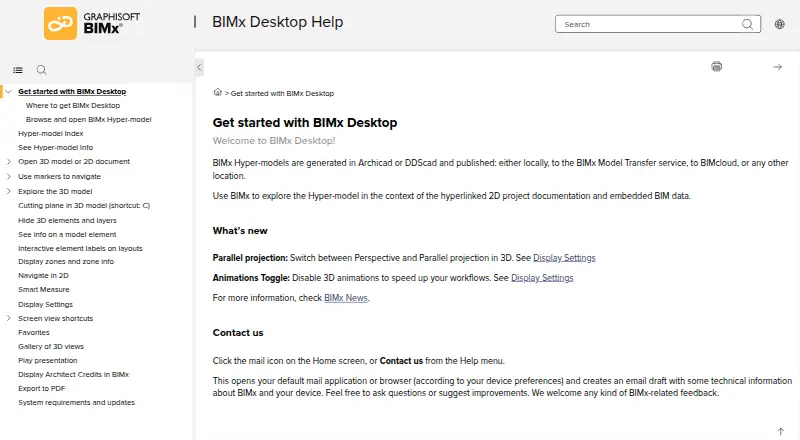
BIMx Desktop Viewer is Graphisoft’s free application for exploring BIMx Hyper-models generated in Archicad or DDScad. It is aimed at architects, engineers, clients, and other AEC stakeholders who need to inspect linked 2D documentation, interactive 3D models, and embedded BIM data on a desktop. Windows and macOS users can open local BIMx files, navigate models with perspective or parallel projection, inspect selected elements, and browse additional models from BIMx Model Transfer.
Its strongest fit is the BIMx ecosystem. The viewer connects naturally with Archicad, DDScad, BIMcloud, and BIMx Model Transfer, making it useful when project information is already delivered through Graphisoft’s workflow. Navigation goes beyond basic model viewing: users can measure length, angle, and area in 2D and 3D; create temporary horizontal, diagonal, and customizable cutting planes; and explore hyperlinked documentation. Presentation features also allow animated views from Gallery or Favorites, while layouts and 3D views can be exported to PDF.
The product’s focus is also its main boundary. It is designed around the .bimx format rather than broad multi-format model review, and its published desktop distribution covers Windows and macOS. That makes it a practical choice for teams sharing BIMx Hyper-models with desktop stakeholders, especially when measurement, model-element information, and presentation views matter. Organizations needing wider file-format support, other operating systems, or a general-purpose 3D viewer should consider a broader alternative instead. Choose BIMx Desktop Viewer for focused BIMx review and presentation; avoid it when platform or format flexibility is a primary requirement.
Your product? Our editors can test BIMx Desktop Viewer in depth and publish a review, labelled as paid · from $149/mo →
BIMx Desktop Viewer pricing
BIMx Desktop Viewer fact sheet
| Free plan | Yes |
|---|---|
| Paid from | Free |
| Supported platforms | Windows, macOS |
| Supported file formats | .bimx |
| Measurement tools | Yes |
| Annotations or markup | Not verified |
| Presentation mode | Yes |
| Sharing access | Not verified |
| Deployment | Desktop |
| Platforms | Windows, macOS |
| Support | Email, Docs |
| Built for | Small business, Mid-market, Enterprise (editorial estimate) |
| Integrations | 4 integrations: Archicad, DDScad, BIMcloud, BIMx Model Transfer |
| Pricing | Free plan |
| Website | help.graphisoft.com |
| Facts checked | 22 Sep 2026 |
BIMx Desktop Viewer integrations
BIMx Desktop Viewer lists 4 integrations on its own site.
- Archicad
- DDScad
- BIMcloud
- BIMx Model Transfer
Alternatives to BIMx Desktop Viewer
- SketchfabA versatile web-based 3D publishing platform with embeddable viewing, APIs, VR, and app-free AR.9.2
- Autodesk NavisworksA Windows desktop workspace for reviewing coordinated construction models and reporting clashes.9.1
- Trimble ConnectAn affordable BIM collaboration hub with viewing, coordination, clash detection, and API access.9.0



See all BIMx Desktop Viewer alternatives →
Used BIMx Desktop Viewer? Be the first to review it
The editor score above is our own research. What this page doesn't have yet is a reader's view — what you used BIMx Desktop Viewer for, what worked and what didn't. No stars are seeded and no review is paid for; an editor reads every one before it appears.
Write a reviewTwo minutes · verified accounts only · read by an editor before it appears
Featured on iTechGuides

BIMx Desktop Viewer is listed in our 3D Model Viewer Software directory. Add the badge to your site — it links back to this page.
<a href="https://www.itechguides.com/products/bimx-desktop-viewer/"><img src="https://www.itechguides.com/best/badge/bimx-desktop-viewer.svg" alt="Featured on iTechGuides" width="230" height="46"></a>
Reviewed by iTechGuides Editors · Editorial team · Updated Oct 2026
Advertiser disclosure: iTechGuides is reader-supported. Vendors can pay for top positions in our rankings and for a place on other products' pages, and we may earn a commission when you click some links. Bought places stand at the number bought; this page and our disclosure say so. Paying vendors may get a fuller, more detailed review from our editors, and that review can change their score. How we rank.
Last updated · How we research and update