
Autodesk Navisworks
Autodesk Navisworks: A mature Windows tool for aggregating, reviewing, and coordinating multidisciplinary BIM models. Ranked #7 of 30 in BIM Software by our editors (8.7/10); pricing: Free plan · 30-day trial; best for construction teams aggregating and checking models.
At a glance
- Editor score8.7 / 10
- PricingFree plan · 30-day trial
- Best forConstruction teams aggregating and checking models
- Free planYes
- Clash detectionYes
- Founded1982 · San Francisco, California
- Facts checked20 Sep 2026
Where it wins
- Combines multidisciplinary models for coordinated review and measurement
- Supports clash detection, interference reporting, and issue coordination
- Includes IFC support, quantity takeoff, 5D scheduling, and API workflows
Where it doesn't
- Primarily targets Windows workstations
- No dedicated iPhone or iPad app
- Focused on coordination and review rather than BIM authoring
Our verdict on Autodesk Navisworks
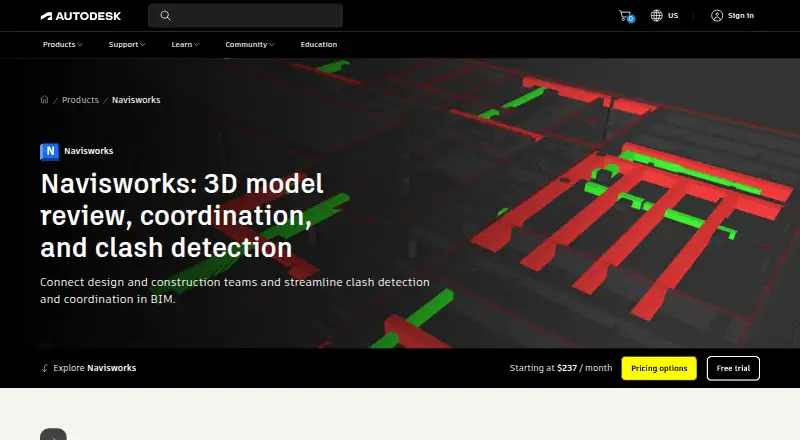
Autodesk Navisworks is desktop project-review software for architecture, engineering, and construction teams working across multiple disciplines. It combines design and construction data into coordinated models for review, measurement, quantification, scheduling, simulation, and visualization. Navisworks Simulate covers 3D model review, quantification, coordination, and simulation, while Navisworks Manage adds clash detection and interference management. It is suited to teams that need to aggregate and check models rather than create them in a full BIM authoring environment.
Its strongest fit is multidisciplinary coordination. The product supports IFC files and integrates with Autodesk Construction Cloud, BIM 360, Autodesk BIM Collaborate Pro, AutoCAD, Revit, ReCap Pro, and Inventor. Teams can use model measurement and redlining, 2D and 3D quantity takeoff, 5D construction scheduling, and logistics simulation. Autodesk Construction Cloud issue coordination extends review workflows beyond the desktop, while the Navisworks .NET API and NWCreate SDK support plug-ins and automation. This breadth makes Navisworks useful when model checking, quantities, sequencing, and coordination need to sit in one review workflow.
The pricing model includes free access and a 30-day trial, with Simulate and Manage representing the main product tiers. Simulate is the more focused option for review, quantification, coordination, and simulation; Manage is the choice when clash detection and interference management are required. The main trade-off is scope: Navisworks is primarily a Windows workstation product and is not a replacement for BIM authoring software. Teams needing model aggregation, clash workflows, and construction coordination should consider it; teams prioritizing mobile-first access or authoring may need a different primary tool.
Your product? Our editors can test Autodesk Navisworks in depth and publish a review, labelled as paid · from $149/mo →
Autodesk Navisworks pricing
All 2 Autodesk Navisworks plans and prices →
Autodesk Navisworks fact sheet
| Free plan | Yes |
|---|---|
| Paid from | Not verified |
| Discipline coverage | Multi-discipline |
| IFC support | Yes |
| Cloud collaboration | Yes |
| Clash detection | Yes |
| Quantity takeoff | Yes |
| Mobile access | None |
| API access | Yes |
| Free trial | 30 days |
| Money-back guarantee | 30 days |
| Deployment | Desktop |
| Platforms | Windows |
| Support | Community, Docs · 24/7 |
| Built for | Small business, Mid-market, Enterprise (editorial estimate) |
| Integrations | 7 integrations: Autodesk Construction Cloud, BIM 360, Autodesk BIM Collaborate Pro, AutoCAD, Revit, ReCap Pro … |
| Pricing | Free plan · 30-day trial (source) |
| Website | autodesk.com |
| Facts checked | 20 Sep 2026 |
Autodesk Navisworks integrations
Autodesk Navisworks lists 7 integrations on its own site.
- Autodesk Construction Cloud
- BIM 360
- Autodesk BIM Collaborate Pro
- AutoCAD
- Revit
- ReCap Pro
- Inventor
Alternatives to Autodesk Navisworks
- Autodesk RevitA mature, multi-discipline BIM environment for coordinated building delivery.9.4
- ArchicadA broad architectural BIM platform with strong openBIM and teamwork capabilities.9.2
- Tekla StructuresA deep structural BIM platform for modeling, detailing, fabrication and project collaboration.9.1



See all Autodesk Navisworks alternatives →
Autodesk Navisworks vs the competition
- Autodesk Navisworks vs Autodesk Revit
- Autodesk Navisworks vs Archicad
- Autodesk Navisworks vs Tekla Structures
- Autodesk Navisworks vs Allplan
- Autodesk Navisworks vs OpenBuildings Designer
- Autodesk Navisworks vs Vectorworks Architect



Compare Autodesk Navisworks with any tool side by side →
Also Ranked In
Autodesk Navisworks is ranked in 2 of our directories.
Used Autodesk Navisworks? Be the first to review it
The editor score above is our own research. What this page doesn't have yet is a reader's view — what you used Autodesk Navisworks for, what worked and what didn't. No stars are seeded and no review is paid for; an editor reads every one before it appears.
Write a reviewTwo minutes · verified accounts only · read by an editor before it appears
Featured on iTechGuides

Autodesk Navisworks is listed in our BIM Software directory. Add the badge to your site — it links back to this page.
<a href="https://www.itechguides.com/products/autodesk-navisworks/"><img src="https://www.itechguides.com/best/badge/autodesk-navisworks.svg" alt="Featured on iTechGuides" width="230" height="46"></a>
Reviewed by iTechGuides Editors · Editorial team · Updated Oct 2026
Advertiser disclosure: iTechGuides is reader-supported. Vendors can pay for top positions in our rankings and for a place on other products' pages, and we may earn a commission when you click some links. Bought places stand at the number bought; this page and our disclosure say so. Paying vendors may get a fuller, more detailed review from our editors, and that review can change their score. How we rank.
Last updated · How we research and update