Biblioscape
Biblioscape: A broad Windows research library with one-time pricing and deep citation features. Ranked #17 of 23 in Citation Management Software by our editors (7.1/10); pricing: Paid; best for research libraries needing deep one-time-license features.
At a glance
- Editor score7.1 / 10
- PricingPaid
- Best forResearch libraries needing deep one-time-license features
- Free planNo
- Paid from$0.50/user/yr
- PDF annotationYes
- Founded1997 · Johns Creek, Georgia, USA
- Facts checked20 Sep 2026
Where it wins
- More than 1,000 pre-built citation styles
- Searchable PDFs with non-destructive annotation and notes
- Shared databases, BiblioWeb access, and library catalog tools
Where it doesn't
- No free plan or mobile apps
- Documented desktop support centers on older Windows versions
- Education pricing requires an academic-domain email address
Our verdict on Biblioscape
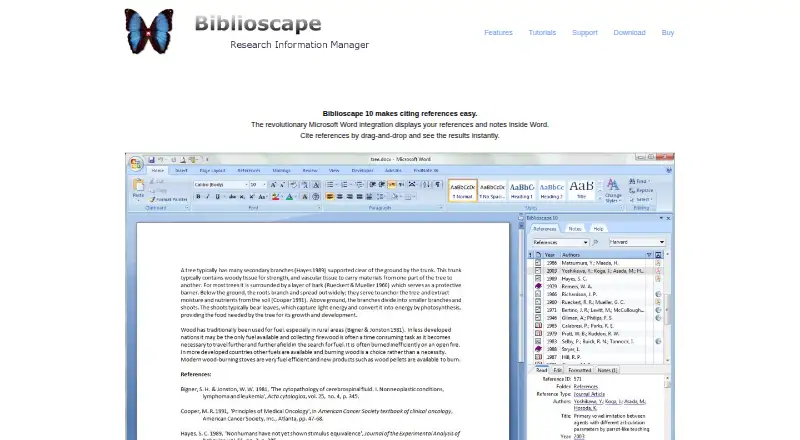
Biblioscape is a Windows desktop reference manager for students, researchers, professors, libraries, and research organizations. It captures and organizes bibliographic records, extracts metadata from PDFs, supports searchable PDF text, and adds non-destructive annotation and research notes. Its Microsoft Word add-in inserts citations and bibliographies, while an integrated browser captures references and notes. Beyond citation management, it includes folders, collections, categories, tasks, charts, knowledge-map links, shared databases, BiblioWeb browser access, and small-library circulation management.
Its one-time plans range from $49 to $699. Lite — Education costs $49 and Lite — Regular costs $79, with References. Standard — Education is $99 and Standard — Regular is $139, adding Notes and Categories. Professional — Education is $199 and Professional — Regular is $299, adding Tasks, Charts, and BiblioWeb users up to 30. Librarian — Education is $499 and Librarian — Regular is $699, with Unlimited BiblioWeb users. Education pricing is restricted to users with an academic-domain email address. This structure suits buyers who prefer a perpetual purchase and need progressively deeper library or collaboration features.
Biblioscape fits workflows built around Microsoft Word, Google Scholar, ACS Publications, JSTOR, and ScienceDirect. The product supports web and Windows access, shared databases, and remote multi-user research workflows, but its documented desktop compatibility lists Windows XP, Vista, and 7/8, while mobile apps are not part of the platform. The official site documents Biblioscape 10, released in 2014, so buyers should consider the age of the documented release when evaluating platform fit. Choose Biblioscape for a feature-rich research library with PDF, citation-style, catalog, and collaboration needs; choose another option if mobile access or newer documented Windows support is central.
Your product? Our editors can test Biblioscape in depth and publish a review, labelled as paid · from $149/mo →
Biblioscape pricing
All 11 Biblioscape plans and prices →
Biblioscape fact sheet
| Free plan | No |
|---|---|
| Paid from | $0.50/user/yr |
| PDF annotation | Yes |
| Browser extension | No |
| Citation styles | Not verified |
| Word processor support | Microsoft_word |
| Mobile apps | None |
| Import formats | Not verified |
| Team collaboration | Yes |
| Deployment | Desktop, Self-hosted |
| Platforms | Web, Windows |
| Support | Email, Phone, Community, Docs |
| Built for | Solo, Small business, Mid-market, Enterprise (editorial estimate) |
| Integrations | 5 integrations: Microsoft Word, Google Scholar, ACS Publications, JSTOR, ScienceDirect |
| Pricing | Paid (source) |
| Website | biblioscape.com |
| Facts checked | 20 Sep 2026 |
Biblioscape integrations
Biblioscape lists 5 integrations on its own site.
- Microsoft Word
- Google Scholar
- ACS Publications
- JSTOR
- ScienceDirect
Alternatives to Biblioscape
- ZoteroA flexible, free citation manager with strong capture, annotation, and writing-tool support.9.4
- EndNoteA mature citation suite with broad writing support, PDF tools, collaboration, and AI assistance.9.2
- Mendeley Reference ManagerA flexible, cross-platform reference manager with PDF tools, Word integration, and tiered AI features.9.0


See all Biblioscape alternatives →
Also Ranked In
Biblioscape is ranked in 2 of our directories.
Used Biblioscape? Be the first to review it
The editor score above is our own research. What this page doesn't have yet is a reader's view — what you used Biblioscape for, what worked and what didn't. No stars are seeded and no review is paid for; an editor reads every one before it appears.
Write a reviewTwo minutes · verified accounts only · read by an editor before it appears
Featured on iTechGuides

Biblioscape is listed in our Citation Management Software directory. Add the badge to your site — it links back to this page.
<a href="https://www.itechguides.com/products/biblioscape/"><img src="https://www.itechguides.com/best/badge/biblioscape.svg" alt="Featured on iTechGuides" width="230" height="46"></a>
Reviewed by iTechGuides Editors · Editorial team · Updated Oct 2026
Advertiser disclosure: iTechGuides is reader-supported. Vendors can pay for top positions in our rankings and for a place on other products' pages, and we may earn a commission when you click some links. Bought places stand at the number bought; this page and our disclosure say so. Paying vendors may get a fuller, more detailed review from our editors, and that review can change their score. How we rank.
Last updated · How we research and update