
Banani
Banani: A flexible web-based wireframing tool for AI-assisted design-to-code workflows. Ranked #7 of 33 in AI Wireframe Generators by our editors (8.7/10); pricing: Free plan; best for designers connecting AI tools to wireframes.
At a glance
- Editor score8.7 / 10
- PricingFree plan
- Best forDesigners connecting AI tools to wireframes
- Free planYes
- Paid from$12/mo
- Founded2024
- Facts checked20 Sep 2026
Where it wins
- Converts text, images, screenshots, and sketches into editable wireframes
- Supports responsive mockups and interactive multi-screen prototypes
- Exports to Figma, HTML/CSS, images, and MCP-connected code workflows
Where it doesn't
- Free and Plus plans use monthly and daily credit limits
- Runs as a web-based product rather than a desktop application
- Security controls are still being designed toward SOC 2 best practices
Our verdict on Banani
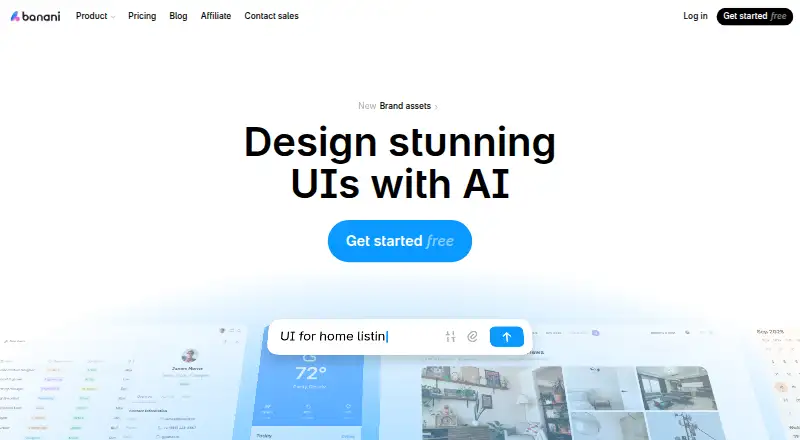
Banani is a web-based AI design tool for product managers, founders, designers, developers, and product teams. It generates editable wireframes and multi-screen UI prototypes from text prompts, screenshots, sketches, or product requirements. Designs can be refined in an editable UI canvas or through AI chat, then shaped into responsive web and mobile mockups. Shared project links support collaboration, while exports connect the design work to Figma, HTML/CSS, images, and code workflows.
Pricing is structured around usage credits. The Free plan costs $0 per month and includes 12 monthly credits, 3 daily credits, and private projects. Plus costs $12 per month when billed monthly and adds Agent mode, 100 monthly credits, 10 daily credits, unlimited Figma export, MCP/Code export, and 3x generation speed. Pro costs $30 per month and includes Agent mode, unlimited credits, the highest generation speed, priority support, and everything from Plus. Plus and Pro also have annual billing options, with the pricing page displaying a 40% discount for yearly billing. The plan structure suits occasional exploration at no cost, while frequent generation or faster output points toward a paid tier.
Banani’s main distinction is its connection between visual design and developer workflows. Figma export supports handoff, while MCP connections work with Claude Code, Cursor, and Codex; HTML/CSS and code export add another route beyond design files. That breadth makes it a fit for designers who want to move from rough inputs to responsive prototypes and implementation-oriented output in one web workspace. It is less suitable for teams that need desktop software or established formal compliance controls, and users with high generation volume should account for the credit limits on Free and Plus before choosing a plan.
Your product? Our editors can test Banani in depth and publish a review, labelled as paid · from $149/mo →
Banani pricing
All 3 Banani plans and prices →
Banani fact sheet
| Free plan | Yes |
|---|---|
| Paid from | $12/mo |
| Sketch or image input | Not verified |
| Clickable prototypes | Not verified |
| Export formats | Figma, HTML/CSS, images |
| Collaboration level | Not verified |
| AI generation limit | Not verified |
| Custom components | Not verified |
| Deployment | Cloud |
| Platforms | Web |
| Compliance & security | GDPR |
| Support | Live chat |
| Built for | Solo, Small business, Mid-market, Enterprise (editorial estimate) |
| Integrations | 5 integrations: Figma, Claude Code, Cursor, Codex, MCP |
| Pricing | Free plan (source) |
| Website | banani.co |
| Facts checked | 20 Sep 2026 |
Banani integrations
Banani lists 5 integrations on its own site.
- Figma
- Claude Code
- Cursor
- Codex
- MCP
Alternatives to Banani
- UX PilotA broad AI wireframing workspace that connects ideas, flows, prototypes, Figma, and code.9.4
- UizardA collaborative web tool for turning prompts, screenshots, and sketches into prototypes.9.2
- VisilyA collaborative AI wireframing workspace with strong prototyping and Figma workflows.9.1



Banani vs the competition
- Banani vs UX Pilot
- Banani vs Uizard
- Banani vs Visily
- Banani vs MockFlow
- Banani vs Prototyper
- Banani vs Studio Lofi



Compare Banani with any tool side by side →
Also Ranked In
Banani is ranked in 3 of our directories.
Used Banani? Be the first to review it
The editor score above is our own research. What this page doesn't have yet is a reader's view — what you used Banani for, what worked and what didn't. No stars are seeded and no review is paid for; an editor reads every one before it appears.
Write a reviewTwo minutes · verified accounts only · read by an editor before it appears
Featured on iTechGuides

Banani is listed in our AI Wireframe Generators directory. Add the badge to your site — it links back to this page.
<a href="https://www.itechguides.com/products/banani/"><img src="https://www.itechguides.com/best/badge/banani.svg" alt="Featured on iTechGuides" width="230" height="46"></a>
Reviewed by iTechGuides Editors · Editorial team · Updated Oct 2026
Advertiser disclosure: iTechGuides is reader-supported. Vendors can pay for top positions in our rankings and for a place on other products' pages, and we may earn a commission when you click some links. Bought places stand at the number bought; this page and our disclosure say so. Paying vendors may get a fuller, more detailed review from our editors, and that review can change their score. How we rank.
Last updated · How we research and update