
Azuga
Azuga: Azuga pairs GPS tracking and safety tools with clearly tiered per-vehicle pricing. Ranked #23 of 40 in Fleet Management Software by our editors (7.1/10); pricing: Paid; best for safety-focused fleets comparing monthly per-vehicle plans.
At a glance
- Editor score7.1 / 10
- PricingPaid
- Best forSafety-focused fleets comparing monthly per-vehicle plans
- Free planNo
- Paid from$25/mo
- GPS trackingYes
- Facts checked19 Sep 2026
Where it wins
- Live GPS tracking, geofencing, and location alerts
- Driver scoring, rewards, and safety monitoring
- Maintenance, fuel tracking, diagnostics, and DVIR workflows
Where it doesn't
- No free plan; pricing starts at $25 per vehicle monthly
- Listed integrations are limited to fuel cards and API
- Advanced features such as custom reports require CompleteFleet
Our verdict on Azuga
Azuga combines fleet location tools with driver safety, vehicle upkeep, fuel tracking, and reporting. Its web, iOS, and Android access supports administrators and drivers, while the platform also includes an API. Fleets looking to pair GPS visibility with safety and maintenance workflows may find its breadth useful; teams seeking a free entry plan should look elsewhere.
The published plans show three monthly per-vehicle tiers. BasicFleet costs $25 and includes GPS tracking, alerts, driver scores and rewards, reports, geofencing, and scheduled maintenance. SafeFleet is $30 and adds vehicle diagnostics, fuel-card integration, API integration, and distracted-driving monitoring, while also including BasicFleet features. CompleteFleet costs $35 and adds Azuga Coach safety training, FuelSaver, high-frequency tracking, custom reports, and quarterly fleet reviews. This makes the cost difference between the tiers straightforward to compare, with the higher tiers adding more safety and operational capabilities.
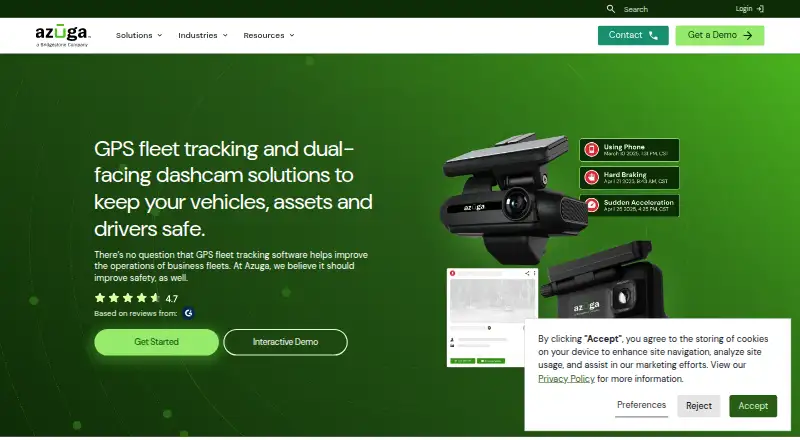
Azuga’s feature range extends beyond map tracking: it includes diagnostic trouble-code monitoring, fuel-expense tracking, electronic driver logs, DVIR compliance workflows, and dual-facing AI dashcams that monitor driver and road events. The available integrations are narrower than that feature set, with fuel cards and API listed. Fleets that value an integrated mix of tracking, safety, and maintenance tools may prefer Azuga, especially if a higher tier’s additions match their needs. Buyers whose decision depends on a broad selection of prebuilt integrations may want to compare alternatives before choosing.
Your product? Our editors can test Azuga in depth and publish a review, labelled as paid · from $149/mo →
Azuga pricing
All 3 Azuga plans and prices →
Azuga fact sheet
| Free plan | No |
|---|---|
| Paid from | $25/mo |
| GPS tracking | Yes |
| Maintenance management | Yes |
| Fuel tracking | Yes |
| Driver safety tools | Yes |
| Compliance tracking | Yes |
| Vehicle limit | Not verified |
| Deployment | Cloud, Mobile |
| Platforms | Web, iOS, Android |
| Integrations | 2 integrations: Fuel cards, API |
| Pricing | Paid (source) |
| Website | azuga.com |
| Facts checked | 19 Sep 2026 |
Azuga integrations
Azuga lists 2 integrations on its own site.
- Fuel cards
- API
Alternatives to Azuga
- GeotabA broad fleet operations suite with tracking, compliance, maintenance and analytics.9.3
- WebfleetBroad fleet controls with route optimization, tracking and maintenance tools.9.2
- Verizon ConnectA broad fleet platform for tracking vehicles, supporting drivers and coordinating dispatch.9.1


Also Ranked In
Azuga is ranked in 6 of our directories.
Used Azuga? Be the first to review it
The editor score above is our own research. What this page doesn't have yet is a reader's view — what you used Azuga for, what worked and what didn't. No stars are seeded and no review is paid for; an editor reads every one before it appears.
Write a reviewTwo minutes · verified accounts only · read by an editor before it appears
Featured on iTechGuides

Azuga is listed in our Fleet Management Software directory. Add the badge to your site — it links back to this page.
<a href="https://www.itechguides.com/products/azuga/"><img src="https://www.itechguides.com/best/badge/azuga.svg" alt="Featured on iTechGuides" width="230" height="46"></a>
Reviewed by iTechGuides Editors · Editorial team · Updated Oct 2026
Advertiser disclosure: iTechGuides is reader-supported. Vendors can pay for top positions in our rankings and for a place on other products' pages, and we may earn a commission when you click some links. Bought places stand at the number bought; this page and our disclosure say so. Paying vendors may get a fuller, more detailed review from our editors, and that review can change their score. How we rank.
Last updated · How we research and update