
Axtra
Axtra: An AI-assisted daily planner for visual time blocking with Google Calendar sync. Ranked #43 of 137 in Daily Planner Apps by our editors (4.7/10); pricing: Free plan · 14-day trial; best for AI-assisted planners using Google Calendar.
At a glance
- Editor score4.7 / 10
- PricingFree plan · 14-day trial
- Best forAI-assisted planners using Google Calendar
- Free planYes
- Paid from$9/mo
- Planning methodHybrid
- Facts checked22 Sep 2026
Where it wins
- Plain-English and voice input can turn tasks into scheduled time blocks
- Free plan includes unlimited time blocks, templates, routines, and stats
- Combines calendars, tasks, focus sessions, and productivity insights
Where it doesn't
- AI scheduling, smart capture, and voice input require the Pro plan
- Google Calendar is the listed calendar integration
- Notifications and 28-day insights are available on Pro
Our verdict on Axtra
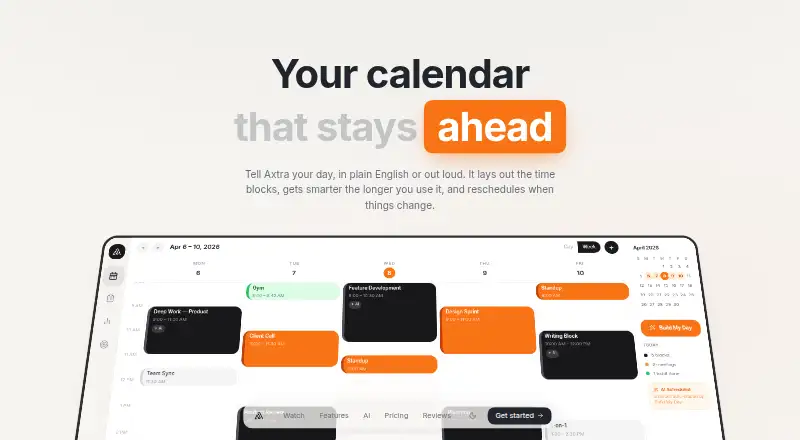
Axtra is a daily planning workspace that brings tasks, calendars, priorities, and time blocks together. It is aimed at individuals and small teams that want a structured view of the day or week, with visual time blocking, task tags, day templates, recurring routines, Pomodoro focus sessions, and productivity statistics. Its main distinction is the ability to describe a day in plain English or by voice and receive a planned schedule with time blocks and priorities.
The free plan is a meaningful starting point: it includes unlimited time blocks, week and day calendar views, a tagged todo list, day templates, the Chrome Dock extension, and basic productivity stats. The listed Pro plan costs $9 per month when billed monthly and adds Build My Day, a natural-language scheduler, AI Smart Capture, voice input, Google Calendar sync, 28-day productivity insights, and push and email notifications. A 14-day free trial is also listed. Buyers should choose Pro when AI-assisted scheduling, calendar synchronization, and notifications are central to their workflow; the free plan suits manual planning and time blocking.
Axtra's feature set stays focused on daily execution rather than broad project management. Google Calendar synchronization connects the planner to an existing calendar workflow, while recurring routines, focus sessions, and completion patterns support repeatable planning habits. Access is listed through the web and a Chrome extension, making it a fit for browser-centered work. Choose Axtra if you want visual planning with AI commands and Google Calendar in one workspace. Consider another option if you need a wider integration ecosystem or a planning tool centered on platforms beyond the listed web and Chrome environments.
Your product? Our editors can test Axtra in depth and publish a review, labelled as paid · from $149/mo →
Axtra pricing
All 2 Axtra plans and prices →
Axtra fact sheet
| Free plan | Yes |
|---|---|
| Paid from | $9/mo |
| Planning method | Hybrid |
| Calendar sync | Yes |
| Recurring tasks | Yes |
| Mobile platforms | Not verified |
| Daily task limit | Not verified |
| Focus sessions | Yes |
| Free trial | 14 days |
| Deployment | Cloud, Browser extension |
| Platforms | Web, Chrome extension |
| Built for | Solo, Small business (editorial estimate) |
| Integrations | 1 integrations: Google Calendar |
| Pricing | Free plan · 14-day trial (source) |
| Website | axtra.app |
| Facts checked | 22 Sep 2026 |
Axtra integrations
Axtra lists 1 integrations on its own site.
- Google Calendar
Alternatives to Axtra
- SunsamaA guided daily planner for turning tasks, calendars, and workload limits into a focused workday.8.9
- Amazing MarvinA flexible planner for people who want structured days without a fixed workflow.8.8
- MotionA broad AI planner for scheduling, booking, calendars, and project work.8.7


Used Axtra? Be the first to review it
The editor score above is our own research. What this page doesn't have yet is a reader's view — what you used Axtra for, what worked and what didn't. No stars are seeded and no review is paid for; an editor reads every one before it appears.
Write a reviewTwo minutes · verified accounts only · read by an editor before it appears
Featured on iTechGuides

Axtra is listed in our Daily Planner Apps directory. Add the badge to your site — it links back to this page.
<a href="https://www.itechguides.com/products/axtra/"><img src="https://www.itechguides.com/best/badge/axtra.svg" alt="Featured on iTechGuides" width="230" height="46"></a>
Reviewed by iTechGuides Editors · Editorial team · Updated Oct 2026
Advertiser disclosure: iTechGuides is reader-supported. Vendors can pay for top positions in our rankings and for a place on other products' pages, and we may earn a commission when you click some links. Bought places stand at the number bought; this page and our disclosure say so. Paying vendors may get a fuller, more detailed review from our editors, and that review can change their score. How we rank.
Last updated · How we research and update