AVS Photo Editor
AVS Photo Editor: A practical free editor for Windows users who need RAW corrections without advanced compositing. Ranked #79 of 158 in Photo Editing Software by our editors (3.0/10); pricing: Free plan; best for free Windows users needing basic RAW corrections.
At a glance
- Editor score3.0 / 10
- PricingFree plan
- Best forFree Windows users needing basic RAW corrections
- Free planYes
- Paid fromFree
- PlatformDesktop
- Facts checked22 Sep 2026
Where it wins
- Imports RAW camera formats for basic photo correction workflows
- Brush-based selective adjustments, retouching, and cloning are included
- Saves all edited images from a folder at once
Where it doesn't
- Windows-only desktop coverage limits platform flexibility
- No verified layers, masking, AI, or cloud workflow features
- Focused on corrections rather than advanced layered compositing
Our verdict on AVS Photo Editor
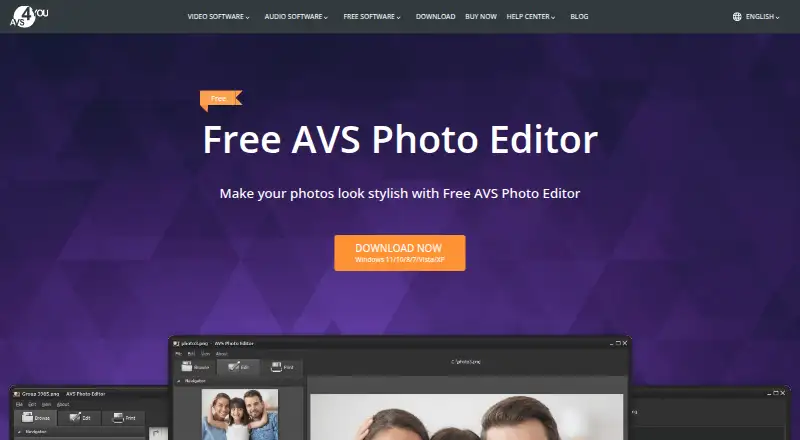
AVS Photo Editor is a free Windows desktop application for improving digital photos. It is suited to users who want straightforward corrections, RAW import, retouching, and export tools without a cloud-based workflow. The feature set covers cropping, rotation, brightness, contrast, saturation, color balance, tone adjustments, red-eye correction, text or image watermarks, and printing. It supports common raster formats alongside RAW camera formats, making it relevant for photographers who need a simple desktop correction tool.
Its strongest practical advantage is the combination of selective editing and repeatable correction tools. Brush-based adjustments allow targeted color and tone changes, while presets can be applied and saved for later use. Retouching and cloning support localized cleanup, and folder-wide saving can reduce repetitive export work when several images need similar handling. These capabilities give the application more range than a basic crop-and-adjust utility while keeping its focus on core photo improvement.
The product is free, and its published feature set does not describe paid AVS Photo Editor tiers. Its boundaries are important: the application is available for Windows, and it does not provide verified layers, masking, AI features, cloud features, or multi-platform coverage. Choose AVS Photo Editor for free desktop RAW corrections, selective touchups, presets, watermarks, printing, and batch saving. Choose an alternative if layered compositing, cloud access, broader operating-system support, or advanced AI-assisted editing is central to the workflow.
Your product? Our editors can test AVS Photo Editor in depth and publish a review, labelled as paid · from $149/mo →
AVS Photo Editor pricing
AVS Photo Editor fact sheet
| Free plan | Yes |
|---|---|
| Paid from | Free |
| Platform | Desktop |
| RAW photo support | Yes |
| Layer editing | Not verified |
| Masking tools | Not verified |
| Batch editing | Yes |
| Cloud sync | Not verified |
| AI retouching | Not verified |
| Deployment | Desktop |
| Platforms | Windows |
| Support | Email, Tickets, Docs |
| Built for | Solo, Small business (editorial estimate) |
| Pricing | Free plan (source) |
| Website | avs4you.com |
| Facts checked | 22 Sep 2026 |
Alternatives to AVS Photo Editor
- Adobe PhotoshopA deep, multi-platform editor for compositing, retouching, RAW work, and AI-assisted edits.9.4
- Adobe LightroomA broad Lightroom workflow for RAW editing, masking, organization, and synchronized access.9.2
- Capture OneA deep choice for professional RAW and tethered workflows, without a free plan.9.0



See all AVS Photo Editor alternatives →
Used AVS Photo Editor? Be the first to review it
The editor score above is our own research. What this page doesn't have yet is a reader's view — what you used AVS Photo Editor for, what worked and what didn't. No stars are seeded and no review is paid for; an editor reads every one before it appears.
Write a reviewTwo minutes · verified accounts only · read by an editor before it appears
Featured on iTechGuides

AVS Photo Editor is listed in our Photo Editing Software directory. Add the badge to your site — it links back to this page.
<a href="https://www.itechguides.com/products/avs-photo-editor/"><img src="https://www.itechguides.com/best/badge/avs-photo-editor.svg" alt="Featured on iTechGuides" width="230" height="46"></a>
Reviewed by iTechGuides Editors · Editorial team · Updated Oct 2026
Advertiser disclosure: iTechGuides is reader-supported. Vendors can pay for top positions in our rankings and for a place on other products' pages, and we may earn a commission when you click some links. Bought places stand at the number bought; this page and our disclosure say so. Paying vendors may get a fuller, more detailed review from our editors, and that review can change their score. How we rank.
Last updated · How we research and update