AVS Audio Converter
AVS Audio Converter: A broad Windows audio toolkit with batch conversion, ripping, metadata, and audiobook tools. Ranked #18 of 36 in Audio Converter Software by our editors (7.6/10); pricing: Free plan; best for feature-rich Windows conversion and ripping.
At a glance
- Editor score7.6 / 10
- PricingFree plan
- Best forFeature-rich Windows conversion and ripping
- Free planYes
- Paid from$149/yr
- Batch conversionYes
- Founded2004 · London, United Kingdom
- Facts checked21 Sep 2026
Where it wins
- Supports broad audio formats, including FLAC, ALAC, MP3, WAV, and M4A
- Combines batch conversion, metadata editing, ripping, and audio effects
- Creates chaptered M4B audiobooks and M4R iPhone ringtones
Where it doesn't
- Windows-only desktop software
- Free output contains a voice logo
- Paid access starts at $149 per year
Our verdict on AVS Audio Converter
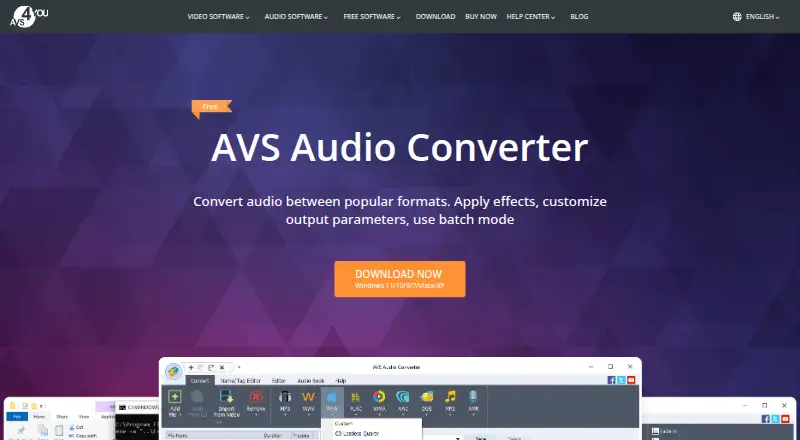
AVS Audio Converter is Windows desktop software for converting and editing audio files. It is aimed at people who need more than a basic format change, including batch processing, configurable output settings, metadata editing, CD ripping, audio extraction from video, and simple editing tools. Supported formats include MP3, WMA, WAV, M4A, AMR, OGG, ALAC, FLAC, AC3, MP2, AAC, AIFF, APE, MIDI, and others. It also creates M4B audiobooks with chapters and bookmarks, plus M4R iPhone ringtones.
Its strongest case is breadth within a desktop workflow. Multiple files can be converted in batches, while output parameters and presets provide control over conversion settings. Users can edit titles, authors, artists, and album-cover metadata, then trim, merge, fade, or normalize audio. CD audio extraction and audio extraction from video extend it beyond file-to-file conversion. Cloud conversion is not part of the product, so it suits users who prefer local Windows software and need a concentrated set of audio utilities.
The free version is available, but its output contains a voice logo. Paid access removes that limitation and is offered through the AVS4YOU suite: the 1 year plan costs $149 per year and provides access to 5 AVS4YOU programs, while Unlimited costs $279 as a one-time purchase for unlimited access to 5 AVS4YOU programs. The software is a fit for Windows users who value format coverage, ripping, metadata, and audiobook features in one application. Users on other platforms, or those seeking cloud-based conversion, should choose an alternative.
Your product? Our editors can test AVS Audio Converter in depth and publish a review, labelled as paid · from $149/mo →
AVS Audio Converter pricing
All 2 AVS Audio Converter plans and prices →
AVS Audio Converter fact sheet
| Free plan | Yes |
|---|---|
| Paid from | $149/yr |
| Batch conversion | Yes |
| Supported formats | MP3, WMA, WAV, M4A, AMR, OGG, ALAC, FLAC, AC3, MP2, AAC, MP1, AU, AIFF, VOX, MPC, MKA, RAW, MIDI, APE, QCP, MPA, Real Audio |
| Quality controls | Yes |
| Metadata editing | Yes |
| CD ripping | Yes |
| Cloud conversion | No |
| Money-back guarantee | 30 days |
| Deployment | Desktop |
| Platforms | Windows |
| Compliance & security | GDPR |
| Support | Email, Tickets, Docs |
| Built for | Solo, Small business (editorial estimate) |
| Pricing | Free plan (source) |
| Website | avs4you.com |
| Facts checked | 21 Sep 2026 |
Alternatives to AVS Audio Converter
- fre:acA capable free desktop converter for cross-platform library management and CD ripping.9.4
- MediaHuman Audio ConverterA capable free converter for batch jobs, metadata handling, and everyday library exports.9.2
- X Lossless DecoderA free macOS tool for accurate lossless conversion, ripping, tagging, and batch processing.9.1

See all AVS Audio Converter alternatives →
Used AVS Audio Converter? Be the first to review it
The editor score above is our own research. What this page doesn't have yet is a reader's view — what you used AVS Audio Converter for, what worked and what didn't. No stars are seeded and no review is paid for; an editor reads every one before it appears.
Write a reviewTwo minutes · verified accounts only · read by an editor before it appears
Featured on iTechGuides

AVS Audio Converter is listed in our Audio Converter Software directory. Add the badge to your site — it links back to this page.
<a href="https://www.itechguides.com/products/avs-audio-converter/"><img src="https://www.itechguides.com/best/badge/avs-audio-converter.svg" alt="Featured on iTechGuides" width="230" height="46"></a>
Reviewed by iTechGuides Editors · Editorial team · Updated Oct 2026
Advertiser disclosure: iTechGuides is reader-supported. Vendors can pay for top positions in our rankings and for a place on other products' pages, and we may earn a commission when you click some links. Bought places stand at the number bought; this page and our disclosure say so. Paying vendors may get a fuller, more detailed review from our editors, and that review can change their score. How we rank.
Last updated · How we research and update