
AutoCap
AutoCap: A focused iOS app for turning spoken video into styled, social-ready captions. Ranked #89 of 99 in AI Video Caption Generators by our editors (3.0/10); pricing: Freemium; best for iPhone creators recording and captioning videos.
At a glance
- Editor score3.0 / 10
- PricingFreemium
- Best foriPhone creators recording and captioning videos
- Caption stylingYes
- Facts checked19 Sep 2026
Where it wins
- Automatically transcribes video audio and supports error correction
- Offers fonts, colors, animations, timing, and reusable caption templates
- Combines AI scripts with a speaking-pace-synchronized teleprompter
Where it doesn't
- Available for iPhone and iPad rather than multiple platforms
- Direct social sharing is focused on TikTok and Instagram
- Its plan options are limited to Monthly, Unlimited Access, and Yearly subscriptions
Our verdict on AutoCap
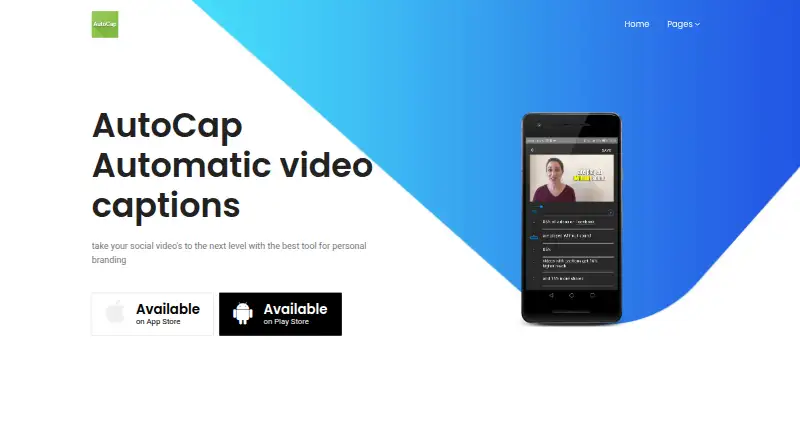
AutoCap is a video-captioning and subtitle-editing app for social-media creators, presenters, educators, marketers, and vloggers. Available for iPhone and iPad, it automatically transcribes spoken audio, supports correction of voice-recognition errors, and gives creators control over caption fonts, colors, animations, position, and timing. The app also includes AI script generation, a smart teleprompter synchronized to speaking pace, reusable caption templates, and direct sharing or export to TikTok and Instagram. Its strongest fit is for iPhone creators who record, caption, and publish short-form video from one mobile workflow.
The feature set goes beyond basic transcription. Caption styling includes adjustable visual treatments and reusable templates or favorites, while the teleprompter is designed to follow the speaker’s pace rather than act as a separate static script display. AI script generation adds support earlier in the creation process, which may appeal to presenters, educators, marketers, and vloggers planning spoken content. The published category details identify caption styling and brand presets, and the US App Store listing shows a starting price of 4.99. The listed subscription options are Monthly subscription, Unlimited Access, and Yearly subscription.
Platform and ecosystem fit are straightforward but narrow: AutoCap is an iOS product, with TikTok and Instagram as its named social integrations. That makes it a practical choice for creators already working on iPhone or iPad and publishing to those platforms. Choose AutoCap if customizable captions, repeatable styles, script assistance, and a synchronized teleprompter matter in the same app. Choose an alternative if you need broader device coverage or a wider set of named social integrations.
Your product? Our editors can test AutoCap in depth and publish a review, labelled as paid · from $149/mo →
AutoCap pricing
All 3 AutoCap plans and prices →
AutoCap fact sheet
| Free plan | Not verified |
|---|---|
| Paid from | Not verified |
| Max video length | Not verified |
| Caption languages | Not verified |
| Caption styling | Yes |
| Subtitle export | Not verified |
| Burn-in captions | Not verified |
| Speaker identification | Not verified |
| Brand caption presets | Yes |
| Deployment | Mobile |
| Platforms | iOS |
| Integrations | 2 integrations: TikTok, Instagram |
| Pricing | Freemium (source) |
| Website | autocap.app |
| Facts checked | 19 Sep 2026 |
AutoCap integrations
AutoCap lists 2 integrations on its own site.
- TikTok
Alternatives to AutoCap
- WhisperA flexible local transcription engine, but not a complete caption-editing product.9.2
- CaptionHubA workflow-rich caption and localization platform for enterprise video teams.8.8
- SubmagicAn all-in-one caption editor with styling, text editing, B-roll, and publishing tools.8.7


See all AutoCap alternatives →
Used AutoCap? Be the first to review it
The editor score above is our own research. What this page doesn't have yet is a reader's view — what you used AutoCap for, what worked and what didn't. No stars are seeded and no review is paid for; an editor reads every one before it appears.
Write a reviewTwo minutes · verified accounts only · read by an editor before it appears
Featured on iTechGuides

AutoCap is listed in our AI Video Caption Generators directory. Add the badge to your site — it links back to this page.
<a href="https://www.itechguides.com/products/autocap/"><img src="https://www.itechguides.com/best/badge/autocap.svg" alt="Featured on iTechGuides" width="230" height="46"></a>
Reviewed by iTechGuides Editors · Editorial team · Updated Oct 2026
Advertiser disclosure: iTechGuides is reader-supported. Vendors can pay for top positions in our rankings and for a place on other products' pages, and we may earn a commission when you click some links. Bought places stand at the number bought; this page and our disclosure say so. Paying vendors may get a fuller, more detailed review from our editors, and that review can change their score. How we rank.
Last updated · How we research and update