Auto Subtitle
Auto Subtitle: A capable local subtitle editor for developers, without styling or burn-in output. Ranked #95 of 99 in AI Video Caption Generators by our editors (3.0/10); pricing: Open source; best for developers wanting browser-local subtitle generation.
At a glance
- Editor score3.0 / 10
- PricingOpen source
- Best forDevelopers wanting browser-local subtitle generation
- Free planNo
- Paid fromFree
- Caption stylingNo
- Facts checked19 Sep 2026
Where it wins
- Local Whisper transcription runs in the browser without an application backend
- Interactive preview, timeline editing, and selected-range regeneration
- Exports SRT, WebVTT, TXT, and project JSON files
Where it doesn't
- No verified user-controlled caption styling or brand presets
- Does not provide burn-in caption rendering
- Local browser processing may not suit hosted or cloud-based workflows
Our verdict on Auto Subtitle
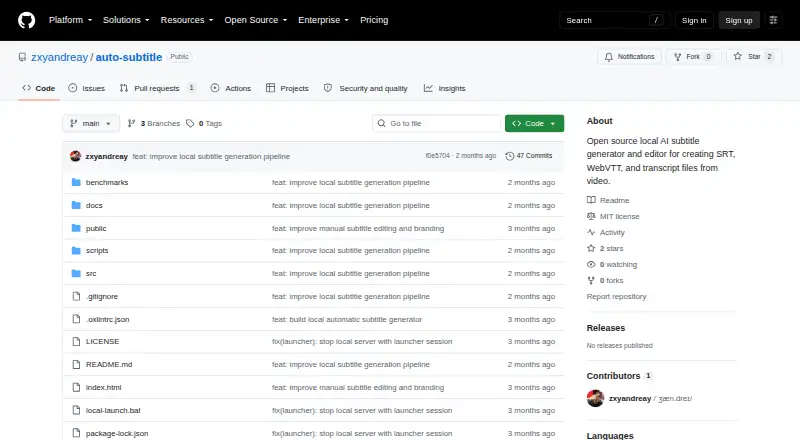
Auto Subtitle is an open-source browser application for generating, reviewing, editing, and exporting subtitles from video. It is aimed at developers and technically minded users who want local processing rather than a required cloud transcription service. Whisper models run through Transformers.js, while FFmpeg.wasm supports browser-based video handling. Users can import MP4, WebM, MOV, or MKV files, preview captions over video, adjust text and timestamps, and work across Windows, macOS, Linux, and the web.
Its strongest area is the subtitle editing workflow. The interactive timeline and caption overlay help connect transcript text with video timing, while selected ranges can be regenerated with alternative subtitle drafts instead of requiring a complete restart. SRT and WebVTT imports support existing subtitle files, and exports include SRT, WebVTT, TXT, and project JSON. IndexedDB project autosave adds continuity to local browser projects. This makes Auto Subtitle a focused tool for creating and refining subtitle files, particularly when processing should remain on the user's device.
The trade-off is output scope. Auto Subtitle documents formatting and overlay behavior, but does not provide verified user-controlled caption styling, brand presets, or burn-in caption rendering. That limits its fit for creators who need finished captioned-video files with designed visuals rather than subtitle exports. Developers wanting browser-local Whisper transcription, editable timing, range regeneration, and open-source local processing should consider it. Teams seeking hosted workflows, visual caption design, or rendered video delivery should choose a tool built around those capabilities instead.
Your product? Our editors can test Auto Subtitle in depth and publish a review, labelled as paid · from $149/mo →
Auto Subtitle pricing
Auto Subtitle fact sheet
| Free plan | No |
|---|---|
| Paid from | Free |
| Max video length | Not verified |
| Caption languages | Not verified |
| Caption styling | No |
| Subtitle export | Other formats |
| Burn-in captions | No |
| Speaker identification | Not verified |
| Brand caption presets | Not verified |
| Deployment | Cloud, Desktop |
| Platforms | Web, Windows, macOS, Linux |
| Pricing | Open source |
| Website | github.com |
| Facts checked | 19 Sep 2026 |
Alternatives to Auto Subtitle
- WhisperA flexible local transcription engine, but not a complete caption-editing product.9.2
- CaptionHubA workflow-rich caption and localization platform for enterprise video teams.8.8
- SubmagicAn all-in-one caption editor with styling, text editing, B-roll, and publishing tools.8.7


See all Auto Subtitle alternatives →
Used Auto Subtitle? Be the first to review it
The editor score above is our own research. What this page doesn't have yet is a reader's view — what you used Auto Subtitle for, what worked and what didn't. No stars are seeded and no review is paid for; an editor reads every one before it appears.
Write a reviewTwo minutes · verified accounts only · read by an editor before it appears
Featured on iTechGuides

Auto Subtitle is listed in our AI Video Caption Generators directory. Add the badge to your site — it links back to this page.
<a href="https://www.itechguides.com/products/auto-subtitle/"><img src="https://www.itechguides.com/best/badge/auto-subtitle.svg" alt="Featured on iTechGuides" width="230" height="46"></a>
Reviewed by iTechGuides Editors · Editorial team · Updated Oct 2026
Advertiser disclosure: iTechGuides is reader-supported. Vendors can pay for top positions in our rankings and for a place on other products' pages, and we may earn a commission when you click some links. Bought places stand at the number bought; this page and our disclosure say so. Paying vendors may get a fuller, more detailed review from our editors, and that review can change their score. How we rank.
Last updated · How we research and update