
Auto Browser
Auto Browser: A privacy-focused Chrome agent with local controls, provider choice, and approval gates. Ranked #9 of 23 in AI Browser Agents by our editors (8.4/10); pricing: Free plan; best for privacy-focused Chrome browser automation.
At a glance
- Editor score8.4 / 10
- PricingFree plan
- Best forPrivacy-focused Chrome browser automation
- Free planYes
- Paid fromFree
- Browser controlYes
- Facts checked20 Sep 2026
Where it wins
- Performs browser actions and fills forms from plain-English instructions
- Supports local models, provider switching, and OpenAI-compatible endpoints
- Stores API keys and conversation data locally with sensitive-origin protections
Where it doesn't
- Limited to use as a Chrome extension
- Cloud AI providers may charge separately for API usage
- Human approval is required before write actions
Our verdict on Auto Browser
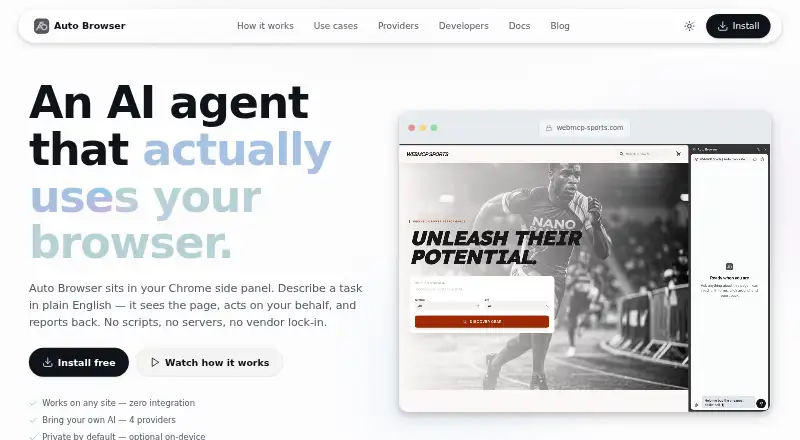
Auto Browser is a free Chrome extension that lets users describe website tasks in plain English. It reads webpage accessibility trees and snapshots, then clicks, types, scrolls, navigates, and fills forms. The agent can also discover and execute WebMCP tools. Its audience is people who want browser automation while keeping stronger control over where conversation data and API keys are stored, especially users who prefer local AI options.
Its provider flexibility is a central strength. Auto Browser supports Google Gemini, OpenRouter, Ollama, LM Studio, OpenAI-compatible endpoints, and Chrome Built-in AI with Gemini Nano. Users can switch providers during a conversation, which suits workflows that combine hosted services with local models. The extension does not require an Auto Browser account, and its settings, API keys, and conversation data are stored locally in the browser. Sensitive-origin blocking and secret redaction add safeguards for higher-risk browsing tasks.
The trade-off is platform scope: Auto Browser is available as a Chrome extension rather than a broader desktop or browser-agnostic product. Human approval before write actions also adds a deliberate checkpoint when forms are submitted or other changes are made. The extension itself is free to install, but cloud AI providers may charge directly according to their own API pricing. Choose Auto Browser if Chrome, local-data controls, provider choice, and approval gates match your workflow. Consider an alternative if you need support beyond Chrome or prefer fully managed AI costs and automation without approval pauses.
Your product? Our editors can test Auto Browser in depth and publish a review, labelled as paid · from $149/mo →
Auto Browser pricing
Auto Browser fact sheet
| Free plan | Yes |
|---|---|
| Paid from | Free |
| Browser control | Yes |
| Form filling | Yes |
| Research tasks | Yes |
| Human approval steps | Yes |
| Scheduled tasks | Not verified |
| Parallel runs | Not verified |
| Team workspace | Not verified |
| Deployment | Browser extension |
| Platforms | Chrome extension |
| Support | Email, Docs |
| Built for | Solo (editorial estimate) |
| Integrations | 5 integrations: Google Gemini, OpenRouter, Ollama, LM Studio, OpenAI-compatible endpoints |
| Pricing | Free plan |
| Website | autobrowser.dev |
| Facts checked | 20 Sep 2026 |
Auto Browser integrations
Auto Browser lists 5 integrations on its own site.
- Google Gemini
- OpenRouter
- Ollama
- LM Studio
- OpenAI-compatible endpoints
Alternatives to Auto Browser
- Claude in ChromeA governed Chrome agent for research, forms, workflows, and scheduled browser tasks.9.3
- Retriever AIA broad browser agent with a low paid entry point and useful workflow controls.9.2
- SkyvernA visual browser-automation platform with APIs, security controls, and self-hosting.9.1



See all Auto Browser alternatives →
Also Ranked In
Auto Browser is ranked in 2 of our directories.
Used Auto Browser? Be the first to review it
The editor score above is our own research. What this page doesn't have yet is a reader's view — what you used Auto Browser for, what worked and what didn't. No stars are seeded and no review is paid for; an editor reads every one before it appears.
Write a reviewTwo minutes · verified accounts only · read by an editor before it appears
Featured on iTechGuides

Auto Browser is listed in our AI Browser Agents directory. Add the badge to your site — it links back to this page.
<a href="https://www.itechguides.com/products/auto-browser/"><img src="https://www.itechguides.com/best/badge/auto-browser.svg" alt="Featured on iTechGuides" width="230" height="46"></a>
Reviewed by iTechGuides Editors · Editorial team · Updated Oct 2026
Advertiser disclosure: iTechGuides is reader-supported. Vendors can pay for top positions in our rankings and for a place on other products' pages, and we may earn a commission when you click some links. Bought places stand at the number bought; this page and our disclosure say so. Paying vendors may get a fuller, more detailed review from our editors, and that review can change their score. How we rank.
Last updated · How we research and update