
AuthWin
AuthWin: A focused Windows authenticator with encrypted local storage and no device sync. Ranked #105 of 111 in Authenticator Apps by our editors (3.0/10); pricing: Free plan; best for windows users wanting local encrypted OTP storage.
At a glance
- Editor score3.0 / 10
- PricingFree plan
- Best forWindows users wanting local encrypted OTP storage
- Free planYes
- Paid fromFree
- Facts checked22 Sep 2026
Where it wins
- Generates TOTP codes on a Windows desktop
- Stores account data in an AES-256-encrypted local file
- Supports QR, manual enrollment and Google Authenticator import
Where it doesn't
- Available only on Windows
- Does not provide multi-device synchronization
- Exports all accounts as a JSON file rather than a native backup format
Our verdict on AuthWin
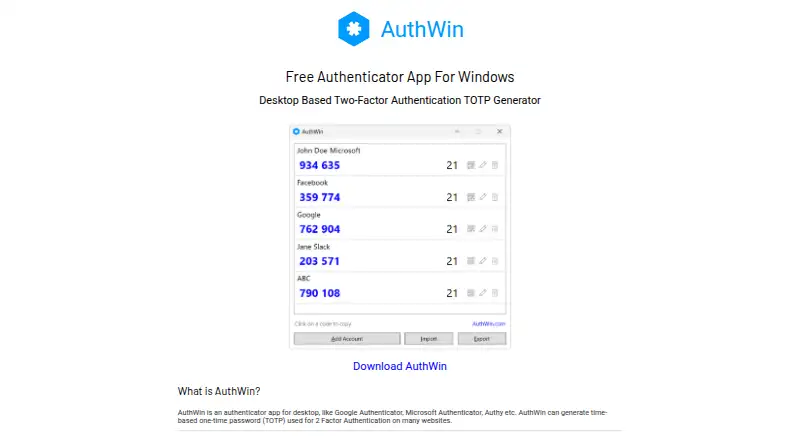
AuthWin is a free Windows desktop authenticator for people who want to generate time-based one-time passwords on a computer instead of a mobile device. It supports Google Authenticator imports, QR-code enrollment and manual entry of secret codes. The app keeps account data locally in an AES-256-encrypted file, giving its workflow a clear local-storage focus rather than a cloud-based account model.
Its strongest fit is for Windows users who want a straightforward TOTP tool with several account-transfer options. Individual accounts can be exported as QR codes, while all accounts can be exported as a JSON file. Exported account files can also be protected with a password. These features make AuthWin practical for moving or preserving account information, while keeping the core account data on the Windows computer.
The trade-off is narrow platform and device coverage. AuthWin is Windows-only and does not provide multi-device synchronization, so it is less suitable for people who need the same authenticator accounts available across computers or mobile devices. Its free pricing and local encrypted storage make it a focused choice for a single Windows environment, particularly when cloud storage is not part of the desired workflow. Choose AuthWin if local storage, TOTP generation and flexible enrollment matter most; choose an alternative if cross-device access or broader platform support is essential.
Your product? Our editors can test AuthWin in depth and publish a review, labelled as paid · from $149/mo →
AuthWin pricing
AuthWin fact sheet
| Free plan | Yes |
|---|---|
| Paid from | Free |
| Code type | Totp |
| Push approvals | Not verified |
| Encrypted backup | Yes |
| Multi-device sync | No |
| Team administration | Not verified |
| Supported platforms | Windows |
| Deployment | Desktop |
| Platforms | Windows |
| Built for | Solo (editorial estimate) |
| Pricing | Free plan |
| Website | authwin.com |
| Facts checked | 22 Sep 2026 |
Alternatives to AuthWin
- Proton AuthenticatorA mature free option for secure 2FA codes across mobile and desktop platforms.9.4
- Google AuthenticatorA free, straightforward authenticator with offline codes, sync, and QR transfers.9.2
- AuthyA focused free authenticator for mobile users who need synced TOTP tokens.9.1


See all AuthWin alternatives →
Used AuthWin? Be the first to review it
The editor score above is our own research. What this page doesn't have yet is a reader's view — what you used AuthWin for, what worked and what didn't. No stars are seeded and no review is paid for; an editor reads every one before it appears.
Write a reviewTwo minutes · verified accounts only · read by an editor before it appears
Featured on iTechGuides

AuthWin is listed in our Authenticator Apps directory. Add the badge to your site — it links back to this page.
<a href="https://www.itechguides.com/products/authwin/"><img src="https://www.itechguides.com/best/badge/authwin.svg" alt="Featured on iTechGuides" width="230" height="46"></a>
Reviewed by iTechGuides Editors · Editorial team · Updated Oct 2026
Advertiser disclosure: iTechGuides is reader-supported. Vendors can pay for top positions in our rankings and for a place on other products' pages, and we may earn a commission when you click some links. Bought places stand at the number bought; this page and our disclosure say so. Paying vendors may get a fuller, more detailed review from our editors, and that review can change their score. How we rank.
Last updated · How we research and update