Artstudio Pro
Artstudio Pro: A capable Apple-focused art app with PSD support, animation, and layered workflows. Ranked #16 of 46 in Digital Painting Software by our editors (7.8/10); pricing: Free plan · 7-day trial; best for apple-platform artists needing PSD and animation tools.
At a glance
- Editor score7.8 / 10
- PricingFree plan · 7-day trial
- Best forApple-platform artists needing PSD and animation tools
- Free planYes
- Layer supportYes
- Founded2010 · Lodz, Poland
- Facts checked20 Sep 2026
Where it wins
- GPU-accelerated painting with customizable brushes and stylus support
- Advanced layers, masks, clipping masks, and adjustment layers
- Imports and exports PSD, ABR, TPL, PNG, and JPEG files
Where it doesn't
- Free version limits saving, canvas size, layers, and some exports
- Supports iOS and macOS rather than broader desktop platforms
- Some capabilities are split across subscriptions and separate licenses
Our verdict on Artstudio Pro
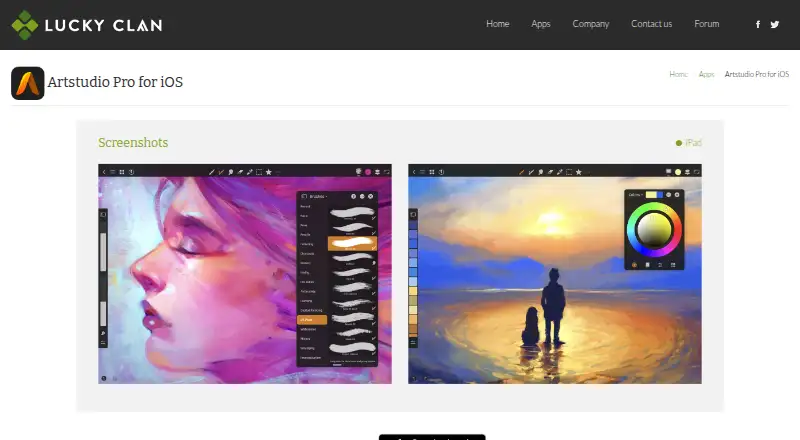
Artstudio Pro is a digital painting and photo-editing application for iPhone, iPad, and Mac. It is aimed at artists who want a layered workspace, customizable brushes, Apple Pencil or stylus input, photo-editing tools, and animation in one Apple-platform application. Its GPU-accelerated painting engine supports multiple open documents, while artwork can use layer groups, masks, clipping masks, adjustment layers, 27 blending modes, and non-destructive layer effects. The app also supports image and brush formats including PSD, PNG, JPEG, ABR, and TPL.
Pricing is split between free access and paid options. The Free plan is a free download, but saving, larger canvases, additional layers, and some exports are limited. A seven-day free trial is available for the macOS application. The macOS plan costs $19.99 as a one-time purchase, while the Yearly subscription unlocks paid features through an annual subscription. A Lifetime license is also available for the iOS application. The published App Store pricing is for the US region, and prices may vary by region.
Its strongest fit is the Apple ecosystem: iCloud Drive integration supports file access across compatible Apple devices, and Apple Pencil support complements the painting workflow. Beyond painting, Artstudio Pro includes photo adjustments, filters, inpainting, retouching tools, and layer- and group-based animation with export options. Artists needing PSD compatibility, brush imports, advanced layer controls, or animation should find the feature set relevant. Those who need platforms beyond iOS and macOS should choose software that supports their required operating systems instead.
Your product? Our editors can test Artstudio Pro in depth and publish a review, labelled as paid · from $99/mo →
Artstudio Pro pricing
All 4 Artstudio Pro plans and prices →
Artstudio Pro fact sheet
| Free plan | Yes |
|---|---|
| Paid from | Not verified |
| Brush customization | Yes |
| Layer support | Yes |
| Pressure sensitivity | Not verified |
| Supported platforms | iOS, iPadOS, macOS |
| Color management | Not verified |
| Stroke stabilization | Not verified |
| Free trial | 7 days |
| Deployment | Mobile, Desktop |
| Platforms | iOS, macOS |
| Integrations | 2 integrations: iCloud Drive, Apple Pencil |
| Pricing | Free plan · 7-day trial (source) |
| Website | luckyclan.com |
| Facts checked | 20 Sep 2026 |
Artstudio Pro integrations
Artstudio Pro lists 2 integrations on its own site.
- iCloud Drive
- Apple Pencil
Alternatives to Artstudio Pro
- KritaA broad, professional-grade painting toolkit with no paid plan and wide platform coverage.9.4
- Clip Studio PaintA broad digital art workspace spanning illustration, comics, 3D, animation, and cloud tools.9.3
- ProcreateA polished iPad painting workflow with broad creative tools and limited platform coverage.9.1


See all Artstudio Pro alternatives →
Also Ranked In
Artstudio Pro is ranked in 2 of our directories.
Used Artstudio Pro? Be the first to review it
The editor score above is our own research. What this page doesn't have yet is a reader's view — what you used Artstudio Pro for, what worked and what didn't. No stars are seeded and no review is paid for; an editor reads every one before it appears.
Write a reviewTwo minutes · verified accounts only · read by an editor before it appears
Featured on iTechGuides

Artstudio Pro is listed in our Digital Painting Software directory. Add the badge to your site — it links back to this page.
<a href="https://www.itechguides.com/products/artstudio-pro/"><img src="https://www.itechguides.com/best/badge/artstudio-pro.svg" alt="Featured on iTechGuides" width="230" height="46"></a>
Reviewed by iTechGuides Editors · Editorial team · Updated Oct 2026
Advertiser disclosure: iTechGuides is reader-supported. Vendors can pay for top positions in our rankings and for a place on other products' pages, and we may earn a commission when you click some links. How we rank.
Last updated · How we research and update