
allGeo Field Inspection
allGeo Field Inspection: A field inspection platform for mobile teams needing evidence, workflows, and offline collection. Ranked #14 of 25 in Inspection Software by our editors (7.9/10); pricing: Pricing on request; best for mobile field inspection teams.
At a glance
- Editor score7.9 / 10
- PricingPricing on request
- Best forMobile field inspection teams
- Free planNo
- Offline inspectionsYes
- Facts checked20 Sep 2026
Where it wins
- Custom forms support validation, conditional rules, and automated exceptions.
- Offline collection, GPS, photos, signatures, and scans support field evidence.
- Reports and REST API integrations connect inspections with back-office systems.
Where it doesn't
- Contact-sales pricing makes direct cost comparison harder.
- The feature set may exceed the needs of simple checklist inspections.
- Back-office integrations may require configuration or implementation work.
Our verdict on allGeo Field Inspection
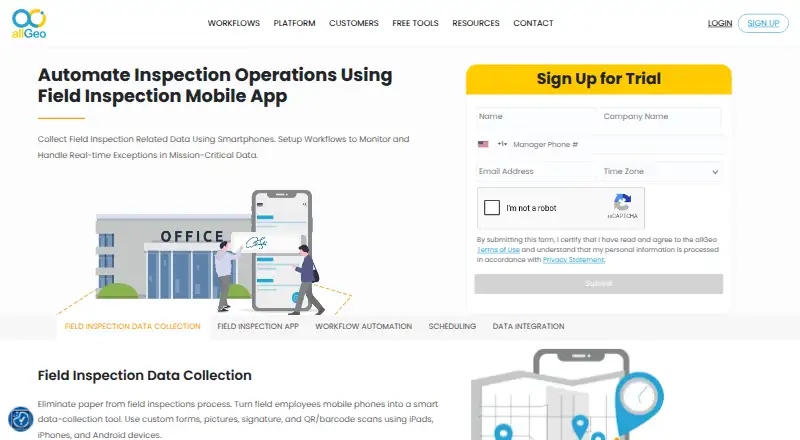
allGeo Field Inspection is a mobile inspection and field-data collection application for field service organizations. It is designed for midsize and enterprise teams in construction, facilities management, healthcare, manufacturing, and other field-service settings. Teams can create custom forms, assign inspections, dispatch jobs, and collect photos, signatures, notes, QR or barcode scans, GPS data, and time-stamped records from iOS and Android devices. Web access and an API extend the product beyond mobile field work.
The strongest fit is for organizations that need more than a basic checklist app. Offline data collection allows field staff to continue recording inspections without connectivity, with synchronization after reconnection. Conditional rules and automated exception handling can structure follow-up workflows, while photo evidence, signatures, geotagging, and timestamps provide a detailed inspection record. Reports can be exported in CSV, HTML, XLS, and PDF formats, supporting different reporting and operational needs.
Integration breadth is another important consideration. The REST API supports two-way data synchronization, and the product connects with payroll, CRM, ERP, and HR systems, as well as ADP, QuickBooks, and Google Drive. That makes allGeo Field Inspection a candidate for teams that want inspection data to move into existing back-office processes. Pricing uses a contact-sales model, so it is better suited to organizations evaluating a tailored deployment than buyers seeking a simple self-serve purchase. Choose it for mobile inspections with offline capability, evidence capture, dispatch, and workflow automation; choose a simpler tool if those requirements are unnecessary.
Questions about allGeo Field Inspection
What does allGeo Field Inspection run on? Web, iOS and Android. It runs in the cloud and as a mobile app.
What does allGeo Field Inspection integrate with? 7 integrations, including payroll systems, CRM systems, ERP systems, HR systems and ADP.
Who is allGeo Field Inspection built for? Mid-market companies and enterprises (our editorial estimate).
Your product? Our editors can test allGeo Field Inspection in depth and publish a review, labelled as paid · from $149/mo →
allGeo Field Inspection pricing
allGeo Field Inspection fact sheet
| Free plan | No |
|---|---|
| Paid from | Not verified |
| Offline inspections | Yes |
| Mobile platforms | Ios_android |
| Photo evidence | Yes |
| Signature capture | Yes |
| Workflow automation | Yes |
| GPS location capture | Yes |
| API access | Yes |
| Deployment | Cloud, Mobile |
| Platforms | Web, iOS, Android |
| Compliance & security | SOC 2, GDPR, HIPAA |
| Support | Email, Live chat, Phone, Docs |
| Built for | Mid-market, Enterprise (editorial estimate) |
| Integrations | 7 integrations: payroll systems, CRM systems, ERP systems, HR systems, ADP, QuickBooks … |
| Pricing | Pricing on request (source) |
| Website | allgeo.com |
| Facts checked | 20 Sep 2026 |
allGeo Field Inspection integrations
allGeo Field Inspection lists 7 integrations on its own site.
- payroll systems
- CRM systems
- ERP systems
- HR systems
- ADP
- QuickBooks
- Google Drive
Alternatives to allGeo Field Inspection
- SafetyCulture (now Mitti)A flexible inspection platform with offline mobile workflows, corrective actions, and a free starting tier.9.4
- LumiformA deep inspection platform with strong offline workflows, but quote-based pricing limits transparency.9.1
- GoAuditsA practical inspection platform with offline workflows and strong evidence capture.9.0



See all allGeo Field Inspection alternatives →
Used allGeo Field Inspection? Be the first to review it
The editor score above is our own research. What this page doesn't have yet is a reader's view — what you used allGeo Field Inspection for, what worked and what didn't. No stars are seeded and no review is paid for; an editor reads every one before it appears.
Write a reviewTwo minutes · verified accounts only · read by an editor before it appears
Featured on iTechGuides

allGeo Field Inspection is listed in our Inspection Software directory. Add the badge to your site — it links back to this page.
<a href="https://www.itechguides.com/products/allgeo-field-inspection/"><img src="https://www.itechguides.com/best/badge/allgeo-field-inspection.svg" alt="Featured on iTechGuides" width="230" height="46"></a>
Reviewed by iTechGuides Editors · Editorial team · Updated Nov 2026
Advertiser disclosure: iTechGuides is reader-supported. Vendors can pay for top positions in our rankings and for a place on other products' pages, and we may earn a commission when you click some links. Bought places stand at the number bought; this page and our disclosure say so. Paying vendors may get a fuller, more detailed review from our editors, and that review can change their score. How we rank.
Last updated · How we research and update