
Align
Align: A polished iPhone planner for turning calendars and tasks into visual time blocks. Ranked #82 of 137 in Daily Planner Apps by our editors (3.0/10); pricing: Free plan; best for simple iPhone time-blocking and calendar planning.
At a glance
- Editor score3.0 / 10
- PricingFree plan
- Best forSimple iPhone time-blocking and calendar planning
- Free planYes
- Planning methodTime blocking
- Facts checked22 Sep 2026
Where it wins
- Drag-and-drop timeline with resizing, overlaps, and free-time gaps
- Recurring schedules, reminders, subtasks, colors, and icons
- iCloud sync, widgets, and calendar-system integration
Where it doesn't
- Available only on iPhone
- Not designed for team project management
- Paid pricing may vary by region
Our verdict on Align
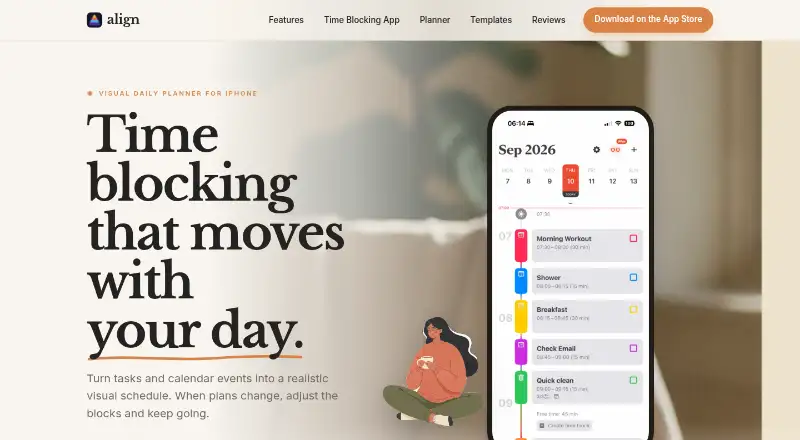
Align is an iPhone daily-planning app for people who want tasks, routines, and calendar events arranged in one visual time-blocked timeline. It is suited to busy professionals, students, entrepreneurs, and anyone who prefers visual time management over a simple list. The timeline shows time blocks, calendar events, free-time gaps, and overlaps, while drag-and-drop controls let users reorganize blocks and resize their duration. Custom colors, icons, reminders, notifications, subtasks, and completion tracking add structure without shifting the product toward team project management.
Its strongest ecosystem fit is within Apple’s calendar and device environment. Align imports and synchronizes calendars through the iPhone calendar system, supporting Apple Calendar and calendars from Google and Outlook through that system. iCloud synchronization keeps planning data available across Apple devices, while Home Screen and Lock Screen widgets provide quick access. Recurring time blocks can follow daily, weekly, monthly, or yearly schedules, making the app suitable for repeating routines as well as one-off planning. Users who already organize their schedules through an iPhone calendar system will find the integration model more relevant than those seeking broad cross-platform coverage.
Align follows a freemium model with a free plan and Align Plus Weekly, Align Plus Monthly, Align Plus Yearly, and Align Plus Lifetime options. The paid plans add advanced organization features, while the Lifetime option provides lifetime access to Align Plus. The listed starting price is 2.99, with App Store pricing subject to regional variation. Pick Align for focused iPhone time blocking, recurring routines, and visual calendar planning. Choose another option if you need Android or broader platform coverage, or if your priority is collaborative project management rather than individual scheduling.
Your product? Our editors can test Align in depth and publish a review, labelled as paid · from $149/mo →
Align pricing
All 4 Align plans and prices →
Align fact sheet
| Free plan | Yes |
|---|---|
| Paid from | Not verified |
| Planning method | Time blocking |
| Calendar sync | Yes |
| Recurring tasks | Yes |
| Mobile platforms | Ios |
| Daily task limit | Not verified |
| Focus sessions | Not verified |
| Deployment | Mobile |
| Platforms | iOS |
| Support | Email, Docs |
| Built for | Solo, Small business (editorial estimate) |
| Integrations | 4 integrations: iPhone Calendar, iCloud, Google Calendar, Outlook |
| Pricing | Free plan (source) |
| Website | align.day |
| Facts checked | 22 Sep 2026 |
Align integrations
Align lists 4 integrations on its own site.
- iPhone Calendar
- iCloud
- Google Calendar
- Outlook
Alternatives to Align
- SunsamaA guided daily planner for turning tasks, calendars, and workload limits into a focused workday.8.9
- Amazing MarvinA flexible planner for people who want structured days without a fixed workflow.8.8
- MotionA broad AI planner for scheduling, booking, calendars, and project work.8.7


Also Ranked In
Align is ranked in 2 of our directories.
Used Align? Be the first to review it
The editor score above is our own research. What this page doesn't have yet is a reader's view — what you used Align for, what worked and what didn't. No stars are seeded and no review is paid for; an editor reads every one before it appears.
Write a reviewTwo minutes · verified accounts only · read by an editor before it appears
Featured on iTechGuides

Align is listed in our Daily Planner Apps directory. Add the badge to your site — it links back to this page.
<a href="https://www.itechguides.com/products/align/"><img src="https://www.itechguides.com/best/badge/align.svg" alt="Featured on iTechGuides" width="230" height="46"></a>
Reviewed by iTechGuides Editors · Editorial team · Updated Oct 2026
Advertiser disclosure: iTechGuides is reader-supported. Vendors can pay for top positions in our rankings and for a place on other products' pages, and we may earn a commission when you click some links. Bought places stand at the number bought; this page and our disclosure say so. Paying vendors may get a fuller, more detailed review from our editors, and that review can change their score. How we rank.
Last updated · How we research and update