
AI Presentations
AI Presentations: A flexible AI deck maker for turning mixed source material into editable presentations. Ranked #48 of 93 in Presentation Software by our editors (4.6/10); pricing: Free plan; best for multi-source AI deck creation.
At a glance
- Editor score4.6 / 10
- PricingFree plan
- Best forMulti-source AI deck creation
- Free planYes
- Paid from$8.33/mo
- AI assistanceYes
- Facts checked22 Sep 2026
Where it wins
- Accepts URLs, videos, documents, spreadsheets, images, and audio
- Refines outlines and slides with AI before PowerPoint export
- Runs on web, Windows, macOS, and Linux
Where it doesn't
- Free plan limits users to 10 slide credits monthly
- PowerPoint export is preview-only on the Free plan
- Listed integrations focus on Google Slides and Google Workspace
Our verdict on AI Presentations
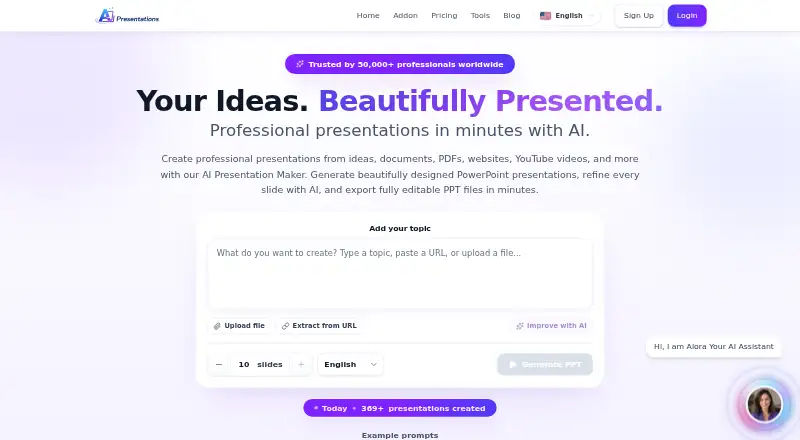
AI Presentations is a browser-based presentation maker for professionals who create decks from varied source material. It can generate presentations from topics and prompts, as well as from URLs, YouTube videos, PDFs, Word files, Excel files, images, video, and audio. Consultants, agencies, founders, marketers, sales teams, educators, and trainers can use outline editing, AI slide refinement, themes, fonts, colors, shapes, and a browser-based editor to shape the result. Presentations can be exported as editable PowerPoint files on paid plans.
The freemium structure gives prospective users a low-commitment way to explore the workflow. The Free plan includes up to 10 slides per AI generation, 10 slide credits per month, and 10 AI chat messages, while PowerPoint export is preview-only. According to the published plans, Basic costs $8.33 per month or $100 per year and adds 600 monthly slide credits, 120 AI chat messages, full PowerPoint export, slide editing, advanced AI models, and professional themes. Pro costs $23.33 per month or $280 per year and raises those allowances to 1,400 slide credits and 280 AI chat messages, with priority support.
Its main strength is breadth at the input stage: teams can bring together research, media, and office files before refining a deck in one workflow. The Google Slides add-on and Google Workspace integration support a Google-centered process, while PPTX export suits users who need editable PowerPoint files. The product is a good fit for individual professionals and teams producing frequent, source-heavy presentations. It is less suitable for users who need substantial free usage, a broad integration ecosystem, or a workflow centered on capabilities beyond its listed AI creation and editing features.
Your product? Our editors can test AI Presentations in depth and publish a review, labelled as paid · from $149/mo →
AI Presentations pricing
All 3 AI Presentations plans and prices →
AI Presentations fact sheet
| Free plan | Yes |
|---|---|
| Paid from | $8.33/mo |
| AI assistance | Yes |
| Real-time collaboration | Not verified |
| PowerPoint import | Yes |
| PowerPoint export | Yes |
| Offline access | Not verified |
| Presenter mode | Not verified |
| Supported platforms | Web browser; Windows, macOS, Linux, smartphones, and tablets |
| Deployment | Cloud |
| Platforms | Web, Windows, macOS, Linux |
| Built for | Solo, Small business, Mid-market (editorial estimate) |
| Pricing | Free plan (source) |
| Website | aipresentations.app |
| Facts checked | 22 Sep 2026 |
Alternatives to AI Presentations
- Microsoft PowerPointA broad presentation workspace spanning web, desktop, mobile, collaboration, AI, and rehearsal tools.9.4
- Apple KeynoteA polished free presentation tool for Apple ecosystem users, with optional AI features.9.1
- Zoho ShowA capable free option for teams that need collaboration, offline work, and PPTX support.9.0



See all AI Presentations alternatives →
Also Ranked In
AI Presentations is ranked in 2 of our directories.
Used AI Presentations? Be the first to review it
The editor score above is our own research. What this page doesn't have yet is a reader's view — what you used AI Presentations for, what worked and what didn't. No stars are seeded and no review is paid for; an editor reads every one before it appears.
Write a reviewTwo minutes · verified accounts only · read by an editor before it appears
Featured on iTechGuides

AI Presentations is listed in our Presentation Software directory. Add the badge to your site — it links back to this page.
<a href="https://www.itechguides.com/products/ai-presentations/"><img src="https://www.itechguides.com/best/badge/ai-presentations.svg" alt="Featured on iTechGuides" width="230" height="46"></a>
Guides on presentation software
- 5 Best AI Presentation and PowerPoint Design Tools in 2026Aug 2026
- Best AI Tools for Effortless Presentation Design Compared 2025: 2026 Buyer’s UpdateAug 2026
- Best Presentation Apps for iPad and iPhone: Keynote, PowerPoint, Google Slides, Canva, and PreziAug 2026
Reviewed by iTechGuides Editors · Editorial team · Updated Oct 2026
Advertiser disclosure: iTechGuides is reader-supported. Vendors can pay for top positions in our rankings and for a place on other products' pages, and we may earn a commission when you click some links. Bought places stand at the number bought; this page and our disclosure say so. Paying vendors may get a fuller, more detailed review from our editors, and that review can change their score. How we rank.
Last updated · How we research and update