
Adobe Bridge
Adobe Bridge: A capable free local asset browser for Adobe users, not a collaborative DAM. Ranked #129 of 150 in Digital Asset Management Software by our editors (3.0/10); pricing: Free plan; best for adobe users needing a free local asset browser.
At a glance
- Editor score3.0 / 10
- PricingFree plan
- Best forAdobe users needing a free local asset browser
- Free planYes
- Paid fromFree
- Metadata and taggingYes
- Facts checked20 Sep 2026
Where it wins
- Rich previews, metadata search, keywords, ratings, and collections
- Batch rename, export, and multi-step workflow tools
- Deep integration with Creative Cloud and Adobe applications
Where it doesn't
- No approval workflows or asset version history
- No guest sharing for external collaborators
- Limited to Windows and macOS desktop use
Our verdict on Adobe Bridge
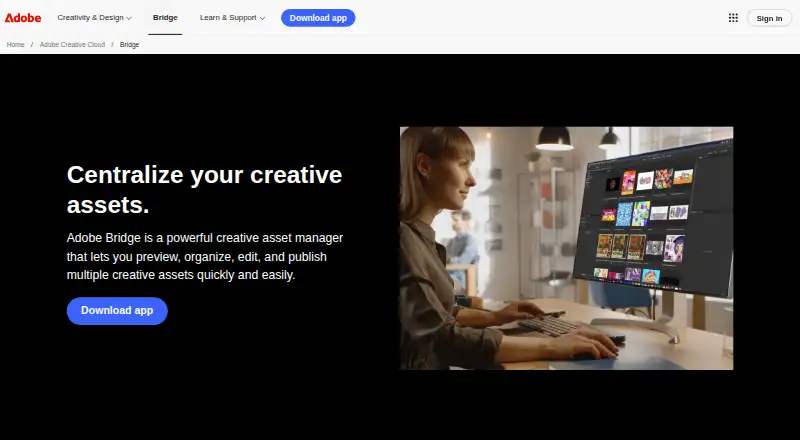
Adobe Bridge is a free desktop application for photographers, designers, and other creative professionals who need to organize and manage local creative files. It supports Adobe Photoshop, InDesign, Illustrator, After Effects, Substance 3D, raw images, video, audio, and DICOM images. Users can preview assets with thumbnails and rich previews, search and filter by metadata and keywords, edit IPTC, GPS, camera, video, and audio fields, and organize files with collections and ratings.
Its strongest fit is the Adobe ecosystem. Bridge connects with Creative Cloud applications, Creative Cloud Libraries, Camera Raw, Photoshop, InDesign, Illustrator, After Effects, Substance 3D Stager, Adobe Stock, and Adobe Portfolio. The application also supports hierarchical keywords, batch renaming, batch exports, multi-step workflows, and image export to JPEG, PNG, TIFF, and DNG. The Bridge API and SDK provide an extension path for teams that need to adapt the application to their creative processes. It runs on Windows and macOS, making it suitable for desktop-centered workflows rather than broad browser or mobile access.
The free plan is the core product, with no subscription tier described. That makes Bridge a practical choice for individuals and teams that want local asset browsing and metadata control without adding a separate DAM subscription. Its narrower scope is important: approval workflows, version history, and guest sharing are not part of the listed feature set. Choose Bridge when Adobe integration, local organization, previews, metadata, collections, and batch operations matter most. Choose a broader collaborative DAM when stakeholders need browser-based review, approvals, external sharing, or formal version control.
Your product? Our editors can test Adobe Bridge in depth and publish a review, labelled as paid · from $149/mo →
Adobe Bridge pricing
Adobe Bridge fact sheet
| Free plan | Yes |
|---|---|
| Paid from | Free |
| Storage limit | Not verified |
| Supported asset types | Adobe Photoshop files, Adobe InDesign files, Adobe Illustrator files, Adobe After Effects files, Substance 3D files, raw images, video files, audio files, DICOM images |
| Metadata and tagging | Yes |
| Approval workflows | No |
| Version history | No |
| Guest sharing | No |
| API access | Yes |
| Deployment | Desktop |
| Platforms | Windows, macOS |
| Support | Docs |
| Built for | Solo, Small business, Mid-market, Enterprise (editorial estimate) |
| Integrations | 10 integrations: Adobe Creative Cloud applications, Creative Cloud Libraries, Adobe Stock, Adobe Portfolio, Adobe Camera Raw, Adobe Photoshop … |
| Pricing | Free plan |
| Website | adobe.com |
| Facts checked | 20 Sep 2026 |
Adobe Bridge integrations
Adobe Bridge lists 10 integrations on its own site.
- Adobe Creative Cloud applications
- Creative Cloud Libraries
- Adobe Stock
- Adobe Portfolio
- Adobe Camera Raw
- Adobe Photoshop
- Adobe InDesign
- Adobe Illustrator
- Adobe After Effects
- Substance 3D Stager
Alternatives to Adobe Bridge
- Adobe Experience Manager AssetsA deep enterprise DAM for Adobe-centered teams that need governance, delivery, and automation.9.3
- ResourceSpaceA flexible open-source DAM for teams that need metadata, workflows and controlled sharing.9.2
- Acquia DAM (Widen)A broad DAM for enterprise content operations, portals, workflows, and analytics.9.1


See all Adobe Bridge alternatives →
Used Adobe Bridge? Be the first to review it
The editor score above is our own research. What this page doesn't have yet is a reader's view — what you used Adobe Bridge for, what worked and what didn't. No stars are seeded and no review is paid for; an editor reads every one before it appears.
Write a reviewTwo minutes · verified accounts only · read by an editor before it appears
Featured on iTechGuides

Adobe Bridge is listed in our Digital Asset Management Software directory. Add the badge to your site — it links back to this page.
<a href="https://www.itechguides.com/products/adobe-bridge/"><img src="https://www.itechguides.com/best/badge/adobe-bridge.svg" alt="Featured on iTechGuides" width="230" height="46"></a>
Reviewed by iTechGuides Editors · Editorial team · Updated Oct 2026
Advertiser disclosure: iTechGuides is reader-supported. Vendors can pay for top positions in our rankings and for a place on other products' pages, and we may earn a commission when you click some links. Bought places stand at the number bought; this page and our disclosure say so. Paying vendors may get a fuller, more detailed review from our editors, and that review can change their score. How we rank.
Last updated · How we research and update