
Abtrac
Abtrac: A project and business management system built around billable professional services work. Ranked #139 of 188 in Project Management Software by our editors (3.0/10); pricing: 30-day trial; best for professional services firms linking projects to accounts.
At a glance
- Editor score3.0 / 10
- Pricing30-day trial
- Best forProfessional services firms linking projects to accounts
- Free planNo
- Paid from$8/user/mo
- Founded1999 · Auckland, New Zealand
- Facts checked21 Sep 2026
Where it wins
- Combines budgets, costs, resources, timesheets, expenses, and invoicing
- Connects with Xero, MYOB, QuickBooks, Sage, and other business systems
- Supports web, iOS, Android, API connectivity, and mobile time tracking
Where it doesn't
- Starts at 47 per month and has no free plan
- Several accounting and debtor features require paid add-ons
- Teams seeking deeper task workflows may need to compare alternatives
Our verdict on Abtrac
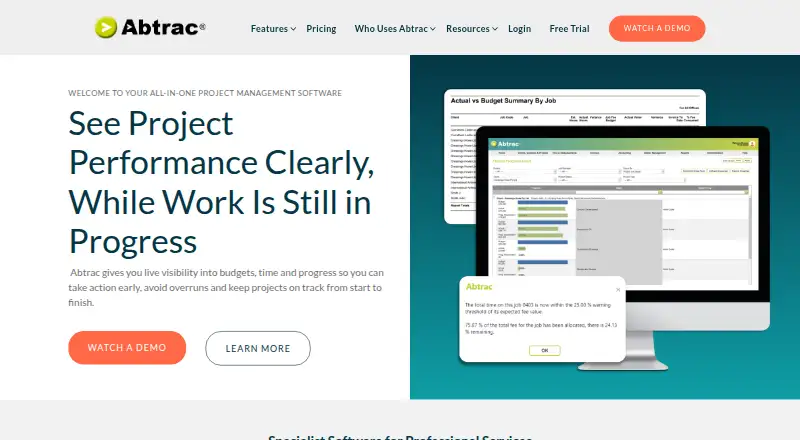
Abtrac is cloud project and business management software for professional services firms that bill for time and expertise. It brings project and task management together with budgeting, cost tracking, resource scheduling, workload planning, timesheets, expenses, invoicing, reporting, permissions, and accounting connections. Its audience includes architects, engineers, surveyors, planners, cost estimators, and similar teams that need operational and financial visibility around client work. Web, iOS, Android, and API access support different working environments, while the companion mobile timesheet app addresses time capture away from a desk.
The published plans show a paid model with a 30-day trial and a starting price of 47 per month for 1 user, with all core features included. Users 2–10 are priced at 22 per user per month, Users 11–25 at 12, and Users 26–50 at 8, each with a discounted user rate. Accounts link costs 20 per month for syncing invoices, expenses, and payroll with accounting software; Debtor management costs 45 per month for invoice, payment, aged-debtor, and reminder tracking; Maps costs 15 per month for geographic project views. This structure suits firms that want to add finance-focused capabilities as their workflows require them.
Abtrac’s main distinction is its breadth across project delivery and business administration rather than project tasks alone. Integrations include Xero, MYOB, QuickBooks, Reckon, Sage, Moneyworks, 12d Synergy, Microsoft Power BI, Zoho, and HubSpot. That ecosystem fit is useful for firms connecting delivery data with accounting, reporting, CRM, or business systems. Choose Abtrac when project profitability, time tracking, invoicing, and account-level coordination are central requirements. Teams mainly seeking a task-focused workspace with deeper workflow automation should compare alternatives before choosing it.
Questions about Abtrac
Does Abtrac have a free plan? No free plan is listed; paid plans start at $8/user/mo (Users 26–50).
How much does Abtrac cost? Abtrac lists 7 paid plans; the lowest is Users 26–50 at $8/user/mo.
Is there a free trial of Abtrac? Yes: a 30-day free trial; no card is needed.
What does Abtrac run on? Web, iOS and Android. It runs in the cloud and as a mobile app.
What does Abtrac integrate with? 10 integrations, including Xero, MYOB, QuickBooks, Reckon and Sage.
Who is Abtrac built for? Solo users, small businesses, mid-market companies and enterprises (our editorial estimate).
Your product? Our editors can test Abtrac in depth and publish a review, labelled as paid · from $149/mo →
Abtrac pricing
All 8 Abtrac plans and prices →
Abtrac fact sheet
| Free plan | No |
|---|---|
| Paid from | $8/user/mo |
| Task views | Not verified |
| Automation rules | Not verified |
| Time tracking | Yes |
| Guest access | Not verified |
| Free-plan user limit | Not verified |
| Native integrations | Not verified |
| Free trial | 30 days · no card needed |
| Deployment | Cloud, Mobile |
| Platforms | Web, iOS, Android |
| Support | Email, Phone, Docs |
| Built for | Solo, Small business, Mid-market, Enterprise (editorial estimate) |
| Integrations | 10 integrations: Xero, MYOB, QuickBooks, Reckon, Sage, Moneyworks … See all → |
| Pricing | 30-day trial (source) |
| Website | abtrac.com |
| Facts checked | 21 Sep 2026 |
Abtrac integrations
Abtrac lists 10 integrations on its own site.
- Xero
- MYOB
- QuickBooks
- Reckon
- Sage
- Moneyworks
- 12d Synergy
- Microsoft Power BI
- Zoho
- HubSpot
Alternatives to Abtrac
- ClickUpBroad project control with tasks, Docs, automations, reporting, time tracking, and AI.9.4
- JiraA mature choice for agile delivery teams needing boards, backlogs, workflows, and automation.9.3
- AsanaA mature project hub with flexible views, automation, reporting, and AI features.9.2


Also Ranked In
Abtrac is ranked in 2 of our directories.
Used Abtrac? Be the first to review it
The editor score above is our own research. What this page doesn't have yet is a reader's view — what you used Abtrac for, what worked and what didn't. No stars are seeded and no review is paid for; an editor reads every one before it appears.
Write a reviewTwo minutes · verified accounts only · read by an editor before it appears
Featured on iTechGuides

Abtrac is listed in our Project Management Software directory. Add the badge to your site — it links back to this page.
<a href="https://www.itechguides.com/products/abtrac/"><img src="https://www.itechguides.com/best/badge/abtrac.svg" alt="Featured on iTechGuides" width="230" height="46"></a>
Reviewed by iTechGuides Editors · Editorial team · Updated Nov 2026
Advertiser disclosure: iTechGuides is reader-supported. Vendors can pay for top positions in our rankings and for a place on other products' pages, and we may earn a commission when you click some links. Bought places stand at the number bought; this page and our disclosure say so. Paying vendors may get a fuller, more detailed review from our editors, and that review can change their score. How we rank.
Last updated · How we research and update