
AAKlipper
AAKlipper: Desktop video editor for word-synced captions and short-form clips, with one-time credit packs. Ranked #37 of 99 in AI Video Caption Generators by our editors (4.0/10); pricing: Free plan; best for desktop creators wanting one-time-cost caption workflows.
At a glance
- Editor score4.0 / 10
- PricingFree plan
- Best forDesktop creators wanting one-time-cost caption workflows
- Free planYes
- Paid from$5 one-time
- Caption stylingYes
- Facts checked22 Sep 2026
Where it wins
- Creates word-synced captions and reusable branded themes.
- Finds clips and suggests hooks and contextual B-roll.
- Runs locally on Windows, macOS, and Linux, with 4K export.
Where it doesn't
- Credit packs limit processing time, even at the highest listed tier.
- Caption language support is described as expanding.
- Subtitle-file export formats are not specified.
Our verdict on AAKlipper
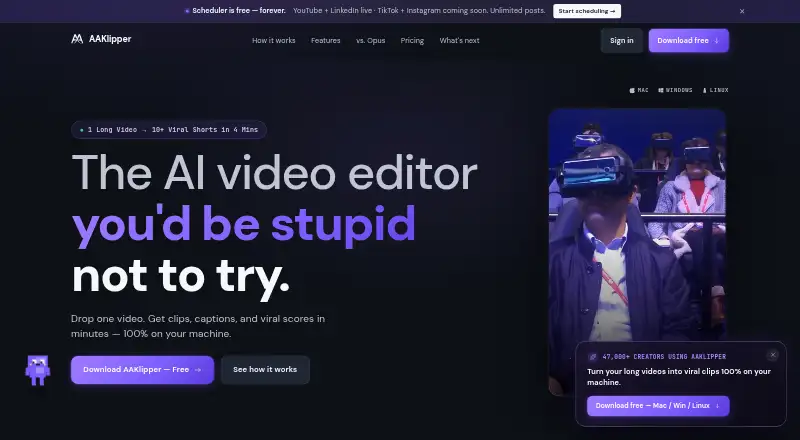
AAKlipper is a desktop AI video editor for creators, podcasters, YouTubers, educators, marketers, and agencies who want to turn long-form footage into short clips. It identifies and ranks moments, generates hooks, suggests contextual B-roll, and adds word-synced captions that can be edited and styled with reusable themes. Local processing keeps video files on the user's machine, and the app is available for Windows, macOS, and Linux. It suits creators who want clipping and captioning in one desktop workflow rather than a caption-only tool.
Its pricing uses free credits and one-time purchases instead of a recurring subscription. Free credits include automatic captions, local processing, and the option to bring an API key. The $5 Starter Pack provides 2 hours 4 minutes of processing, unlocks all caption templates, and has credits that never expire. At $19.99, Creator Pro includes 10 hours of 4K video processing, local GPU NVENC batch export, and active speaker tracking. Studio Scale costs $59.99 and includes 35 hours of raw 4K processing, maximum GPU acceleration, and private client compliance. The plans also describe approximate short counts, making the credit allowance relevant when estimating ongoing workloads.
The feature set reaches beyond captions: AAKlipper can export in 9:16, 1:1, and 16:9, track active speakers, and render 4K video. That breadth may appeal to small teams handling repurposing from start to finish, while the processing-hour structure may be less suitable for frequent, high-volume output than an unlimited-use model. Choose it if local desktop processing, branded caption styles, and one-time packs fit your workflow; consider another option if you need specified subtitle-file formats or a clearly stated language range.
Your product? Our editors can test AAKlipper in depth and publish a review, labelled as paid · from $149/mo →
AAKlipper pricing
All 4 AAKlipper plans and prices →
AAKlipper fact sheet
| Free plan | Yes |
|---|---|
| Paid from | $5 one-time |
| Max video length | Not verified |
| Caption languages | Not verified |
| Caption styling | Yes |
| Subtitle export | Not verified |
| Burn-in captions | Yes |
| Speaker identification | Yes |
| Brand caption presets | Yes |
| Deployment | Desktop |
| Platforms | Windows, macOS, Linux |
| Built for | Solo, Small business, Mid-market, Enterprise (editorial estimate) |
| Pricing | Free plan (source) |
| Website | aaklipper.com |
| Facts checked | 22 Sep 2026 |
Alternatives to AAKlipper
- WhisperA flexible local transcription engine, but not a complete caption-editing product.9.2
- CaptionHubA workflow-rich caption and localization platform for enterprise video teams.8.8
- SubmagicAn all-in-one caption editor with styling, text editing, B-roll, and publishing tools.8.7


See all AAKlipper alternatives →
Used AAKlipper? Be the first to review it
The editor score above is our own research. What this page doesn't have yet is a reader's view — what you used AAKlipper for, what worked and what didn't. No stars are seeded and no review is paid for; an editor reads every one before it appears.
Write a reviewTwo minutes · verified accounts only · read by an editor before it appears
Featured on iTechGuides

AAKlipper is listed in our AI Video Caption Generators directory. Add the badge to your site — it links back to this page.
<a href="https://www.itechguides.com/products/aaklipper/"><img src="https://www.itechguides.com/best/badge/aaklipper.svg" alt="Featured on iTechGuides" width="230" height="46"></a>
Reviewed by iTechGuides Editors · Editorial team · Updated Oct 2026
Advertiser disclosure: iTechGuides is reader-supported. Vendors can pay for top positions in our rankings and for a place on other products' pages, and we may earn a commission when you click some links. Bought places stand at the number bought; this page and our disclosure say so. Paying vendors may get a fuller, more detailed review from our editors, and that review can change their score. How we rank.
Last updated · How we research and update