
Crashes, No Sound, or Screen Glitches?
Random freezes, missing sound and display glitches usually trace back to one bad driver. Find and replace yours safely.Free scan · under a minuteWindows Errors? Fix Them Before They Spread
Repair common Windows errors and clear accumulated junk for a smoother, more stable PC - no reinstall needed.Free scan · no reinstalliTechGuides is reader-supported. When you buy through links on our site, we may earn an affiliate commission. As an Amazon Associate I earn from qualifying purchases. Learn more
Process Explorer is best for investigating which process currently has a file, directory, or DLL open—not for routine Windows 10 task management. Microsoft’s current documentation lists Process Explorer v17.14 for Windows 11 and higher, so it does not establish support for Windows 10. Use Task Manager for everyday resource and startup checks, and Process Monitor when you need a real-time record of system activity.
What Process Explorer can help you find
Process Explorer is a Microsoft Sysinternals utility for examining active processes in more detail than a routine task view. Its upper pane lists processes and their owning accounts. Select a process to inspect its open handles, or switch the lower pane to view DLLs and memory-mapped files it has loaded.




Its search can identify processes that have a specified handle or DLL. That makes it useful when a file or directory seems to be in use, when investigating a possible handle leak, or when checking for DLL-version problems. Microsoft’s documentation describes the utility as a way to find which program has a particular file or directory open: Process Explorer documentation and download.
Free tools Windows power users keep installed
One-click scans. No signup required.
Is Process Explorer supported on Windows 10?
Microsoft’s current Process Explorer page lists version 17.14, published September 10, 2026, and gives the client requirement as “Windows 11 and higher.” Windows 10 is not listed. That means current Microsoft documentation does not establish support for this release on Windows 10; it does not prove the program cannot launch or work there. Reliable operation of v17.14 on Windows 10 remains unestablished, so do not treat older compatibility claims or anecdotes as a current guarantee.
#1 Best Overall
Microsoft says installation is simply a matter of running procexp.exe. The official page also provides the download and Sysinternals Live options. Check the stated client requirement before relying on the current release for a Windows 10 troubleshooting task.
Choose the tool for the question you need to answer
| Tool | Best fit | What it shows | Microsoft’s stated Windows client support |
|---|---|---|---|
| Task Manager | Routine resource and startup checks | Performance and resource consumption, plus startup management | Not stated in the cited Task Manager documentation: Microsoft Task Manager overview. |
| Process Explorer | Finding a process with a particular handle or DLL; inspecting process ownership and loaded modules | Current process details, including handles, DLLs, and memory-mapped files | Windows 11 and higher, per the current Microsoft Process Explorer page. |
| Process Monitor | Tracing what the system does over time | Real-time file system, Registry, process, thread, and DLL activity | Not stated in the cited Process Monitor documentation: Microsoft Process Monitor documentation. |
The practical distinction is current state versus activity over time. If you need to identify which process has an object open now, Process Explorer is the targeted choice. If you need ordinary resource or startup information, begin with Task Manager. If you need an event trace spanning system activity, use Process Monitor.
Rank #2
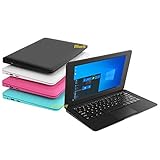
- We are Professional Computer laptop Seller Since 2009, Keep Improving Our Quality and Service Day After Day
- Intel Quad Core Z8350 CPU, 2GB RAM 32GB Storage,Support TF card up to 256GB, Enough space and fast speed, make life easier
- Customized large capacity battery 6000Mah, able to watch video for 4-5 hours continuously
- 10.1 Inch FHD display provides an excellent experience for watching Videos, youtube, facebook, twitter, netflix, surfing in internet...
- An Optical Mouse and Charger and Keychain Light Included, All just 1.2kgs, fit it in your bag and easy to carry
Keep Windows 10’s lifecycle separate from utility compatibility
Windows 10 support ended on October 14, 2025. Microsoft says that after this date it no longer provides free software updates, technical assistance, or security fixes through Windows Update. That OS lifecycle status is separate from whether an individual program may still launch; it does not resolve Process Explorer v17.14 compatibility. See Microsoft’s Windows 10 end-of-support notice.
A broader Sysinternals reference
For readers who want a physical reference covering more than one utility, Microsoft Press lists Troubleshooting with the Windows Sysinternals Tools, 2nd Edition, published October 17, 2016. It includes in-depth coverage of Process Explorer and Process Monitor, but its publication date means it should not be treated as a guide to current versions. The book is optional; it is not needed to use Process Explorer. Microsoft Press book listing.
Quick Recap
Best Value
Rank #3
Product prices and availability are accurate as of the date/time indicated and are subject to change. Any price and availability information displayed on Amazon at the time of purchase will apply.

