
What’s actually slowing this PC down?
Pick the symptom - the matching free tool is one click away.
iTechGuides is reader-supported. When you buy through links on our site, we may earn an affiliate commission. As an Amazon Associate I earn from qualifying purchases. Learn more
A PCIe 6-pin GPU power plug is commonly rated for 75 W, and an 8-pin for 150 W; a 6+2 cable can fit either matching socket. The newer 12V-2×6 is a 16-pin revision that replaces 12VHPWR. Those connector ratings do not tell you which power supply or cable your graphics card needs: check the GPU requirements and the exact PSU model’s cable compatibility before connecting anything.
How do I identify the GPU power connector?
| Connector | What it is | What to check |
|---|---|---|
| PCIe 6-pin | Auxiliary GPU power plug, commonly rated at 75 W, according to Corsair. | Do not treat it as an 8-pin substitute; use the connection specified by the graphics card maker. |
| PCIe 8-pin | Auxiliary GPU power plug, commonly rated at 150 W, according to Corsair. | Check the GPU’s required plugs and the PSU manual; use a native 8-pin lead when the card calls for one. |
| PCIe 6+2-pin | A PCIe GPU cable plug with a detachable two-pin segment, so it can fit a six-pin or eight-pin GPU socket. | Make sure the cable is a PCIe GPU lead, not the similar-looking EPS/CPU power lead. |
| 12VHPWR | A 16-pin (12+4) high-power connector. | Use a cable or adapter specified for the particular GPU and PSU; seat it fully and route it without stressing the plug. |
| 12V-2×6 | A 16-pin (12+4) revision that replaces 12VHPWR in PCIe CEM 5.1. | Although MSI describes the older and newer connectors as visually identical and downward compatible, verify PSU-side cable compatibility for your exact unit. |
The 75 W and 150 W figures are commonly cited connector ratings, not recommended GPU power budgets or PSU sizing rules. A connector rating alone does not establish a card’s total power needs.
What is the difference between 6-pin, 8-pin and 6+2-pin?
6-pin and 8-pin
The key practical difference is the commonly cited rating: 75 W for the 6-pin and 150 W for the 8-pin. Use the connector the GPU manufacturer specifies rather than inferring that a six-pin lead can safely power an eight-pin socket. NVIDIA advises using a PSU with native 8-pin leads when the card requires them.
Do these 3 things before closing this tab:
1Scan for outdated or missing drivers - takes under a minute2Clear out junk files and repair common Windows errors3Fix the driver behind crashes, sound loss and screen glitches6+2-pin
The small two-pin piece attaches alongside the six-pin section to make an eight-pin plug; leave it detached for a six-pin socket. This is a shape-and-fit distinction, not permission to combine cables or use a CPU/EPS lead. The sources cited here do not establish a complete pin-by-pin wiring description, so do not rely on visual similarity to identify individual pin functions.
#1 Best Overall
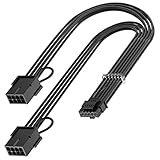
- 【16Pin GPU Power Cable for RTX 4070Ti】PCIE 5.0 16 Pin with dual 8 Pin Connector, this psu extension cable is mainly designed for Geforce RTX 4070Ti GPU which has the 16 Pin connector. Please Noted: This 16Pin sleeved modular cable is only suitable for 16pin GeForce RTX 4070 4070Ti 4070 Super Series GPU.
- 【Better Protect Your Graphic Cards】Made of alloy copper and tinned material, the plug terminals of the graphics card cable can bring more stable and higher currents with no heat on the plug and cable, which can avoid Graphic Card overheating due to the adapter is bent too much or frequently loose or connect. With 2X8Pin connector, the gpu extension cable can support 400W to 450W output, peak power up to 450 Watt.
- 【Stable Voltage Transmission with 16AWG Tinned Copper Wire】Using with the upgraded 16AWG tinned copper wire, this PCIE 5.0 extension cable can ensure more stable voltage transmission and higher power output, up to 450W. Unlike the original thick and stiff power cord, this GPU extension cable adopts the high-density flexible protective sleeve and nylon braided fiber.
- 【Neat and Space Saving】With the length of 14 inches, the 2x8 Pin psu extension cable enable you to have more room to create a more neat and tidy computer system for those tight or smaller cases. The included 4 transparent cable comb acrylic clips can help you better mange the extension cord for a clean look of your computer system.
- 【Warm Tips before your Purchase】Your package will include 1 Pack 16pin(12+4) to 2x8pin PCIE 5.0 12VHPWR adapter sleeved extension cable(13 Inch-Black). As a newborn brand, we care customer most.Provide high quality products and prompt customer service is our goal. If you receive any defective chargers or have any other problems of our products, please feel free to contact us.
Is 12VHPWR the same as 12V-2×6?
They are related 16-pin GPU power connectors, but 12V-2×6 is the later revision. PCI-SIG’s August 31, 2023 change notice says: “This connector, defined in CEM 5.1, replaces the 12VHPWR connector.” MSI says both are 16-pin (12+4), have the same maximum power output, and are visually identical and downward compatible. That does not make every PSU cable interchangeable: PSU-side modular sockets and cable support depend on the specific power supply.
Some manufacturers advertise their own 12V-2×6 cables for up to 600 W. For example, ASRock and Seasonic list that maximum for their respective cables. It is a product cable rating, not a guarantee that a particular GPU, PSU, or system supports 600 W.
Rank #2

- 『12VHPWR Cable Extension』Designed for converting 16pin(12+4) port to dual 8pin(6+2) male port;
- 『16 Pin - Dual 8P(6+2)』16 Pin(12+4) female end to plug into the PCIe 16 pin output cable of your power supply(Note: This is conversion cable, Not modular cable.) and two PCIe 8 pin(6+2) male ends to plug into the video graphics card.(The 8 pin (6+2) ends could be used as 6 pin or 8 pin end by sliding on/off the 2 pin.);
- 『Compatibility』Works with all PSUs which has original 12VHPWR output pcie cable, such as: for Seasonic CORE GX650/750/850 ATX3/ for Seasonic FOCUS GX750/GX850/GX1000 ATX3. For Corsair SF1000L/ TX1000/ 850/ 750 ATX3/ for Corsair HX1000i/1200i/1500i ATX3.1. For PHANTEKS AMP GH1000/ 850/ 750/ 650 ATX3.1.
- 『Parameter』Length(including connectors): 7 in(18cm), Gauge: 1007-16AWG(standard tin-coating copper wire, supports up to 600W output), Quantity: 1pcs, Self-adhesive tape*1pcs;
- 『Note』This cable is conversion cable, Not modular cable. Please refer to the 6th photo about how to use it;
Can I use a 6-pin-to-8-pin adapter?
NVIDIA advises against using a 6-pin-to-8-pin adapter as a general fix and recommends a PSU with native 8-pin leads. It warns that a dual-6-pin-to-one-8-pin adapter could damage the computer. NVIDIA says a single-6-pin adapter may work only if the PSU manual confirms that the rail can carry the 150 W rating of an 8-pin lead. If that documentation is absent or unclear, do not use the adapter.
How do I check PSU and GPU cable compatibility?
- Read the graphics card’s power requirements. Note the connector type and number of plugs specified by its manufacturer; do not size a PSU from the connector rating alone.
- Identify the exact PSU model. For a modular PSU, consult the PSU maker’s manual or compatibility list for cables approved for that model. Modular cables that look alike are not necessarily interchangeable.
- Check the cable’s model list and PSU-side sockets. For example, Seasonic says its listed 12V-2×6 cable works only with specified PSU models and requires two available PSU-side 8-pin CPU/PCIe sockets.
- Fit and route the connector according to its maker’s instructions. ASRock says to fully insert and click-lock its documented 12V-2×6 cable, ensure the connector sits flush with the GPU socket, and avoid bending or applying force near the plug. Follow the instructions for your own cable and card.
- Stop if anything does not fit correctly. If the plug will not seat, the cable is under strain, or the PSU is not on the cable maker’s compatibility list, do not force the connection; check the model-specific documentation or use a verified compatible cable.
PCI-SIG lists Base Specification Revision 7.1 as approved on September 17, 2026, while its connector-specific 12V-2×6 replacement notice is dated August 31, 2023. Product cable lists and manufacturer instructions may change, so check the current documentation for the exact parts in your system.
Quick Recap
Best Value

- 【12VHPWR Cable Extension】It is Conversion Cable, NOT Modular Cable. 16pin(12+4) female to connect the male port of PSU 12VHPWR output cable; Dual 8 pin(6+2) male connector for graphics card PCIe port.
- 【PSUs Compatibility】Works with all PSUs which come with original 12VHPWR/12V-2X6 output PCIe cable, e.g. Corsair SF1000L/ TX1000/ 850/ 750 ATX3, Corsair HX1000i/1200i/1500i ATX3.1; Seasonic CORE GX650/750/850 ATX3, Seasonic FOCUS GX750/GX850/GX1000 ATX3.
- 【Dual 8 pin(6+2) male for GPU】Works with GPUs with PCIe 8Pin/6Pin Male connector such as RTX 3060/3070/3070 Ti/3080/4060/4070. *NOTE: NOT Compatible with GPU with 12+4 pin connector like RTX 4070 TI (Super), RTX 5070.
- 【Parameter】This 12VHPWR Conversion Cable is 6.8 in/17cm long. The cable with 16AWG Copper wire supports up to 600W output and ensures stable transmission capability.
Rank #4

- 【Notice before shopping】To order a correct 16pin(12+4) 12VHPWR adapter cable extension for your PSU and GPU, we recommend you had better confirm the RTX 5070 / 5070Ti / 4090 / 4080 / 4070ti / 3090ti GPU's requirement of the output wattage of PSU. If it is not suitable for your power supply or you are not sure what to choose, please feel at ease to connect with us. Don't plug and unplug by force
- 【RTX 5070Ti 5070 4090 4080 4070ti 3090ti】Fasgear PCIe 5.1 16pin (12+4) male to 2x8 pin female sleeved extension 12v-2x6 GPU cable is made for GeForce RTX 5070, 5070 ti, 4090, 4080, 4070 ti, 4070 (only for 16pin interface), 3090 ti GPU. That means, this cable can extend the length and work well with the original power cable to get stable and reliable performance. 【NOTE】 This GPU sleeved extender cable is not compatible with the GPU with 12pin or 8pin power connector, such as GeForce RTX 3090 and 8pin RTX 4070 GPU
- 【Up to 600W Output】Fasgear 12v-2x6 PSU adapter extension cable supports up to 600W output. The plug terminals of the graphics card cable are made of alloy copper and tinned material, which can bring stable and higher currents. NOTE: This extension cable requires 2 unoccupied 8-pin PCI-e ports on your power supply to properly function. Connecting fewer than two connectors to your power supply may cause system damage. For RTX 5080, 5090 series, it is recommended to use 3x8 pin or 4x8pin for higher stability
- 【Neat and Tidy】Fasgear 30cm 16pin gpu cable to 2 x 8 pin GPU riser extension cable, compared with the original 10cm power cable, can make your DIY computer system neat and tidy. With 4 transparent cable comb acrylic clips, it is convenient for you to manage this sleeved extension cable cord. Thus, this extension cable can make the appearance of the computer system more beautiful
- 【16AWG Tinned Copper Wire】Fasgear PCI-e 5.1 extension 12vhpwr cable contains 16AWG tinned copper wire. Compared with the standard 18AWG power cord, this updated 16AWG tinned copper wire can bring stable voltage transmission and higher power output. Meanwhile, this tinned copper can prevent oxidation. As for the 12+4pin connector, 2 of 4 pins are connected with power wires while another 2 pins are GND wires.
Rank #3

- 40 SERIES READY: Powers an NVIDIA 40 Series GPU with an existing NZXT ATX 2.X PSU—no ATX 3.0 required.
- 600W RATED: Delivers up to 600 watts of power to graphics cards with a 12VHPWR port.
- CONNECTORS: 12+4-pin (16-pin) 12VHPWR goes to the GPU, and dual 8-pin PCIe goes to the PSU.
- COMPACT CABLE: Replaces the bulky standard adapter that comes with NVIDIA 40 Series GPUs.
- NZXT COMPATIBILITY: Guaranteed for use with all NZXT C-Series Gold ATX 2.X PSUs (PA-xG1BB).
Product prices and availability are accurate as of the date/time indicated and are subject to change. Any price and availability information displayed on Amazon at the time of purchase will apply.

