
Do these 3 things before closing this tab:
1Fix the driver behind crashes, sound loss and screen glitches2Repair Windows errors before they cause bigger problems3Scan for outdated or missing drivers - takes under a minute“ORICO dual offline clone” usually refers to a family of dual-bay SATA docking stations that can copy one drive to another without a computer. Before starting, identify the exact model and its bay labels: the clone overwrites the target drive, and the ORICO DD18/DD28 manual says the target must be larger than the source.
Which ORICO model do you have?
There is no single product named “ORICO dual offline clone.” ORICO sells multiple dual-bay models with standalone cloning, and features vary by model and revision. Check the model number on the dock, its label, packaging, or manual before relying on a capacity, speed, or button sequence. ORICO’s dual-bay product catalog lists multiple models.
| Model | Drive type | Host connection | Offline clone | Model-specific notes |
|---|---|---|---|---|
| 6626C3-C | 2.5- and 3.5-inch SATA HDDs and SSDs | USB-C | Yes | ORICO’s official page lists 10Gbps and 40TB total; its retail page lists 6Gbps and 36TB total, up to 18TB per bay. Confirm the specifications for the exact regional listing or revision. |
| 6626C3-C-V1 | 2.5- and 3.5-inch SATA HDDs and SSDs | USB-C | Yes | ORICO lists 5Gbps, 44TB total and 22TB per bay for this revision. |
| 9628C3-C | 2.5- and 3.5-inch SATA HDDs and SSDs | USB-C | Yes | Container-style design; ORICO lists USB 3.2 Gen 2, 40TB total and 20TB per bay. |
| DD28U3-C / DD28C3-C | 2.5- and 3.5-inch SATA drives | USB Type-B or Type-C, depending on revision | Yes, on the “-C” models shown in the manual | The DD18/DD28 manual gives a detailed clone procedure; it lists 5Gbps and 12V/3A power for the DD28 series. |
| 5628US3-C / 6228US3-C | 2.5- and 3.5-inch SATA drives | USB 3.0 Type-B | Yes | Older USB 3.0 family; check the individual model’s capacity limit. |
Listed link speeds describe an interface specification, not a guaranteed offline-cloning speed. The 6626C3-C differences are a reason to check the exact model, revision, and listing rather than assume one figure applies to every dock.
What offline cloning does—and does not do
In offline clone mode, the dock’s controller copies from its designated source bay to its target bay. No host computer or cloning application is needed during that operation. “Offline” means computer-free local cloning; it does not mean cloud backup or operation without power.
#1 Best Overall

- 【Full Compatibility】 HDD Docking Station supported 44TB(2*22TB) compatible with 2.5"/3.5" SATA I/II/III HDDs and SSDs; dual Bay hard drive docking Station includes 3ft (1m) USB-A cables and universal power adapter which can use in most places and is small in size and easy to use
- 【Offline Clone Hard Drive Duplicator】ORICO hard drive docking station supports an offline clone function, it can be used to clone an existing hard drive without connecting to a computer, easy to duplicate data from one to another hard drive by pressing the CLONE button for about 3 seconds. Please note the target disk must be larger than the source disk.
- 【Independent Power Supply】The SATA hard drive docking station with a highly efficient 36W(12V/3A) power supply, guarantees a steady uninterrupted transmission process for maximum durability. external hard drive dock is inactive for 10 minutes, saving energy by automatically sleeping in mode
- 【Devices Connect Freedom】This Dual-Bay hard drive enclosure is designed to work with a variety of devices including PCs, laptops, smart TVs, smart routers, and even PS4. It supports multiple platform operating systems such as Windows, Mac, Linux, iPad OS(Thunderbolt), and Android. With this versatility, you can enjoy seamless connectivity across all your favorite devices.
- 【High-Speed Protocol】USB 3.0 hard drive docking station supports UASP &Trim protocol with transfer speeds of up to 5Gbps; USB hard drive dock enables instant access to 2.5/3.5" SATA drives for file backup, disk imaging, or data transfer - Toolless design facilitates quick drive hot-swapping
Treat this as whole-disk duplication, not a file copy: you cannot choose individual folders in standalone mode. The ORICO manual documents the source-to-target process and warns that target data will be erased, but it does not promise file selection, bad-sector handling, filesystem repair, or post-clone verification. A clone may carry unwanted files or existing corruption along with the data you want. It is also not a versioned or off-site backup.
Check drive and capacity compatibility
- Interface: The SATA docks in this family are for SATA HDDs and SSDs. A 2.5-inch SATA SSD is compatible in principle; an M.2 NVMe drive is not.
- Size: The relevant models generally accept 2.5- and 3.5-inch SATA drives. Open-insert bays usually need no drive enclosure or mounting screws. A 3.5-inch HDD needs the dock’s external power adapter.
- SATA generation: The 6626C3-C retail listing says it supports SATA I, II, and III. Verify drive and capacity limits against your own model’s documentation.
- Target capacity: The ORICO DD18/DD28 manual says the target must be larger than the source. It does not describe shrinking partitions or copying only used space. Even drives sold as the same nominal capacity can differ in reported sector count, so choose a target with more capacity rather than relying on a same-size match.
Capacity limits are model-specific. For example, ORICO lists 40TB total for the 6626C3-C on its official product page, while its retail page lists 36TB total and 18TB per bay; the 6626C3-C-V1 listing gives 44TB total and 22TB per bay. Those figures should not be generalized across ORICO’s range.
How to clone a drive with a DD28-series dock
The steps below follow ORICO’s DD18/DD28 manual for the DD28U3-C. Bay names and controls can differ, so check your own model’s manual before powering on. Cloning erases the target.
Rank #2
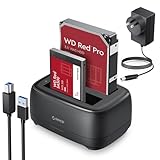
- 【Compatible 40TB Drives】: Hard Drive Dock compatible with 2.5"/3.5" SATA I/II/III HDD and SSD, support a maximum of 20 TB serial ATA hard drives; Hard drive bay includes 3ft (1m) USB-A cables and power supply which can be used in most places and is small in size and easy to use
- 【UASP Supported】: USB 3.0 external hard drive dock supports UASP &Trim protocol with transfer speeds of up to 5Gbps; External HDD reader enables instant access to SATA drives for file backup, disk imaging, or data transfer - Tool-less design facilitates hot-swapping
- 【Durability Dual Bay Docking Station】: 2 bay hard drive docking station with an efficient 36W 12V/3A power adapter, ensures the stability and maximum durability of the uninterrupted transmission process. SATA docking stations are inactive for 10 minutes, saving energy by automatically sleeping in mode
- 【Devices Connect Freedom】:This SATA Dual-Bay HDD dock is available for PCs, laptops, smart TVs, smart routers, and even PS4 devices. It supports Windows, Mac, Linux, Android, and other platform operating systems. With this versatility, you can enjoy seamless connectivity on all your favorite devices. {Note: Your phone should support OTG then support reading hard disk)
- 【Application Design】: The USB Hard Drive Docking Station adopts a dust-proof design and silicone anti-skid pad, Host Connection Tool-less Design - Hot-Swap - LED Indicators(Blue Reading, Red Transfer File)
Before you start
- Back up any data on the target drive that you need to keep; assume it will be erased.
- Confirm that the target is larger than the source and that both drives are SATA.
- Disconnect the dock’s USB data cable from the computer; the documented offline process does not require a host connection.
- Identify the source and target bays using the labels on your dock or manual. Do not assume left or right is the same across models.
- To reduce the risk of mixing them up, check drive labels or identify the drives in PC mode before disconnecting them.
Run the clone
- Connect the correct ORICO power adapter.
- Insert the drive to be copied into the source bay. On the DD28 procedure, this is HDD 1.
- Insert the disposable or blank target drive into the target bay. On the DD28 procedure, this is HDD 2.
- Turn on the dock and move its mode switch to CLONE.
- Press and hold the power/start button for about five seconds.
- Wait for all indicators to illuminate and for the long beep that signals cloning has started.
- Keep the dock powered and stationary. Do not remove either drive or turn off the dock while cloning is in progress.
- Wait for the progress indicators to complete. The DD28 procedure uses three long beeps to signal completion.
- Turn off the dock before removing the drives.
These indicator and button details are model-specific. If your unit’s manual gives different instructions, follow that manual.
The Tool Desk
Outbyte PC Repair FREERepair Windows errors before they cause bigger problemsFix Now →Outbyte Driver Updater FREEFix the driver behind crashes, sound loss and screen glitchesFind Drivers →What to check after cloning
Do not assume that a completion signal proves every file is readable or that a replacement system drive will boot. The manual does not promise verification or boot repair. Keep the original drive unchanged while you check the target.
- Confirm that the target appears when connected to a computer and that expected partitions and files are present.
- If you are replacing a boot drive, test the target before relying on it as the only copy. A copied Windows disk, for example, is not guaranteed to boot just because the dock completed a clone.
- If the replacement does not boot, possible causes include an incompatible partition layout or firmware boot mode, encryption, recovery partitions, or a source that was not copied as a bootable whole disk. A software tool with partition-resizing and boot-repair options may be better suited to a mission-critical migration.
- Do not erase or repurpose the source until the target has been checked and, where relevant, has booted successfully.
Troubleshooting common problems
The dock does not detect a drive in PC mode
ORICO’s manual troubleshooting list suggests checking the data cable and power-adapter connections, confirming the power LED, trying another USB port or cable, and, where applicable, trying a USB 2.0 printer-style cable or a suitable different 12V adapter. It also suggests checking whether the drive has been initialized or formatted. Do not initialize or format a drive that contains needed data just because the computer cannot read it: the cause could be partition damage, encryption, an unsupported filesystem, or drive failure.
Rank #3

- 【High-Speed Chip】- 2.5 Inch/3.5 Inch ssd dock hdd dock dual Bay docking station support UASP&Trim transmission protocol and transfer rate is 5Gbps. 1m Ultra-long USB C and USB A 2 in-1 interface data cable
- 【Easy to Use Clone】- Drive Bay offline clone only needs plug-in power supply, Put your hard disk in the right position. Note: “TARGET DISK CAPACITY > SOURCE DISK”. slide the switch to clone made and press the "start" button for 5 seconds then all indicator lights are on
- 【Powerful Function】 - Hard Drive Cloner support Offline Clone Dual 22TB Ultra-Large capacity simultaneous transmission with LED indicator light monitoring. After work 10 min Auto Sleep energy saving
- 【Multi Compatibility】- Hard Drive Enclosure support Windows /Mac /Linux/i Pad OS/Android System and PC, Laptop, Smart TV, Smart Router, PS 4/5 Switch Devices, and more
- 【Innovative Design】- Hard Drive Toaster surface Dust-proof silicone Non-slip base design can face multiple workplaces and is small in size and easy to use
The clone will not start or the target seems too small
Check that the drives are in the correct bays, the dock is in clone mode, and the target has greater capacity than the source. If two drives have the same advertised size, their actual reported sector counts may differ. A target from a higher capacity class is the safer choice; software cloning that can resize partitions may be necessary when the available target is smaller.
The target does not boot
First inspect whether the expected partitions are present, and confirm whether the original system used UEFI/GPT or legacy BIOS/MBR. Boot repair, encryption, and vendor recovery partitions can complicate migration. Leave the original intact and use a software cloning workflow with suitable resize and repair features if the dock’s copy is insufficient.
What’s actually slowing this PC down?
Pick the symptom - the matching free tool is one click away.
A drive disconnects or the source appears to be failing
A loose fit, unstable or incorrect power supply, heat, movement during cloning, or a failing drive can interrupt a copy. The manual warns against turning off the dock or removing drives during cloning. If a source clicks, disappears intermittently, or is severely corrupted, minimize further reads and writes and consider professional recovery; a simple duplicator does not document recovery-grade bad-sector handling.
Rank #4

- 【6Gbps with UASP Accelerated】Our hard drive docking station designed with USB 3.2 type-c to c interface, supports up to 6Gbps max transfer speed and UASP accelerated transmission protocol, 70% Faster than conventional USB 3.0, supports S.M.A.R.T and TRIM.
Choose a SATA dock or an NVMe duplicator
“SSD” describes storage media, not one interface. Match the product to the drive connector and protocol:
- 2.5-inch SATA SSD or 2.5-/3.5-inch SATA HDD: Use a compatible SATA dock such as an ORICO dual-bay SATA model.
- M.2 SATA SSD: Do not assume a SATA dock’s open bay accepts it; it needs a compatible M.2 SATA enclosure or duplicator.
- M.2 NVMe SSD: Use a product specifically made for NVMe. ORICO lists the M2P2-C3-C for M-key NVMe drives in 2242, 2260, 2280, and 22110 sizes, with a listed 10Gbps USB connection. It is not a substitute for a 2.5-/3.5-inch SATA dock.
When an offline duplicator is—and is not—the right tool
A dual-bay SATA dock is useful for straightforward drive-to-drive duplication, occasional upgrades, or connecting two loose SATA drives to a computer. Many models also act as dual-drive docks in PC mode, where the computer can access the inserted drives.
Choose software cloning instead when you need to shrink partitions to fit a smaller target, selectively migrate data, schedule or incrementally back up, inspect logs, verify the result, or perform boot repair. If the source may be physically failing, a recovery-oriented workflow or professional help is safer than treating a basic duplicator as a recovery tool. ORICO describes some dual-bay units as both docks and standalone duplicators; its older-model listing covers the 5628US3-C and 6228US3-C USB 3.0 family.
Best Value

- 【UASP Supported】: USB 3.0 external hard drive docking station supports UASP &Trim protocol with transfer speeds of up to 5Gbps; External hard drive reader enables instant access to SATA drives for file backup, disk imaging, or data transfer - Tool-less design facilitates hot-swapping
- 【Compatible 22TB Drives】: 3.5 Hard Drive Dock compatible with 2.5"/3.5" SATA I/II/III HDD and SSD, support a maximum of 22 TB serial ATA hard drives; Sata dock includes 3ft (1m) USB-A cables and power supply which can be used in most places and is small in size and easy to use
- 【Devices Connect Freedom】:This SATA hard drive docking station is suitable to connect multiple devices,such as PCs, laptops, smart TVs, smart routers, and even PS5 devices. It supports Windows, Mac, Linux, iPad OS (Thunderbolt), raspberry Pi, and other platform operating systems. With this versatility, you can enjoy seamless connectivity on all your favorite devices. {Note: Your phone should support OTG then support reading hard disk)
- 【Durability Hard Drive Docking Station】: The SATA HDD drive dock with efficient 36W 12V/2A power ensures the stability and maximum durability of the uninterrupted transmission process. 3.5 hdd enclosure are inactive for 10 minutes, saving energy by automatically sleeping in mode
- 【Application Design】: The Hard Drive Docking Station USB3.0 adopts a dust-proof design and silicone anti-skid pad, Host Connection Tool-less Design - Hot-Swap - LED Indicators(Blue Reading, Red Transfer File);
Frequently Asked Questions
Can an ORICO dual-bay dock clone without a computer?
Yes, models with offline clone support can perform the duplication without a host computer. Confirm that exact feature and the operating steps in your model’s manual.
Can it clone an HDD to an SSD?
A SATA model can copy between compatible SATA HDDs and SSDs, provided the target meets the model’s capacity rule. The DD18/DD28 manual says the target must be larger than the source.
Does cloning delete the source drive?
The documented process copies from the source to the target and warns that the target is erased; it does not describe erasing the source.
Can an ORICO SATA dock clone an NVMe drive?
No. A SATA dock is not an NVMe duplicator. Choose a model specifically designed for the drive’s interface.
Can I use both bays as external drives?
Many dual-bay docks also expose their drives to a computer in PC mode when connected over USB. Check your model’s manual; PC mode is separate from standalone clone mode.
Quick Recap
Product prices and availability are accurate as of the date/time indicated and are subject to change. Any price and availability information displayed on Amazon at the time of purchase will apply.

