
iTechGuides is reader-supported. When you buy through links on our site, we may earn an affiliate commission. As an Amazon Associate I earn from qualifying purchases. Learn more
Nest Cam error C371 means the camera could not find or connect to the Wi-Fi network selected during setup. Google groups it with other Wi-Fi discovery and connection errors; the code alone does not identify a single cause or prove that the camera is defective. Work through the checks below, then retry setup in the app.
Fix C371 by checking these things in order
-
Quit the Nest app
Close the app before checking the network.
-
Confirm the Wi-Fi network has internet access
On a computer connected to your home Wi-Fi, load a webpage. On a phone, Google’s suggested check is to turn on Airplane Mode, enable Wi-Fi while Airplane Mode remains on, and then try loading a webpage. Turn Airplane Mode off when you finish.
-
Connect the setup phone to the selected network
Make sure Wi-Fi is enabled on the phone you are using for setup and that it is connected to the same network you select for the camera.
Special offer. See more information about Outbyte and uninstall instructions. Please review EULA and Privacy policy. -
Check the camera’s supported Wi-Fi bands
Confirm which Wi-Fi bands your camera supports. A camera that supports only 2.4 GHz cannot connect to a 5 GHz network. Do not assume every Nest Cam is limited to 2.4 GHz; check the specifications for your model.
#1 Best Overall
 Google Nest Cam Indoor (Wired, 3rd Gen) - Security Camera - 2025 - Snow
- Meet the smarter, sharper wired Google Nest Cam Indoor; with 2K HDR video and Gemini, it knows what to look out for and what to do next[1,2,3](Gemini features require a Google Home premium subscription; try it for 1 month at no cost to you)[4]
- With an Advanced subscription to Google Home Premium, know more about what’s happening with notifications like “Kids are playing soccer in the living room”[3]; and get even more detailed descriptions and tap to see a summary of what happened[3]
- Google Nest Cam Indoor keeps your data safe with encrypted video, two-step verification, and enhanced security through your Google Account; and a green LED light lets you know when it’s processing or streaming video
- Video is crisp and clear in 2K HDR, Nest Cam’s highest resolution yet[1,2]; see rich color and details, and see in the dark with night vision; and with a wider, taller field of view, you can see even more of a long hallway or large room[1]
- Search your video history with help from Gemini[3]; try something like “What happened to the vase in the living room?” to see a summary and relevant clips (subscription required)
-
Restart the camera
Restart the camera before trying setup again.
-
Retry setup in the app
Open the app and run the setup process again.
If C371 still appears
Repeat the checks, paying particular attention to the network selected in the app, the phone’s Wi-Fi connection, and the camera’s supported band. Google’s C371 guidance does not identify one further cause or prescribe a hardware purchase. If setup continues to fail after these checks, contact Google support for model-specific help rather than treating the code alone as proof of camera failure.
Quick Recap
Best Value

- Nest Cam has built-in intelligence and can tell the difference between a person, animal, and vehicle and send alerts directly through the Google Home app[1], no subscription required.Controller Type:Google Assistant.Connectivity protocol:Bluetooth;Wi-Fi.Power source type:Battery Powered.Operating Temperature : –4°F to 104°F (–20°C to 40°C).
- Easily check in from anywhere 24/7 with 1080p HDR video[1] with night vision, and see what you missed with 3 hours of free event video history[2]; add a Nest Aware subscription (sold separately) for up to 60 days of video history[3]
- If your Wi-Fi goes down or there’s a power outage, Nest Cam will store up to an hour of recorded events so you can see what you missed[4]. Nest Cam Outdoor comes with a wall plate that can be mounted on your brick wall.
- Put Nest Cam anywhere, outside or in; it’s battery powered, so you don’t need to set it up near an outlet, and the magnetic mount makes installation effortless
- For continuous power and 24/7 video recording with Nest Aware Plus, add a weatherproof power cable or indoor stand with power cable (both sold separately)
Rank #4
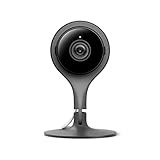
- 24/7 live stream video in full 1080p HD over Wi-Fi. Check in from anywhere at anytime. Send clips to family or friends in 1920x1080 resolution.
- Night vision featuring 8 high-power infrared LEDs provide light for clear video in the darkest conditions.
- Mobile alerts and notifications let you know as soon as your camera spots activity. Take action or save the event for sharing later. 3-hour snapshot history makes sure you don't miss a thing.
- Industry-leading security means that your video feed and information is well protected. Enable two-factor authentication and take your account protection to the next level.
- Free trial of Nest Aware for 30-days. Experience 10-day video history intelligent alerts and activity zones. Keep the service starting at Dollar 6 per month for your Nest devices after the trial ends.
Rank #3

- Meet the smarter, sharper wired Google Nest Cam Indoor; with 2K HDR video and Gemini, it knows what to look out for and what to do next[1,2,3](Gemini features require a Google Home premium subscription; try it for 1 month at no cost to you)[4]
- With an Advanced subscription to Google Home Premium, know more about what’s happening with notifications like “Kids are playing soccer in the living room”[3]; and get even more detailed descriptions and tap to see a summary of what happened[3]
- Google Nest Cam Indoor keeps your data safe with encrypted video, two-step verification, and enhanced security through your Google Account; and a green LED light lets you know when it’s processing or streaming video
- Video is crisp and clear in 2K HDR, Nest Cam’s highest resolution yet[1,2]; see rich color and details, and see in the dark with night vision; and with a wider, taller field of view, you can see even more of a long hallway or large room[1]
- Search your video history with help from Gemini[3]; try something like “What happened to the vase in the living room?” to see a summary and relevant clips (subscription required)
Rank #2

- Nest Cam has built-in intelligence and can tell the difference between a person, animal, and vehicle and send alerts directly through the Google Home app[1], no subscription required.Controller Type:Google Assistant.Connectivity protocol:Bluetooth;Wi-Fi.Power source type:Corded Electric
- Easily check in from anywhere 24/7 with 1080p HDR video[1] with night vision, and see what you missed with 3 hours of free event video history[2]; add a Nest Aware subscription (sold separately) for up to 60 days of video history[3]
- If your Wi-Fi goes down, Nest Cam will store up to 1 hour of recorded events so you can see what you missed [4]
- Take action in an instant if something happens; talk and listen with the built in speaker and mic on your security camera or call your local emergency service directly from the Google Home app (Nest Aware subscription required)[5]
- Set up Activity Zones to receive phone notifications about specific areas of your home and know when familiar faces arrive (Nest Aware subscription required for familiar face alerts)[1,6]
Product prices and availability are accurate as of the date/time indicated and are subject to change. Any price and availability information displayed on Amazon at the time of purchase will apply.
Independent reader supportYour contribution helps us test, update, and keep practical guides available for everyone.
