
iTechGuides is reader-supported. When you buy through links on our site, we may earn an affiliate commission. As an Amazon Associate I earn from qualifying purchases. Learn more
Linear video editing assembles a program in a fixed, predetermined order—traditionally by copying selected footage from source videotapes onto a master tape. Because tape is accessed sequentially, changing an earlier scene can mean copying the scenes that follow it again. Non-linear editing lets editors access and rearrange clips without rebuilding the whole sequence.
What linear video editing means
“Linear” describes the order in which the finished program is assembled, not whether an editing screen displays a straight timeline. Adobe defines linear editing as editing video or audio projects “in a predetermined sequence from start to finish” (Adobe).
In the traditional tape-based method, an editor searches source footage, selects a segment, and records it onto a master tape in the order it should appear in the finished program. The final sequence takes shape as material is copied to that master.
Recommended Free Tools
How a tape-to-tape edit works
A classic setup uses a source machine to play the original tape and a recording machine to create the edit master. An edit controller may coordinate the machines. Since the source is searched by moving along the tape, the editor builds the program by recording selected material in its intended final order (Sony Professional).
#1 Best Overall
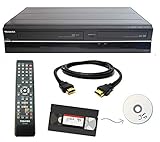
- Designed to easily transfer VHS tapes to DVD with the press of a button
- Convert tapes to DVD at home instead of shipping them off to a transfer lab
- Guaranteed 100% working, hassle free returns through Amazon
- Includes: remote, manual, HDMI and AV cable
- Bonus: includes blank DVDs, ready to start recording immediately
Assemble edits and insert edits
Sony identifies two types of linear edit: assemble edits and insert edits. Both are ways of recording material as part of the tape-editing process; the key distinction from non-linear editing remains that the program is assembled on tape in sequence.
Why revisions can take longer
In a tape-to-tape workflow, scenes are copied from one tape to another in the order they belong in the program. If an editor needs to add or remove a scene in the middle, the later scenes may need to be copied again so the master has the right sequence (Museum Victoria).
Rank #2

- 【Video to Digital Converter】Effortlessly convert and store analog video and audio signals into digital formats, Recording resolution up to 1080P 30Hz. Supports AV/RCA (CVBS+R/L), S-Video, and AUX inputs. Plug and play, No PC, Software, Driver Needed. NOTE: This is a Converter/Recorder/Capture box only, can NOT play with any tapes and DVDs independently.
- 【USB/SD Card for Storage】Equipped with a 3.0" preview LCD and built-in speaker. No capacity limitation for the USB drive or TF card (not included). Enables direct playback of recorded videos and audios, as well as preview snapshots on the capture box. For high-capacity USB storage devices, please ensure using its own power supply.
- 【Video & Audio Format】Store video in MP4 format or audio in MP3 format. Supports NTSC-M/J 3.58, NTSC 4.43, PAL B/G/H/I/D (PAL/N) standard TV formats input. Audio sampling rate up to 48KHz with uncompressed 2-channel LPCM digital audio output. Setup Reminders: Ensure either CVBS R/L (AV input) or AUX-IN (3.5mm) is properly connected. In settings (HOME -> Settings), verify Video-IN-Volume and AUX-IN-Volume are unmuted for the selected input.
- 【Broad Compatibility】Supports recording and digitizing video for VHS, VCR, DVR, DVD, Hi8, camcorders, Mini DV, Cassette Tape Player, and retro gaming consoles.
- 【What You Get】Video Recorder x1(Players Not included, Such as VHS, VCR, Camcorder, VHS, VCR, DVR, DVD, Cassette, Hi8, Mini DV Players, Camcorder, Gaming Consoles ), Power Adapter with USB type A to C Cable x1, Remote Control (2*AAA Batteries Not Included) x1, AV Cable x1, 3.5mm Audio Cable x1, User Manual x1 with a hassle-free 2-year warranty and lifetime technical support. Reach out to our friendly customer service for any questions.
That sequential dependency is the practical drawback of linear editing: an earlier change can affect work already recorded after it. The amount of rework depends on the edit and the equipment, so it is more accurate to say that subsequent material may need to be re-recorded than to assume every revision requires rebuilding the entire program.
Quick wins for a faster PC:
Repair Windows errors before they cause bigger problemsFix Now →Scan for outdated or missing drivers - takes under a minuteDriver Scan →Linear editing compared with non-linear editing
| Aspect | Linear tape editing | Non-linear editing |
|---|---|---|
| Accessing material | Footage is searched sequentially by moving along the tape (Sony Professional). | Clips can be accessed in a non-sequential order on a computer (MIT). |
| Building the sequence | Selected footage is copied to a master tape in final program order (Museum Victoria). | Clips can be selected, moved, shortened, lengthened, or removed in the editing system (MIT). |
| Making an earlier change | Later scenes may have to be copied again after an insertion or deletion (Museum Victoria). | An individual clip can be changed without rebuilding every subsequent clip (MIT). |
These are workflow differences, not claims that every historical tape system or modern editing application behaves identically. A modern editor can show clips on a linear-looking timeline and still be non-linear: the defining question is whether footage can be accessed and rearranged without copying the whole sequence forward onto a master.
Rank #3

- Designed to easily transfer VHS tapes to DVD with the press of a button
- Save on expensive VHS transfer services and convert tapes to DVD at home
- assured 100% working, hassle free returns through Amazon
- Includes -remote, manual, HDMI and AV cable
When linear editing gave way to non-linear editing
Linear editing was the common approach before computer-based non-linear editing became broadly available. Historical accounts place the change over a period rather than at one universal turning point: the British Film Institute describes the rise of non-linear tools from the late 1980s, while educational course material places computer-based NLE’s arrival in the early 1990s (BFI; DDE GJUST). Adobe says linear editing has largely been replaced by NLE.
Those sources establish the historical shift, not that tape-based linear editing has disappeared entirely. They do not provide a current adoption rate or establish how often it is used today.
Quick Recap
Best Value

- Record VHS to DVD or Digital Storage Without a Computer: Connect an external VCR or VHS player, Hi8 or MiniDV camcorder, or other compatible AV or HDMI sources, then record directly to DVD, USB drive, SD card, or external HDD. This recorder does not play VHS tapes by itself.
- All Recordings Saved as MP4: Every recording is saved as an MP4 file, including those recorded to DVD. Choose DVD for a physical copy, or save to a USB drive, SD card, or external HDD for digital storage and backup. Some older standalone DVD players may not support MP4 playback.
- Preview on the 4.3-Inch Screen and Watch on TV: Monitor video on the built-in 4.3-inch IPS LCD and hear audio through the built-in speaker while recording. Play recorded DVDs and compatible media on the recorder, or connect HDMI OUT to a TV or monitor for larger-screen viewing.
- Back Up Phone Photos and Videos with FriendlyMemories: Connect an iOS or Android phone directly to the recorder’s Wi-Fi hotspot and use the FriendlyMemories app to transfer supported photos and videos to connected storage—no computer or cloud storage required.
- Copy Files Without a Computer: Copy supported recordings, photos, videos, and other supported media files between DVD and an SD card or USB drive directly on the recorder. USB drives, SD cards, and compatible external HDDs must use FAT32 or NTFS; exFAT is not supported.
Rank #4
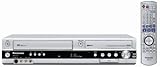
- Combo DVD recorder/VHS player recorder; measures 16.9 x 3.3 x 13.9 inches (WxHxD)
- Easy one-touch dubbing of DVD to VCR and VCR to DVD (non-copy protected sources)
- Records onto DVD-R/RW, DVD+R/RW, and DVD-RAM; plays back dual-layer DVD-R/+R and CD-R/RW
- Connections: composite (2 in, 1 out), S-Video (2 in, 1 out), component (1 out), RF (1 in, 1 out), Firewire (1 in)
- Optical digital audio out for Dolby Digital and DTS surround sound
Product prices and availability are accurate as of the date/time indicated and are subject to change. Any price and availability information displayed on Amazon at the time of purchase will apply.

