
Recommended Free Tools
iTechGuides is reader-supported. When you buy through links on our site, we may earn an affiliate commission. As an Amazon Associate I earn from qualifying purchases. Learn more
HP’s reported “up to 42 hours” for the 14-inch OmniBook 5 refers to local video playback—not ordinary mixed work, web browsing, video calls, or streaming. The independent test available for comparison was performed on a different, 2025 Snapdragon version: PCWorld measured more than 25 hours of video playback and said HP’s separate 34-hour figure for that tested model did not match its result. That is impressive endurance, but it does not verify runtime for the newer Intel model associated with the 42-hour claim.
What the 42-hour claim measures
Tom’s Hardware reported that the 14-inch Intel OmniBook 5 is rated for up to 42 hours of local video playback. The wording matters: “up to” describes a maximum under a particular workload, not a promise that the laptop will last that long in every situation. Local playback also differs from streaming, which uses wireless networking, and from a day of mixed work with applications, calls, and background activity.
The precise test conditions and fine print for the specific 42-hour configuration are not established by the available reporting. HP’s general battery-life guidance says results vary with the model and configuration, applications, features in use, wireless activity, power-management settings, and battery capacity as it declines with age. Those factors make a headline maximum a poor substitute for a test that matches how you use a laptop.
Quick wins for a faster PC:
Fix the driver behind crashes, sound loss and screen glitchesFind Drivers →Repair Windows errors before they cause bigger problemsFix Now →Scan for outdated or missing drivers - takes under a minuteDriver Scan →Source: Tom’s Hardware’s report on the 14-inch Intel OmniBook 5; HP’s general battery-life guidance.
#1 Best Overall

- [Powerful Performance with Intel Core 5 120U] Powerhouse Intel Core 5 120U 10-Core (Base Frequency 2.4 GHz, Up to 5.0 GHz with Intel Turbo Boost Technology, 12 MB Intel Smart cache, 10 cores (2P + 8E), 12 threads)
- [Customization] Seal is opened for Hardware/Software upgrade only to enhance performance. Upgraded to 8GB DDR5 SDRAM 5200 MHz, 512GB PCI-E NVMe Solid State Drive, No Built-in Optical Drive
- [Display and Graphics] Brilliant 14" Touchscreen LED-backlit WUXGA (1920 x 1200) IPS 300 nits, micro-edge, 62.5% sRGB, 60Hz, Thin Bezel LCD Display powered by Intel Graphics, 5MP + IR Camera with Privacy Shutter and integrated digital microphone
- [Connectivity] Intel Wi-Fi 6E AX211 (2x2) and Bluetooth 5.3, 2 x USB-C 3.2 Gen 2 (Power Delivery and DisplayPort 1.4 and Power-off Charging and 10Gbps), 1 x USB 3.2 Gen 2 (10Gbps), 1 x USB 3.2 Gen 1 (5Gbps), 1 x HDMI v2.1, 1 x Headphone/Microphone Combo Jack, 1 x USB-C Power Jack
- [Rock eDigital Feature] Windows 11 Home; Backlit Keyboard; Dual speakers; HP Audio BoostSpeakers; 68Whr 4-cell lithium-ion battery; 12.32 x 8.66 x 0.73 inches, 3.58 lbs; Glacier Silver; 45 AC Adapter, free Rock eDigital 32GB USB Drive
What an independent test found—and what it did not
PCWorld measured more than 25 hours of video playback on its 2025 OmniBook 5 14 review configuration. It also reported that HP’s up-to-34-hour figure for that tested model did not match its test. The result shows that this particular laptop delivered excellent endurance in PCWorld’s video test; it neither confirms nor disproves the 42-hour figure for the newer Intel model.
The two laptops are different configurations and generations. PCWorld’s review unit used a Snapdragon X Plus X1P-42-100 processor, a 59Wh battery, and a 14-inch 1920×1200 OLED display. The newer Intel laptop associated with the 42-hour claim was reported with a 60Wh battery. Different processors, screens, battery capacities, and test protocols mean the figures should not be compared as if they measured the same machine under the same conditions.
Rank #2

- 【 Intel Core 7 150U Processor】It is a high-end notebook CPU based on the Raptor Lake-U Refresh (RPL-U) series (Alder Lake architecture), which was introduced in January 2024. The CPU offers 2 performance cores (P-cores, Golden Cove architecture) and 8 efficiency cores (E-cores, Gracemont architecture). The P-cores support hyperthreading (therefore 12 threads together) and clock from 1.8 to 5.4 GHz. The E-cores clock from 1.2 - 4 GHz and should offer comparable performance to old Skylake cores.
- 【14.0 " (1920x1200) touch Display】Intuitive touchscreen technology lets you control your PC right from the screen. Transform your content with 1920 x 1200 resolution and 178-degree wide-viewing angles. Make taking notes, sketching, and editing easier by rotating the screen to tablet or tent mode. Multitouch-enabled, IPS (in-plane switching), edge-to-edge glass.
- 【Other features】Intel Graphics,Microsoft Copilot,Tuned stereo speakers,HP Audio Boost,HP 5MP IR Camera with HDR Switch, Backlit Keyboard, Windows 11 Home OS.
PCWorld described the Snapdragon review unit’s performance as adequate but not exceptional, in part because it used an entry-level Snapdragon X Plus chip. Battery endurance is only one part of the decision: consider whether the tested configuration’s performance and display suit your work as well.
The Tool Desk
Outbyte Driver Updater FREEScan for outdated or missing drivers - takes under a minuteDriver Scan →Outbyte PC Repair FREEClear out junk files and repair common Windows errorsFree Scan →Source: PCWorld’s OmniBook 5 14 review; Tom’s Hardware’s report.
Rank #3

- [Feature]: Slim, sleek, lightweight 2 in 1 design | Powered by 2026 AMD Ryzen AI 5 400 Series processors and a 50 TOPS NPU | Copilot+ PC | Long Battery Life Up to 24 hours and 30 minutes of battery life | HP 5MP IR camera with HDR auto-switch: Enhanced by AI Noise Reduction & Poly Studio Audio Tuning | Wi-Fi 7 (2x2) and Bluetooth 6.0 wireless card | DTS: X Ultra technology | Backlit keyboard.
- [Processor]: AMD Ryzen AI 5 430 processor with AMD Ryzen AI (50 NPU TOPS) (4 Cores, 8 Threads, 2.0 GHz Base, Up to 4.5 GHz, 12MB Cache ). Unlock powerful AI-driven experiences with a Copilot+ PC powered by an AMD Ryzen AI processor designed to enhance creativity, simplify and streamline your day, and give you valuable time back to do more; AMD Radeon 840M Shared Integrated Graphics.
- [Display]: 14" 2K OLED touchscreen - 1920 x 1200 resolution delivers incredible detail, wide-viewing angles, and lifelike color reproduction. And with touch, you can control your PC right from the screen.
- [Memory & Storage]: 16GB LPDDR5x-7467 MT/s Memory, 512GB PCIe Gen4 Solid State Drive (Boot SSD), Original Factory Box will be opened and resealed for Upgrade.
- [Other]: Weight Only 3.09 lbs | 0.57 Inch Thin | Windows 11 Home | Wi-Fi 7 AX211 (2x2) | 3-cell 65 Wh Li-ion polymer battery up to 24.5 hours Battery Life | HP Audio Boost 2.0 | 5MP IR webcam | HDMI 2.1 | Bluetooth 6.0 | 2 x USB-A 3.1, 2 x USB-C 4.
Keep the other OmniBook 5 battery figures separate
Battery numbers attached to the OmniBook 5 name do not necessarily describe the 14-inch Intel model. HP Tech Takes gives figures for a separate 16-inch Snapdragon OmniBook 5: up to 34 hours and an estimated 15–20 hours in typical everyday use. Neither is a specification or everyday-use estimate for the 14-inch Intel configuration.
| Figure | What it applies to | How to interpret it |
|---|---|---|
| Up to 42 hours | 14-inch Intel OmniBook 5, as reported by Tom’s Hardware in 2026 | Local video playback maximum; full test conditions are not established in the available reporting. |
| More than 25 hours | PCWorld’s 2025 Snapdragon OmniBook 5 14 review configuration | PCWorld video playback test result, not a test of the 42-hour Intel model. |
| Up to 34 hours | Separate 16-inch Snapdragon OmniBook 5 page from HP Tech Takes | Not a specification for the 14-inch Intel model; PCWorld also said HP’s 34-hour figure for its tested 14-inch Snapdragon model did not match its test. |
| 15–20 hours | HP Tech Takes’ typical-everyday-use estimate for its separate 16-inch Snapdragon context | Do not apply this estimate to the 14-inch Intel model. |
Sources: Tom’s Hardware; PCWorld; HP Tech Takes’ 16-inch OmniBook 5 guide.
Rank #4
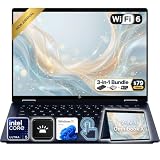
- Power Through Everyday AI Workflows — Powered by the Intel Core Ultra 5 226V processor with Intel AI Boost and 16GB LPDDR5x memory, this laptop delivers fast, responsive performance for multitasking, document creation, online collaboration, and AI-assisted productivity throughout your day.
- Storage That Grows with Your Needs — Available with upgraded PCIe SSD capacities, for business files, creative projects, photos, videos, and everyday productivity, while larger capacity options are available for users who need even more space.
- Immersive Touchscreen Flexibility — The 14-inch 1920×1200 IPS touchscreen delivers crisp visuals, responsive touch control, and more vertical workspace, while the 360° convertible hinge lets you switch easily between laptop, tablet, tent, and presentation modes.
- Built for Modern Hybrid Work — Stay productive anywhere with Wi-Fi 6E, Thunderbolt 4, HDMI 2.1, USB Type-C, and USB Type-A connectivity, making it easy to connect displays, accessories, docks, and other peripherals for work, school, or home office setups.
- Designed for Comfortable Everyday Productivity — A 5MP IR camera with privacy shutter, dual-array microphones, Poly Studio audio, full-size backlit keyboard, HP Imagepad, and fingerprint reader help create a secure, comfortable, and professional experience for meetings, studying, and daily work.
How to compare battery-life claims fairly
When comparing laptops, match the test workload and conditions rather than lining up headline hours. A useful comparison should identify:
- Exact model, processor, and configuration—not just the product family name.
- Display type and resolution, plus the brightness used in the test.
- Workload, such as local video playback, streaming, browsing, or mixed productivity.
- Wireless state and relevant power-management settings.
- Whether the test ran until shutdown or estimated remaining battery life.
- Battery age and condition, particularly when comparing a used laptop with a new one.
For a purchase decision, look for an independent result on the exact generation and configuration you plan to buy. If no matching test is available, treat a manufacturer’s maximum as a workload-specific claim rather than a forecast of your personal runtime.
What to conclude about the OmniBook 5
The 42-hour figure is a reported maximum for local video playback on the newer 14-inch Intel OmniBook 5. PCWorld’s more-than-25-hour result supports the strong endurance of a different, Snapdragon-based 14-inch configuration under its video test, but it is not a direct test of the Intel model. Expect your own runtime to depend on configuration and use, and do not treat the headline as a guarantee for a workday of mixed tasks.
Quick Recap
Product prices and availability are accurate as of the date/time indicated and are subject to change. Any price and availability information displayed on Amazon at the time of purchase will apply.

