
PC Slower Than It Used to Be?
A free scan shows the junk files, broken settings and background clutter dragging Windows down - then fixes them in one click.Free scan · Windows 10 & 11Outdated Drivers Are Slowing You Down
One free scan finds every outdated or missing driver and matches the right update for your exact hardware.Free scan · exact hardware matchiTechGuides is reader-supported. When you buy through links on our site, we may earn an affiliate commission. As an Amazon Associate I earn from qualifying purchases. Learn more
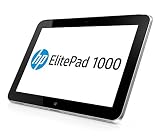
The HP ElitePad 1000 G2 is a light, well-equipped-for-its-era Windows business tablet, but it is not a sensible laptop replacement for most people today. Its sharp 10.1-inch display, security features and optional cellular connectivity can still suit field work, forms and legacy business software. The catch is that its 2014 Atom processor is modest, built-in ports are scarce, and the best experience may require a compatible jacket or dock.
What the ElitePad 1000 G2 is
Introduced in 2014, the ElitePad 1000 G2 is a 10.1-inch Windows tablet based on Intel’s low-power Bay Trail-T Atom Z3795. HP listed 4 GB of LPDDR3 memory and either 64 GB or 128 GB of eMMC storage. The base 4 GB/64 GB configuration had a $739 launch list price, according to InfoWorld’s December 2014 review; that is a historical launch figure, not a guide to current used-device pricing.
HP specified a 10.1-inch, 1920 × 1200 multi-touch display protected by Corning Gorilla Glass 3. The tablet starts at 0.68 kg and is 9.2 mm thick. The screen resolution and relatively light chassis still make it appealing for reading, viewing forms and carrying between locations, though the actual weight and capabilities can vary by configuration and accessories.
The Tool Desk
Outbyte PC Repair FREERepair Windows errors before they cause bigger problemsFix Now →Outbyte Driver Updater FREEFix the driver behind crashes, sound loss and screen glitchesFind Drivers →HP’s specification set includes enterprise-oriented security and manageability features, along with wireless options and useful cameras and microphones. Optional cellular connectivity is configuration-dependent: check the individual unit for its LTE module rather than assuming every ElitePad 1000 G2 can connect to mobile networks.
#1 Best Overall

- Atom Z3795 / 1.6 GHz
- 4 GB RAM
- 64 GB eMMC
- 10.1" touchscreen 1920 x 1200
- Windows 8.1 Pro 64-bit
Can it replace a laptop?
For basic, focused work, sometimes—but only with realistic expectations and, often, an accessory. The Atom Z3795 is a low-power processor from 2014. It can handle light tasks such as email, reading, forms and legacy business applications, but it is not suited to demanding spreadsheets, heavy multitasking or modern creative and workstation software.
InfoWorld columnist Woody Leonhard described the tablet as “more than adequate for light business use” but “underwhelming in power-hungry situations, such as dealing with a sizable spreadsheet” in his December 5, 2014 review. That assessment remains a useful guide to its intended workload, rather than evidence of how every modern application will perform.
Rank #2
- Intel Atom Z3795 @1.6GHZ
- 10.1"
- 128GB SSD
- WINDOWS 8 PRO
- Operating System Software: Windows Embedded 8.1 Industry Pro 64
A keyboard accessory can make longer typing sessions more practical, but it does not turn the old processor into a current laptop-class platform. If you need a primary computer for several demanding apps, current Windows software or broad built-in connectivity, choose a newer laptop or tablet instead. The ElitePad makes more sense as a secondary device or a specialized field terminal.
Ports and accessories: what you may need
The standard tablet has one system connector, a headset/microphone combo jack and microSD expansion. That sparse native I/O makes accessories central to the buying decision: a low-cost tablet without the jacket or dock you need may not be a low-cost working setup.
Rank #3

- , 10.1 inches Display
- Intel A-Series Quad-Core A10-4655M 1.6 GHz (2 MB Cache)
- 128 GB Flash Memory, 4 GB RAM Memory
- 12.66-hour battery life, 4.18 pounds
| Accessory | What it adds | Buying consideration |
|---|---|---|
| Expansion Jacket | Expert Reviews reported that it adds two USB ports, HDMI, a card reader and about six hours of extra battery life. The battery extension is that publication’s report, not a new independent test. | Useful when you need more ports or additional battery capacity. Verify the exact model and condition. |
| Productivity Jacket | Provides a keyboard-oriented option for typing and can add ports, depending on the specific version. | Check which functions and connections the included jacket supports; do not assume all jackets are interchangeable or offer identical features. |
| Dock | Can provide a more convenient desk setup with external connections, depending on the dock. | Confirm compatibility and included power or connection cables before buying. |
Accessories may be sold separately, and the tablet’s single system connector means the jacket or dock can determine whether it works for your routine. Compare the complete bundle cost—not just the tablet listing—with the cost of a newer device that has the ports and keyboard you need built in.
Battery life: original rating versus a used unit
HP lists a 30 Wh, two-cell lithium-polymer battery and advertises up to 13 hours of use with the tablet alone, or up to 21 hours 30 minutes with an optional base. Those are manufacturer maximum claims, not a guarantee of runtime in a particular workload. The Expansion Jacket’s roughly six-hour extension is Expert Reviews’ report, not an independently verified measurement here.
Rank #4
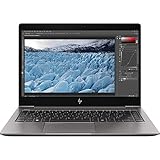
- HP 13.3" EliteBook x360 1030 G3 Multi-Touch 2-in-1 Laptop
- 1.9 GHz Intel Core i7-8650U Quad-Core
- 8GB of LPDDR3 RAM | 256GB PCIe SSD - Windows 10 Pro (64-Bit)
- 13.3" 1920 x 1080 BrightView Touchscreen - 1080p IR Webcam, Mics, and Speakers 360° Hinge
- 802.11ac Wi-Fi | Bluetooth 4.2 Gigabit Ethernet via Included Cable
More importantly for a used purchase, a battery from a 2014 device has had years to age. Its actual capacity and runtime can fall substantially below the original rating. Ask the seller about battery condition and return options, and test runtime promptly if possible. Treat an unverified “holds charge” claim as uncertain rather than as proof that the tablet will last through a workday.
Free tools Windows power users keep installed
One-click scans. No signup required.
Is it still worth buying?
It can be worthwhile as an inexpensive, purpose-specific Windows device if its condition and included accessories suit the job. Its strongest case is light field or office use: carrying a thin tablet for reading, forms, email or legacy software, with security and manageability features that may fit a managed environment. A sound battery and the right jacket or dock matter as much as the tablet itself.
Best Value

- Compatibility - Specifically designed for HP ElitePad 1000 G2 Tablet
- Long-Lasting Protection from Scratches, Bubble Free, Significantly Reduces Dust, Oil & Fingerprint Smudges
- Exceptionally Clear & Smooth Glass-Like Surface
- Self-Healing Technology & Military Grade Material Designed to be Ultra Tough for your device
- ArmorSuit Lifetime Replacement Warranty *Made in the USA*
It is a poor choice for buyers who want current laptop performance, heavy multitasking, modern creative applications or ample built-in ports. Because no current used price is established here, judge value against the whole setup and the risks of an aging device—not against its original $739 launch list price.
Check these details before buying used
- Confirm whether the unit has 64 GB or 128 GB storage and check its overall condition.
- Ask whether it has an LTE module if cellular connectivity matters; verify the module rather than relying on a generic listing description.
- Get a clear account of battery health, charger inclusion and any charging problems.
- Identify the exact Expansion Jacket, Productivity Jacket or dock included, and confirm that it is compatible and functional.
- Check which Windows installation is on the unit, whether it activates, and whether the drivers and software you need work with it.
- Review the seller’s return policy. Factor possible battery or accessory replacement into the total cost.
How to compare it with another used Windows tablet
Do not compare on screen size or asking price alone. For this older device, the useful comparison is the working package you can actually buy:
- Performance: Compare sustained CPU capability for your actual applications, not just basic startup or browsing.
- Display: Consider resolution, viewing quality and touch condition.
- Connectivity: Count built-in ports and confirm whether cellular hardware is present.
- Complete setup cost: Include the keyboard, jacket, dock, charger and any replacement battery needed.
- Support and repair: Check Windows and driver compatibility, battery availability and practical repair options.
- Condition and risk: Weigh battery health, seller transparency and return terms against the listed price.
The ElitePad’s more persuasive differentiators are business manageability and a modular accessory ecosystem. Its weaker argument is modern performance for the money: an older used unit can appear cheap until the required accessories or battery are added.
Do these 3 things before closing this tab:
1Fix the driver behind crashes, sound loss and screen glitches2Clear out junk files and repair common Windows errors3Scan for outdated or missing drivers - takes under a minuteQuick Recap
Product prices and availability are accurate as of the date/time indicated and are subject to change. Any price and availability information displayed on Amazon at the time of purchase will apply.

