
Crashes, No Sound, or Screen Glitches?
Random freezes, missing sound and display glitches usually trace back to one bad driver. Find and replace yours safely.Free scan · under a minuteWindows Errors? Fix Them Before They Spread
Repair common Windows errors and clear accumulated junk for a smoother, more stable PC - no reinstall needed.Free scan · no reinstalliTechGuides is reader-supported. When you buy through links on our site, we may earn an affiliate commission. As an Amazon Associate I earn from qualifying purchases. Learn more
To capture a password-protected page with ScreenshotOne, use the authentication method the site supports: send an authorization header, pass a valid session cookie, or—if you control the site—configure access for ScreenshotOne’s rendering servers. The API cannot grant access you do not have; the target site must accept the credentials and permit the request.
Choose an authentication method
ScreenshotOne’s guide documents three approaches. The right one depends on the target site’s login design and whether you can change its configuration. These are ways to render a page you are authorized to access, not ways to bypass another person’s account or a site’s access controls. See ScreenshotOne’s authenticated-pages guide and its options reference.

| Method | Use it when | What you need |
|---|---|---|
| Authorization header or custom header | The site accepts a token, basic authentication, or another supported header. | A valid credential and the header format expected by the site. |
| Session cookies | The site authenticates an already signed-in browser session with cookies. | Valid cookies, including the applicable domain and path attributes; you may need your own sign-in code to obtain them. |
| Site-side access configuration | You own or administer the site and can change its authentication or firewall configuration. | Server-side access changes that allow ScreenshotOne’s rendering request. ScreenshotOne describes this as complicated, not a one-click option. |
Use a header for token or basic authentication
If the site accepts an authorization token or basic authentication, use ScreenshotOne’s authorization option. For a site-specific header name, use the general headers option. Confirm the exact scheme and header name with the site you control or its documentation; a token accepted by one site may not work on another.
Use cookies for a browser session
For cookie-based login, first obtain a valid session from an authorized sign-in flow. Preserve the cookie name and value and the relevant attributes, especially its domain and path. ScreenshotOne notes that you may need to write your own sign-in code to obtain cookies. Its documented cookie approach assumes the target site is your own or does not block automation.
#1 Best Overall

- Ergonomic Vertical Shape: This wireless mouse is engineered to align your wrist and forearm in a biomechanically efficient position, minimizing muscular strain and improving long-term comfort compared to conventional designs
- Quite Clicker and Ultra-fast Scrolling Metal Wheel: The smart wheel offers both precision and fast-scrolling modes, allowing you to scroll smoothly—perfect for detailed editing or quickly browsing long documents. The left and right buttons feature quiet clicking to minimize distractions and help maintain focus while working
- Shortcut Control Knob: This wireless mouse features a built-in full-color LED display with 10 pre-programmed shortcut functions, including one-click screenshot, one-click show desktop, one-click task view, one-click volume adjustment, one-click brightness adjustment, one-click page up/down, one-click zoom in/out, and one-click horizontal scrolling in spreadsheets. Please note that these functions are factory preset and cannot be customized. Designed to boost productivity, it simplifies complex operations, saves time, and makes daily work more efficient and convenient. How to use: Select and activate functions using the top rotary dial and confirmation button. (Not supported on macOS.)
- Pair with 3 Devices Simultaneously: This ergonomic wireless mouse supports dual Bluetooth 5.0 and 2.4GHz USB connectivity, allowing you to link up to three separate devices at once. It works seamlessly with Windows 8/10 and above, macOS X 10.12 or later, and Android 4.3 or newer
- 5 Adjustable DPI & Rechargeable Mouse: Switch between 800, 1200, 1600, 2400 and 4800 DPI settings for more accurate tracking and enhanced responsiveness compared to standard optical mice. The wireless vertical mouse is rechargeable and does not require additional batteries, saving the cost of purchasing batteries.
Configure access on a site you control
If header authentication is unsuitable and you administer the target, you can configure the site’s authentication or firewall to allow the rendering request. This requires a change on the site side and appropriate server access. Do not treat it as a workaround for access restrictions on a site you do not control.
Prepare credentials and send the request safely
A ScreenshotOne request needs an access_key. Its documentation supports sending that key in a query string, JSON body, or X-Access-Key header. Keep API keys, authorization values, and cookies secret: ScreenshotOne advises using HTTPS because HTTP does not encrypt these values in transit. Store keys in environment variables or a secrets manager rather than source control, and do not expose unsigned screenshot URLs that contain a key publicly. See the getting-started guide and API-key guidance.
Rank #2

- Unique Integrated Universal USB-C dock: TobenONE innovated and developed this 10-in-1 multifunctional USB C hub. It seamlessly combines a 10-in-1 docking station, RGB Light, Volume Knob, 4x Shortcut Buttons, make your RGB USB-C hub different from the rest, small enough not to clutter the desk but substantial enough to feel stable
- 10-IN-1 USB C Hub: It has 10 interfaces, including a HDMI port for 4K@60Hz high-definition display(meeting the professional needs of programming, video editing, etc); a PD charging port(with a power output of 90W, offering you stable usage); a Gigabit Ethernet port ensuring stable network performance for streaming media; video conferences, gaming, etc; an SD/microSD card reader, USB C 3.0 & 2x USB 3.0 for convenient file/photo transfer; a 3.5mm audio jack for headphone, speaker and microphone
- Convenient Shortcut Buttons: This TobenONE laptop hub integrated with 5 shortcut buttons and 1 knob, it can achieve functions such as quickly locking the computer, controlling the monitor's on/off switch, taking screenshots with one click, adjusting the lighting, smoothly adjusting the volume, and muting. Shortcut-key dock add real value for workflow shortcuts.
- 100W Power Adapter Included: The laptop dock station included a 100W power adapter, offering a reliable and high - performance solution for charging your Type - C laptops. It support up to 100W of power input, 90W of power output. This ensures not only rapid charging but also the utmost safety for your valuable devices, striking the perfect balance between performance and protection
- Wide Compatibility and Versatile Applications: It is fully compatible with full-featured USB C Windows laptop and MacBook(including Dell, HP, Lenovo, Surface, Asus, Acer, MacBook Pro, MacBook Air), It also partially compatible with iPhone 15 series, Type-C mobile phones, Steam Deck, Mac mini, iPad, etc., meeting the device connection needs of different users. It features a plug-and-play design, just plug in the device and start using it. It's convenient for enhancing work efficiency anytime, anywhere
Example: send a custom authorization header
The following cURL pattern sends a token in a header. Replace the placeholders with credentials for a site you are authorized to access, and use the header format that site requires. The url and headers values are request parameters; encode them correctly if adapting this to another client.
curl -X POST "https://api.screenshotone.com/take"
  -H "Content-Type: application/json"
  -H "X-Access-Key: YOUR_SCREENSHOTONE_ACCESS_KEY"
  -d '{
    "url": "https://example.com/private/dashboard",
    "headers": {
      "Authorization": "Bearer YOUR_SITE_TOKEN"
    }
  }'
  --output dashboard.png
For a different header name, replace Authorization with the name the target site expects. If using ScreenshotOne’s documented authorization option for basic authentication or a token, follow the current options reference for its accepted request format.
Rank #3
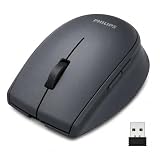
- USB-C RECHARGEABLE, USE WHILE CHARGING – Built-in rechargeable battery with a front-mounted USB-C port, so you can keep working even while it charges. No more buying or replacing disposable batteries. One charge lasts up to 6 months of daily use – practical for office, home, and travel.
- SEAMLESS 3-DEVICE SWITCHING with One press of the round mode button on the bottom – Connect via Bluetooth or the included 2.4GHz USB receiver, and pair up to 3 devices at once. One press of the round mode button on the bottom of the mouse switches between connection modes . Quick tip: if the cursor doesn't move, press the mode button once to match your connection – it solves it in a second.
- 5 PROGRAMMABLE BUTTONS FOR PRODUCTIVITY – Forward/back side buttons make web browsing and research faster, and on supported systems you can customize buttons for copy, paste, screenshots, and app shortcuts – streamlining office work, study, and everyday multitasking.
- SILENT CLICK & ALL-DAY COMFORT – Quiet buttons keep shared offices, libraries, classrooms, and late-night work sessions disturbance-free. The contoured right-hand shape with a soft-touch Morandi finish gives a secure, comfortable grip through hours of use.
- ADJUSTABLE DPI & BROAD COMPATIBILITY – Switch between 3 DPI levels up to 1600 for smooth, accurate tracking across different surfaces – from spreadsheets to presentations. Works with Windows, macOS, iPadOS, iOS, and Android. Note: USB-C-only devices connect via Bluetooth directly, or with a USB-A adapter for the receiver.
Example: send session cookies
Cookie values are secrets. The options reference supports multiple cookies as repeated cookies parameters in an escaped query string; a structured POST JSON request can be easier to encode safely and less prone to accidental disclosure in URL logs. Match the JSON shape and cookie attributes to the current API reference rather than guessing them.
curl -X POST "https://api.screenshotone.com/take"
  -H "Content-Type: application/json"
  -H "X-Access-Key: YOUR_SCREENSHOTONE_ACCESS_KEY"
  -d '{
    "url": "https://example.com/private/dashboard",
    "cookies": [
      {
        "name": "YOUR_SESSION_COOKIE_NAME",
        "value": "YOUR_SESSION_COOKIE_VALUE",
        "domain": "example.com",
        "path": "/"
      }
    ]
  }'
  --output dashboard.png
Use the actual cookie attributes obtained through your authorized login flow and verify the exact request schema in ScreenshotOne’s options reference. Do not publish live session values.
URL-embedded credentials
The options reference describes credentials embedded in a URL for basic-auth-style URLs. Use that only if the target site specifically supports it, and treat the URL as a secret because it contains authentication material. The authenticated-pages guide foregrounds headers, cookies, and site-side access configuration.
The Tool Desk
Outbyte PC Repair FREERepair Windows errors before they cause bigger problemsFix Now →Outbyte Driver Updater FREEScan for outdated or missing drivers - takes under a minuteDriver Scan →Check the result and troubleshoot failures
A screenshot is possible only when the credentials are valid and the site allows the rendering request. Diagnose the authentication path before changing unrelated capture settings.
Best Value

- OPTICAL WIRED MOUSE: This mouse uses high-precision pin-optic mouse optical technology to ensure accurate positioning and smooth operating experience. Via wired connection, stable and reliable.
- FOUR-WAY SCROLL WHEEL SILENT DESIGN: The mouse is equipped with a four-way scroll wheel, which facilitates you to scroll up, down, left and right on the page, and has a silent design to avoid noise interference caused by the scroll wheel.
- ERGONOMIC SUPPORT: The mouse is ergonomically designed to provide a comfortable feel and grip. The top of the mouse has been mirror-polished and feels smooth, while the thumb grip on the side of the mouse is frosted, which increases the stability of the mouse.
- SCREENSHOT KEY, DURABLE AND RELIABLE: The mouse is equipped with a unique screenshot key to help you quickly capture screen content. Products tested for durability
- AFTER SALES: We are sure you will enjoy using our mouse. However, if you encounter any difficulties, please contact us. We will make every effort to address all your concerns.
| Symptom | Likely cause | What to check |
|---|---|---|
| The result shows a login page or an access-denied page. | The site did not accept the supplied credential, the session expired, or the request did not include the expected header or cookie. | Verify the target URL, credential validity, header name and format, cookie name/value, cookie domain/path, and whether the site permits automated rendering. |
| A custom token is ignored. | The target uses a different authentication scheme or expects a different header name. | Check the site’s documented authentication requirements. Use authorization for a supported token or basic-auth flow, or headers for a custom header. |
| A cookie-based request works in a browser but not in the screenshot. | The cookie may be expired, scoped to another domain or path, or obtained through a login flow that has not been reproduced. | Obtain a fresh cookie using an authorized sign-in flow, preserve its applicable attributes, and confirm automation is not blocked. |
| The request fails after changing firewall rules. | The site-side allow configuration may be incomplete or incompatible with its authentication setup. | Review the site’s authentication and firewall configuration with its administrator. ScreenshotOne describes this route as requiring server access configuration. |
| Sensitive values appear in a URL or logs. | Credentials or the API key were placed in a query string or logged request. | Use HTTPS, restrict access to logs, avoid publicly exposing unsigned URLs, and consider a structured POST request where supported. |
Understand storage behavior
ScreenshotOne says requests made without caching, storage, or similar options are rendered and returned without being stored on its infrastructure. That is not an unconditional no-retention guarantee: a JSON response temporarily stores the screenshot to serve its URL, and rendered content can pass through temporary internal components such as queues or buffers. Review the caching documentation and the selected response and storage options before sending sensitive page content.
Or skip the browser setup
ScreenshotNeo is a website screenshot API and MCP server. Its one-call request can return a screenshot of a URL; use credentials only where you have permission and follow the target site’s authentication requirements. See the ScreenshotNeo API documentation.
Quick Recap
curl -G "https://api.screenshotneo.com/v1/shot" -d access_key=YOUR_API_KEY --data-urlencode url=https://example.com/private/dashboard -o shot.webpScreenshotNeo removes cookie banners, newsletter popups, and chat widgets before the shot. Bot checks, blank pages, failed loads, timeouts, and cache hits are not billed. Its MCP server provides screenshot tools for AI agents, and the Free plan includes 1,000 screenshots a month without a card; paid plans start at $5 for 3,000 shots. Sign up free for 1,000 screenshots a month, no card required.
Product prices and availability are accurate as of the date/time indicated and are subject to change. Any price and availability information displayed on Amazon at the time of purchase will apply.

